



today's howtos
Submitted by Roy Schestowitz on Thursday 7th of July 2022 08:12:48 PM
Filed under 
-
ACPI subsytem initialization | Adam Young's Web Log
Many other modules might trigger ACPI device registration. This means the the basic ACPI subsystem has to be up and available before much of the Hardware is usable. Hence, we can see that the ACPI subsystem gets registered here. What I am not certain of is when does this code get called?
To back up a bit, I was reading the ACPI Kernel documentation and saw that something needs to scan the ACPI namespace for devices. Yes, I was starting in the middle.
-
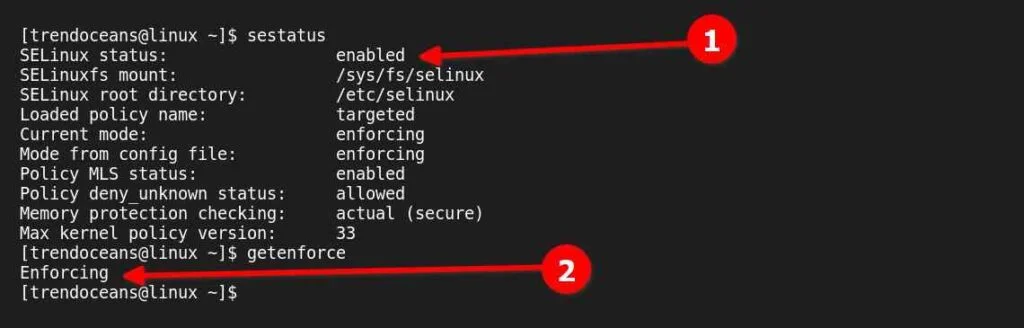
How to Disable SELinux Temporarily or Permanently in RHEL-Based Distributions - TREND OCEANS
SELinux is a Linux kernel security implementation that allows system administrators to have more control over the system. It was originally developed by the United States National Security Agency (NSA) as a series of patches to the Linux kernel using Linux Security Modules (LSM).
It provides a mechanism for supporting access control security policies, including MAC (mandatory access controls). The main reasons behind the implementation are to enforce data confidentiality and integrity, as well as to protect processes from untrusted inputs.
-
How to simplify the managing of users groups and shares in SFTPGo | TechRepublic
Recently, I posted a tutorial on deploying SFTPGo. During my work with this platform, I discovered that if you decide to venture beyond the realm of the default virtual folders, things get a bit complicated and you have to not only add users and groups to SFTPGo but also to the Linux system. This doubles the amount of work you have to do, and if you’re dealing with a lot of users, this can get problematic.
I you opt to keep your users within their virtual folders, this isn’t a problem. But for my purposes, I need to be able to share folders outside of /srv/sftpgo.
If you don’t want to have to jump through the same hoops I did, I have a quick fix for you. Let me show you how it’s done.
-
How to Easily Rebase Fedora Silverblue to Any Available Version
One of the best features of Fedora Silverblue is that it allows you to safely and easily try and switch between several variants of the distro. Here's how you can use a process known as "rebasing" to explore different versions of this unique Linux distribution.
Although none of the following commands are destructive, it’s always best to back up your data before changing options in your operating system in case something goes wrong.
-
Enabling Enhanced Monitoring for Amazon RDS
Amazon RDS provides an enhanced monitoring feature for databases. In this tutorial, you will learn how to use the ‘IAM Passrole’ permission for enabling enhanced monitoring for Amazon RDS. We will see this by demonstrating a simple example.
»
-

- Login or register to post comments
 Printer-friendly version
- 1017 reads
 PDF version
More in Tux Machines
- Highlights
- Front Page
- Latest Headlines
- Archive
- Recent comments
- All-Time Popular Stories
- Hot Topics
- New Members
today's howtos
|
Open Hardware: XON/XOFF and Raspberry Pi Pico
|
Security Leftovers
|
How to Apply Accent Colour in Ubuntu Desktop
A step-by-step tutorial on how to apply accent colour in Ubuntu desktop (GNOME) with tips for Kubuntu and others.
|



 This section of TuxMachines will no longer have new stories in it (with some caveats, including this post). To see the latest stories go to



 Content (where original) is available under CC-BY-SA, copyrighted by original author/s.



Recent comments
2 days 1 hour ago
2 days 5 hours ago
2 days 5 hours ago
3 days 12 hours ago
3 days 13 hours ago
3 days 14 hours ago
3 days 14 hours ago
3 days 15 hours ago
3 days 17 hours ago
3 days 19 hours ago