



today's howtos
Submitted by Roy Schestowitz on Wednesday 6th of July 2022 01:42:05 PM
Filed under 
-
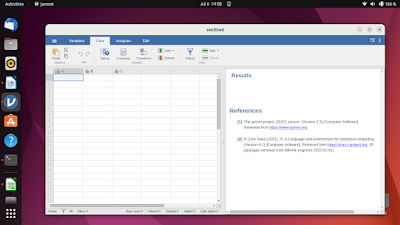
How To Install jamovi (an SPSS Alternative) on Ubuntu 22.04 and Later
This tutorial will explain in step by step how you can install jamovi, a free and open source statistical analysis software, a user-friendly alternative to SPSS on Ubuntu. This is not to be confused with JASP, another free software for statistics, which we have already covered at Ubuntu Buzz. We use the OS version 22.04 "Jammy Jellyfish" and this should be sufficient for any later OS version as well. Let's install it.
-
How to Install Mirage on Fedora 36 Linux - LinuxCapable
Mirage is a fast and simple GTK+ image viewer because it depends only on PyGTK. If you want a decent image viewer and the ability to access it via command line, a fullscreen mode, slideshow mode, essential editing tools to resize/crop/rotate/flip, and a configurable interface, Mirage would be the most straightforward option. Mirage also supports drag-and-drop operations from other applications such as Nautilus, making it easy to view or edit images quickly.
The following tutorial will teach you how to install Mirage on Fedora 36 Linux using the DNF package manager with the command line terminal.
-
How to Install openSUSE Tumbleweed [Rolling Release] Linux
openSUSE Tumbleweed is a rolling release version of the openSUSE project, which ships with the latest stable applications including everyday-to-use office applications, Linux kernel, Git, Samba, and many more. It is an ideal distribution for enthusiasts and developers who are developing the latest application stacks.
For new users to openSUSE, OpenSUSE Leap is a better fit since the software provided is thoroughly tested. It also uses binaries and sources from SUSE Enterprise Linux which results in a stable system, unlike TumbleWeed which is a rolling release distribution.
-
How to Install PostgreSQL 14 on Fedora 36 Linux - LinuxCapable
PostgreSQL is a highly stable and reliable database management system that has been used for over 20 years. It’s supported by an active community who contribute their time to its development, which results in higher levels of resilience, integrity, and correctness. PostgreSQL powers many web applications, including those from Google Earth Engine Geospatial datastore for analytics software like predictive modeling toolsets built using machine learning algorithms created within R/Rapidminer packages
The following tutorial will teach you how to install PostgreSQL on Fedora 36 Linux using the command line terminal and some basic configuration and setup tips.
-
How to Install LXDE on Fedora 36 Linux - LinuxCapable
LXDE, or Lightweight X11 Desktop Environment, is a free desktop environment known for being lightweight, fast, and energy-efficient. It can replace the standard default GNOME Desktop on your Fedora 36 Workstation with LXDE using less RAM and CPU than other desktop environments such as KDE and GNOME, which can be desired for low-powered computers laptops, and netbooks users.
LXDE is based on the GTK+ widget toolkit and uses the Openbox window manager. It is also suitable for older computers that may not have the resources to run a more demanding desktop environment, such as KDE Plasma 5. LXDE includes several applications typically found on a default GNOME install, such as a file manager, image viewer, text editor, and Terminal emulator. Overall, LXDE is an excellent choice for users looking for a fast and lightweight desktop environment that is also easy on resources.
In the following tutorial, you will learn how to install LXDE Desktop Environment on your Fedora 36 Linux workstation desktop with steps on installing optional extra packages with LXDE and how to update or remove the desktop environment in the future if required.
-
How to Install Brave Browser on Linux Mint & Ubuntu
Brave is a free open source browser that blocks ads and trackers by default without having to download an extension that blocks ads. By blocking malicious trackers and ads, not only it serves a safer browsing experience but also it improves the loading speed of sites on your browser.
In this tutorial you will learn how to Install Brave browser on Linux Mint and Ubuntu.
-
How To Install PlayOnLinux on Fedora 36 - idroot
In this tutorial, we will show you how to install PlayOnLinux on Fedora 36. For those of you who didn’t know, PlayOnLinux is a free and open-source graphical front-end for Wine that allows Linux users to install a large number of Windows-based computer games and applications such as MS Office, Windows Media Player, Internet Explorer, Photoshop, and several other programs on your Linux system.
This article assumes you have at least basic knowledge of Linux, know how to use the shell, and most importantly, you host your site on your own VPS. The installation is quite simple and assumes you are running in the root account, if not you may need to add ‘sudo‘ to the commands to get root privileges. I will show you the step-by-step installation of the PlayOnLinux on a Fedora 36.
-
How To Install ReactJS on Ubuntu 22.04 LTS - idroot
In this tutorial, we will show you how to install ReactJS on Ubuntu 22.04 LTS. For those of you who didn’t know, React (also known as React.js or ReactJS) is an open-source JavaScript front-end library for creating web frontend and UI components. Many developers are using it because of its flexibility, integrity, and its feature to bring Html directly into JS.
This article assumes you have at least basic knowledge of Linux, know how to use the shell, and most importantly, you host your site on your own VPS. The installation is quite simple and assumes you are running in the root account, if not you may need to add ‘sudo‘ to the commands to get root privileges. I will show you the step-by-step installation of ReactJS on Ubuntu 22.04 (Jammy Jellyfish). You can follow the same instructions for Ubuntu 22.04 and any other Debian-based distribution like Linux Mint, Elementary OS, Pop!_OS, and more as well.
-
How To Configure Ingress TLS/SSL Certificates in Kubernetes
In this guide we will learn how to configure TLS/SSL in kubernetes using ingress for already existing ssl certificates (either Self-Signed) or purchased ones.
For this to work, you should also have a working ingress set up. We will use Nginx Ingress. You should also have the domain used already configured with the Nginx ingress endpoint record.
-
How to Install Cacti Network Monitoring Tool on Debian 11
Cacti is an open-source, web-based network monitoring tool written in PHP. Cacti generates CPU load and network bandwidth utilization graphs using SNMP (Simple Network Management Protocol). This guide will show you, how to install the Cacti monitoring tools on Debian 11.
»
-

- Login or register to post comments
 Printer-friendly version
- 3169 reads
 PDF version
More in Tux Machines
- Highlights
- Front Page
- Latest Headlines
- Archive
- Recent comments
- All-Time Popular Stories
- Hot Topics
- New Members
today's howtos
|
Open Hardware: XON/XOFF and Raspberry Pi Pico
|
Security Leftovers
|
How to Apply Accent Colour in Ubuntu Desktop
A step-by-step tutorial on how to apply accent colour in Ubuntu desktop (GNOME) with tips for Kubuntu and others.
|


 This section of TuxMachines will no longer have new stories in it (with some caveats, including this post). To see the latest stories go to



 Content (where original) is available under CC-BY-SA, copyrighted by original author/s.



Recent comments
2 days 1 hour ago
2 days 5 hours ago
2 days 5 hours ago
3 days 12 hours ago
3 days 13 hours ago
3 days 14 hours ago
3 days 14 hours ago
3 days 15 hours ago
3 days 17 hours ago
3 days 19 hours ago