



today's howtos
Submitted by Roy Schestowitz on Friday 1st of July 2022 07:23:48 AM
Filed under 
-
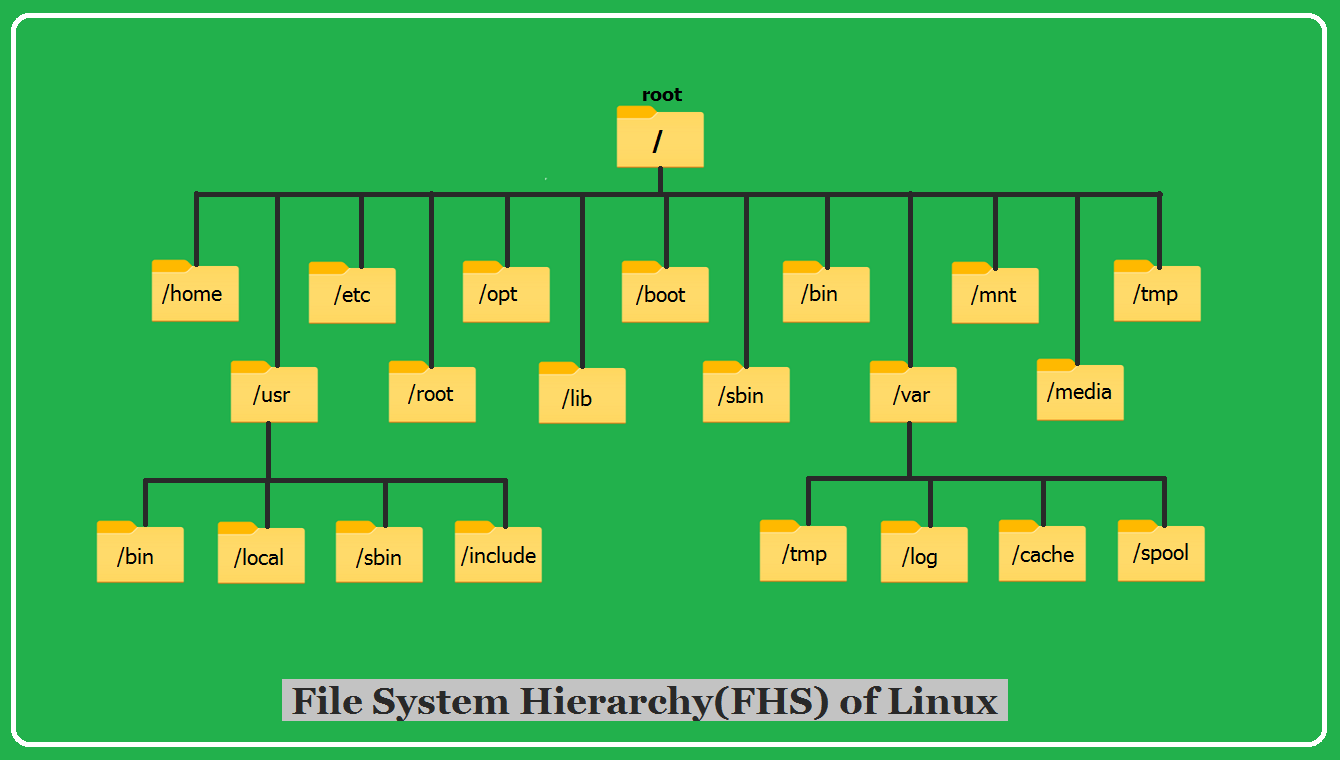
Filesystem Hierarchy Structure (FHS) in Linux – TecAdmin
If you’re new to Linux, understanding the directory structure can be daunting. There are dozens of different directories, and it’s not always clear what each one is used for. In this article, we’ll take a closer look at some of the most important directories in Linux.
-
How to install Grafana on Debian | FOSS Linux
Grafana is free software that allows users to query, visualize, alert, and understand their metrics regardless of where they are stored. Besides, Grafana will enable you to easily create, analyze, and share dashboards with your team, fostering a data-driven culture. Grafana is a multi-platform, open-source active monitoring and data visualization tool that displays detailed analytics on charts and graphs.
It has reusable dynamic dashboards, ad-hoc queries for exploring metrics, alert rules for key metrics to review and send notifications in the event of changes, and built-in sharing for collaboration with team members, among other features. It also can integrate with data sources such as InfluxDB, Graphite, Elasticsearch, and Prometheus.
-
How to add or change the default gateway in Debian | FOSS Linux
A default gateway is a node in a PC network. The node, in this case, uses an internet protocol suite that serves as the forwarding host(router) to other networks. This occurs when no other route specification matches the destination IP address of a packet.
A gateway makes it possible for devices in one network to converse with devices in another network. For instance, if a PC requests a web page, the request goes via the default gateway exiting the LAN (local area network) to reach the internet.
You can contemplate a default gateway as an immediate device between the internet and the local network. We say this because the default gateway facilitates internal data transfer to and from the internet.
»
-

- Login or register to post comments
 Printer-friendly version
- 2447 reads
 PDF version
More in Tux Machines
- Highlights
- Front Page
- Latest Headlines
- Archive
- Recent comments
- All-Time Popular Stories
- Hot Topics
- New Members
today's howtos
|
Open Hardware: XON/XOFF and Raspberry Pi Pico
|
Security Leftovers
|
How to Apply Accent Colour in Ubuntu Desktop
A step-by-step tutorial on how to apply accent colour in Ubuntu desktop (GNOME) with tips for Kubuntu and others.
|


 This section of TuxMachines will no longer have new stories in it (with some caveats, including this post). To see the latest stories go to



 Content (where original) is available under CC-BY-SA, copyrighted by original author/s.



Recent comments
2 days 15 min ago
2 days 4 hours ago
2 days 4 hours ago
3 days 11 hours ago
3 days 12 hours ago
3 days 13 hours ago
3 days 13 hours ago
3 days 13 hours ago
3 days 16 hours ago
3 days 18 hours ago