



Programming/Development Leftovers
Submitted by Roy Schestowitz on Thursday 30th of June 2022 01:28:30 PM
Filed under 
-
How to accept user input in Python – TecAdmin
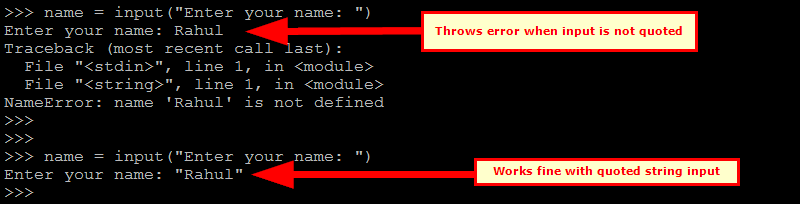
In Python, there are a few ways to accept user input. In this blog post, we will explore three different ways to do so. We will start with the simplest way and work our way up to the more complex methods. By the end of this post, you should have a good understanding of how to accept user input in Python. Let’s get started!
Python 3 provides a built-in function called input() that allows you to take user input. Where Python 2.x uses the raw_input() function is used to accept user input. Python 2.7 also has a function called input(). However, this function takes only one argument: the prompt string.
-
Package a new Python module in 4 steps | Opensource.com
When you install an application, you're usually installing a package that contains the executable code for an application and important files such as documentation, icons, and so on. On Linux, applications are commonly packaged as RPM or DEB files, and users install them with the dnf or apt commands, depending on the Linux distribution. However, new Python modules are released virtually every day, so you could easily encounter a module that hasn't yet been packaged. And that's exactly why the pyp2rpm command exists.
-
The Basics of Coding and Programming That You Need to Know
Considering picking up some programming skills? Great idea!
Programming is a popular and rewarding career path, especially when you get the fundamentals right. Whether you’re considering picking it up as a hobby, or you’re eyeing up a potential job, it pays to understand the basics. Find out a bit more about what programming involves, and whether it might be for you.
-
What is difference between var, let and const in JavaScript? – TecAdmin
A variable declaration is simply telling the computer that a variable exists and what value it should start with. Similar to other programming languages JavaScript also allows for the declaration of variables.
There are three keywords in JavaScript that can be used to declare variables: let, var, and const. Each keyword has different rules and implications for how the variables they create can be used.
-
Red Hat Developer roundup: Best of June 2022 | Red Hat Developer
Security, code tracing, SaaS, and more: Get the Red Hat Developer highlights for the month.
-
The Compounding (Business) Value of Composable Ecosystems
In the finance department, they say compounding interest is the eighth wonder of the world because your money makes money. In software, IT, and open source, composability is the first wonder of the world because it allows innovation to build on innovation. This is what we mean when we say we are standing on the shoulders of giants.
-
Blocking web-page adverts in a container
The "dunfell" icon runs a full isolated desktop, and Pup-Advert-Blocker should work there.
I have fixed so that /etc/hosts gets copied into every container at startup.That will be in the next release.
But, as I mentioned in the forum, replying to Tenoch's post, The "Mvps.org" choice in Pup-Advert-Blocker doesn't work.
Pup-Advert-Blocker is a very old application, created by sc0ttman, found it in the old forum:
https://oldforum.puppylinux.com/viewtopic.php?t=59290
I will need to fix the PET, either take out "Mvps.org" or find a replacement.
»
-

- Login or register to post comments
 Printer-friendly version
- 1434 reads
 PDF version
More in Tux Machines
- Highlights
- Front Page
- Latest Headlines
- Archive
- Recent comments
- All-Time Popular Stories
- Hot Topics
- New Members
today's howtos
|
Open Hardware: XON/XOFF and Raspberry Pi Pico
|
Security Leftovers
|
How to Apply Accent Colour in Ubuntu Desktop
A step-by-step tutorial on how to apply accent colour in Ubuntu desktop (GNOME) with tips for Kubuntu and others.
|



 This section of TuxMachines will no longer have new stories in it (with some caveats, including this post). To see the latest stories go to



 Content (where original) is available under CC-BY-SA, copyrighted by original author/s.



Recent comments
1 day 23 hours ago
2 days 3 hours ago
2 days 3 hours ago
3 days 10 hours ago
3 days 11 hours ago
3 days 12 hours ago
3 days 12 hours ago
3 days 13 hours ago
3 days 15 hours ago
3 days 17 hours ago