



Programming Leftovers
Submitted by Roy Schestowitz on Thursday 7th of April 2022 09:58:41 AM
Filed under 
-
That simple script is still someone's bad day
And, you know what, the worst part about this is that none of this knowledge should even apply. The fact we're talking about shell scripts for something critical means that the battle for reliability was lost a long time ago.
-
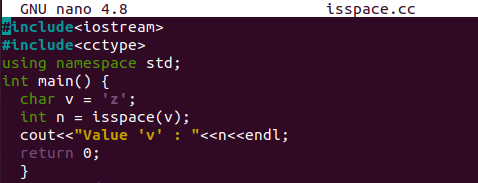
Isspace function C++
You may have used many variables and functions while coding. Have you ever tried to use some functions to find out the total number of spaces used in between some variable values? If not, then you are extremely welcome in today’s tutorial guide.
This article is all about the use of the isspace() function of the C++ language to find out if the specified value is space or not.Let’s make a fresh start to our article by producing a C++ file.
We need Ubuntu’s shell to create a C++ document in Ubuntu’s home folder. To do that, open Ubuntu’s shell using “Ctrl+Alt+T” and use the “touch” instruction as shown below.
-
Implementation of Doubly Linked List C++
A doubly Linked list is the structural concept in C++ that consists of 1 or more nodes. A single node must have three parts i.e., data, a reference towards the previous node, and the next upcoming node. The very first node is said to be the “head” node that is used to access the overall linked list. The very last node of a linked list always has the NULL value. If you are new to this concept and looking for authentic resources to get knowledge, then this guide is for you.
Let’s start this article with the new C++ file creation. We have to create it using the terminal “touch” query. After the file creation, our next task is to open it and create some c++ code. For the opening, you can make use of any built-in editor of Ubuntu 20.04 like a text editor, vim editor, or Gnu nano editor. So, we are using the “nano” instruction on our shell to open the doubly.cc file in it.
-
While Loop Sum of Numbers C++
You may have calculated the sum of numbers in mathematics many times while learning. The C++ language also supports the sum of numbers through various supported methods. One of those methods is the use of the “while” loop in different ways to calculate the sum. If you are looking for the use of the “while” loop to calculate the sum of numbers, then this article will be a plus in your learning process. So, let’s make a fresh start within Ubuntu 20.04 system and open its shell console by “Ctrl+Alt+T” shortcut. Go through each example within this article.
Let’s create a new C++ file first. Ubuntu provides us with the “touch” instruction to make any type of file. Thus, we have been using it to generate a C++ file named “while.cc”. This file can be directly opened in the Gnu Nano editor from the shell terminal via “nano” instruction. If you don’t want to use nano editor, try opening the file explorer and moving towards the home folder or towards the folder where your file is located. Right-click on the newly created file and tap on the “Open file in Text editor” option to open it within the text editor to make code.
-
C++ modf
Modf() is a built-in predefined function in C++ programming language. This function is used for mathematical calculations. All these functions are present in the header file of C++ math. h’. Mostly the variable ‘double’ is used for all the functions that are available in this library and also returns the double value as the result.
-
Teaching optics through conspiracy theories
Data types may contain secret information. Some of it can be extracted, some is hidden forever. We’re going to get to the bottom of this conspiracy.
-
String representations are not unique: learn to normalize!
Though you should expect normalization to be efficient, it is unlikely to be computationally free. Thus you should not repeatedly normalize your strings, as I have done. Rather you should probably normalize the strings as they enter your system, so that each string is normalized only once.
Normalization alone does not solve all of your problems, evidently. There are multiple complicated issues with internalization, but if you are at least aware of the normalization problem, many perplexing issues are easily explained.
-
How to Determine Size of an Array
Array is a linear collection of elements. To calculate the size of array we can use sizeof() operator. With the help of sizeof() operator we can easily find out the size of an array. Except the sizeof() operator we can also use pointer to calculate the size of array.
-
Laravel Form Validation using Controller
The form is an integral part of the Laravel project. The login form, registration form, and contact form are mainly used forms for the visitors of any web application. The user submits the data to the application by using the form. It is essential to check the data submitted by the user is genuine, and the valid user is submitting the data. The form data can be validated by using FormRequest class or the Laravel project controller method. Laravel form validation using the controller has been shown in this tutorial by creating a simple contact form.
»
-

- Login or register to post comments
 Printer-friendly version
- 1389 reads
 PDF version
More in Tux Machines
- Highlights
- Front Page
- Latest Headlines
- Archive
- Recent comments
- All-Time Popular Stories
- Hot Topics
- New Members
digiKam 7.7.0 is released
After three months of active maintenance and another bug triage, the digiKam team is proud to present version 7.7.0 of its open source digital photo manager. See below the list of most important features coming with this release.
|
Dilution and Misuse of the "Linux" Brand
|
Samsung, Red Hat to Work on Linux Drivers for Future Tech
The metaverse is expected to uproot system design as we know it, and Samsung is one of many hardware vendors re-imagining data center infrastructure in preparation for a parallel 3D world.
Samsung is working on new memory technologies that provide faster bandwidth inside hardware for data to travel between CPUs, storage and other computing resources. The company also announced it was partnering with Red Hat to ensure these technologies have Linux compatibility.
|
today's howtos
|


.svg_.png)

 Content (where original) is available under CC-BY-SA, copyrighted by original author/s.


Recent comments
1 year 11 weeks ago
1 year 11 weeks ago
1 year 11 weeks ago
1 year 11 weeks ago
1 year 11 weeks ago
1 year 11 weeks ago
1 year 11 weeks ago
1 year 11 weeks ago
1 year 11 weeks ago
1 year 11 weeks ago