



Programming Leftovers
Submitted by Roy Schestowitz on Thursday 24th of March 2022 06:15:59 AM
Filed under 
-
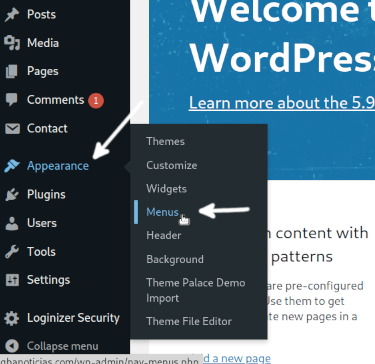
How to Add a Navigation Menu in WordPress
This tutorial explains how to add a navigation menu in WordPress easily. After reading this tutorial, you will be able to add navigation menus through the dashboard or from the customization screen. The last section also describes the steps to add menus in widget areas.
The examples described also show how to add dropdown menus in your navigation menu to customize the structure entirely. But remember that abusing submenus may not be convenient for users with vision impairment. All instructions explained in this tutorial include screenshots. Thus, making it easy for all WordPress user levels to apply them.
-
Scala String Interpolation
String interpolation in the Scala programming language refers to the process of replacing certain variables or expressions within a string with some other suitable value according to the context. This process is used extensively to deal with strings in the Scala programming language.
Therefore, in this article, we will discuss all the different string interpolators of the Scala programming language followed by their respective usage in Ubuntu 20.04.
-
How to Read Files in Scala
File reading in Scala is used as much as in any other programming language. By using the file reading techniques, we can easily open a file and manipulate it according to our requirements. Scala has multiple ways of reading a file. However, this article will share the three most commonly used file reading methods using the Scala programming language in Ubuntu 20.04.
-
Check PHP Version Linux
While working in the computer science field, you must have heard about some programming languages. One of those languages is “PHP” which can be used in various operating systems. It is used to design and create websites or their pages for a better look and feel. You can call it a server-scripting language as well. All the languages came up with many of the versions i.e., old to new. Thus, we have decided to see how we can find out the version of installed PHP on the Ubuntu 20.04 Linux operating system using simple version commands on the shell.
So, let’s just get started by the login from Ubuntu 20.04 system. After login, try to open your Ubuntu 20.04 terminal console application from its application area using the search activity bar. Write “terminal” and tap Enter. An application named “terminal” will be shown. Click on it to open it. If you want to avoid this complex and long procedure, just use the “Ctrl+Alt+T” shortcut. Let’s get started with the newly launched terminal shell and the system update in it.
-
Radix Sort (C++)
A radix or base is a representation of a number that shows how many digits are required to represent a positional number. For example, to represent the binary number, the radix value is 2 (we represent the binary either with 0 or 1). To represent the decimal number, the radix value is 10 (we represent the decimal number with numbers 0 to 9).
-
C isn't a programming language anymore • The Register
Aria Beingessner, a member of the teams that implemented both Rust and Swift, has an interesting take on some of those (and other) language's problems – that C isn't a programming language anymore.
Beingessner should know. They've previously worked on and written about both Rust and Swift.
There are many problems with the C language. To pick just a few: it can be difficult to parse; there are competing and subtly incompatible variants; and then there are the complex ways C defines and handles integers and other variables.
For instance, after much deliberation, a bunch of companies called the Aspen Group settled on a programming model for 64-bit Unix and Unix-like OSes called LP64, also known as "4/8/8". Unfortunately, 64-bit Microsoft Windows uses a different model, called LLP64 or "4/4/8".
-
How to Make an Array of Structs in C
We will first understand the structures in C and then we will discuss about the array of structures in C. We will also go through the array of structure pointers and how to access the structure members within the array of structure objects.
Structs are the user defined group of similar or different data types. Similar or different group of data types can be grouped under one name known as structures.
-
This Week In Rust: This Week in Rust 435
-
Rust Generics
Hello Rustaceans. For this one, we will explore what are generics and how to use generic types in the Rust language. Generics trips most new Rust beginners but we will do our best effort to make it as clear as possible.
If you are interested in exploring more Rust topics, check our Rust list to learn more.
-
Rust Smart Pointers
Pointers are not a new thing to any programmer. They are a feature that allows you to use variables to store an address in memory. The address then “points to”, hence pointer, to data stored in that location.
Smart pointers are pointers with extended capabilities, such as bound checks and automatic memory management. Smart pointers also include additional metadata. Now, the concept of smart pointers is not new, especially to C++ programmers.
For this article, we will explore various smart pointers as defined in the Rust standard library.
-
16 Rust Programming Code Examples
Programming is all about problem-solving. There is no way you can become a proficient programmer without practicing and building things. In this article we will create projects to get you started in the Rust programming language.
-
Bash Check If Directory Exists
Directories and folders are the main and quite important parts of any operating system. Without the directories and files, our system doesn’t get completed. The directories are used to store the sub-folders and files that hold data in them for security and personal work. Within the Linux operating system, we have also got the same file system i.e., directories and sub-folders. Bash programming came up with some of the very simple commands and statements to check if the specific directory of a file exists in our system or not. Therefore, we have decided to write this article to check if the directory exists in our Linux system or not.
-
Bash For Loop Continue
Bash programming is quite well-known amongst Linux users. Within the bash script, we tend to use many loops, statements, and clauses to perform different operations. The most famous loop is the “for” loop in any programming language. Bash programming came up with the “continue” and “break” statements. If you are using any Linux distribution and want to know about the use of the “continue” clause in the “for” loop, then this article is especially for you.
-
Bash Nested For Loop
Loops are the data structure used in many languages to perform some task in iterations i.e., repeatedly until the actual goal is achieved. One of the many loops of programming is the “For” loop. The “for” loop can be used alone and more than one “for” loop in a sequence is said to be “nested”. Therefore, we have decided to use the “nested” for loops in Bash programming within our examples of today’s article. So, let’s start with the opening of the terminal shell in the Ubuntu 20.04 system via the “Ctrl+Alt+T” shortcut.
-
Bash Sleep 1 Second
Whenever we have been working on something, we tend to feel hectic after some time. Therefore, we need rest to recover ourselves or refresh the whole work mode. Just like that, sometimes our Linux system also requires sleep for a few seconds. It came up with the “sleep” function to make the processing of anything pause for a specified period. This sleep function can be utilized within the bash script and within the terminal shell to perform the same goal. Therefore, we have decided to discuss the sleep function in Ubuntu 20.04 Linux system. Let’s just get started with the login from an Ubuntu 20.04 system.After the login, you need to open Ubuntu’s terminal application as we have to perform the sleep command in it. To open it, try the “Ctrl+Alt+T” shortcut. If for some reason the shortcut doesn’t work for you, click on the “Activity” menu from the taskbar of Ubuntu’s desktop. The search bar will be opened. Click on the search area, write “terminal” and press the key “Enter”. The application will be shown on your screen. Click on the “terminal” application and it will be launched within no more than 5 seconds according to your system speed.
-
LibreOffice Dark Mode on Windows Together with Dark Colibre Icon Theme
One of the trending UX features right now is dark mode. According to one study, 58% of Americans experience digital eye strain from using computers. One of the factors causing it is blue light radiation from the screen. That's where the possible idea of a screen that slows down your tired eyes more comes from.
»
-

- Login or register to post comments
 Printer-friendly version
- 1694 reads
 PDF version
More in Tux Machines
- Highlights
- Front Page
- Latest Headlines
- Archive
- Recent comments
- All-Time Popular Stories
- Hot Topics
- New Members
digiKam 7.7.0 is released
After three months of active maintenance and another bug triage, the digiKam team is proud to present version 7.7.0 of its open source digital photo manager. See below the list of most important features coming with this release.
|
Dilution and Misuse of the "Linux" Brand
|
Samsung, Red Hat to Work on Linux Drivers for Future Tech
The metaverse is expected to uproot system design as we know it, and Samsung is one of many hardware vendors re-imagining data center infrastructure in preparation for a parallel 3D world.
Samsung is working on new memory technologies that provide faster bandwidth inside hardware for data to travel between CPUs, storage and other computing resources. The company also announced it was partnering with Red Hat to ensure these technologies have Linux compatibility.
|
today's howtos
|


.svg_.png)

 Content (where original) is available under CC-BY-SA, copyrighted by original author/s.


Recent comments
1 year 11 weeks ago
1 year 11 weeks ago
1 year 11 weeks ago
1 year 11 weeks ago
1 year 11 weeks ago
1 year 11 weeks ago
1 year 11 weeks ago
1 year 11 weeks ago
1 year 11 weeks ago
1 year 11 weeks ago