



Argon EON Review: Turns Raspberry Pi Into a NAS
Submitted by Roy Schestowitz on Monday 7th of March 2022 12:12:37 AM
Filed under 

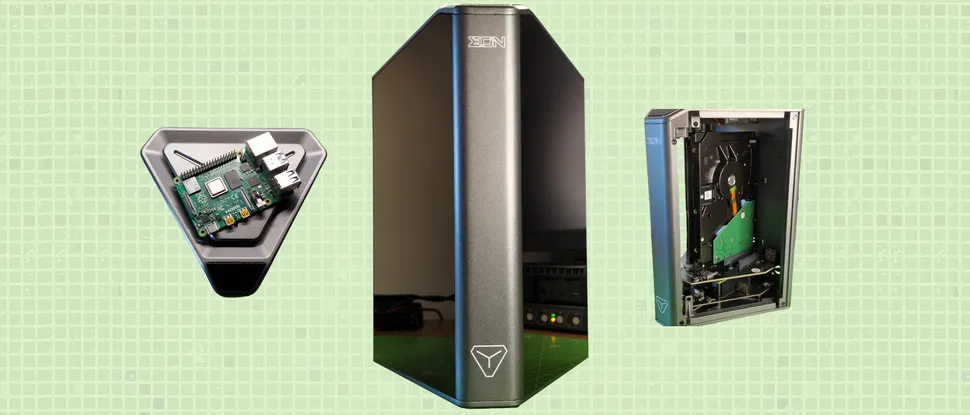
Argon Forty loves releasing cases with names that have permutations of the word “ONE.” So far we’ve had the Argon ONE (and M.2), NEO and now we have the EON. But rather than another wedge shaped Raspberry Pi case bound for our desktop, the EON is bound for our living room, office or small business where it helps turn your Pi into a network-attached storage drive (NAS).
The $150 Argon EON, which goes on sale in mid March 2022, is a delightfully designed Raspberry Pi 4 case that has better aesthetics than many of the best Raspberry Pi Cases. Made from space-grade aluminum, this cyberpunk influenced aesthetic is right at home in our lives. Inside we can store up to four 2.5 inch drives, or two 3.5 inch drives, and running the show is our favorite single board computer, the Raspberry Pi 4.
The Argon EON kickstarter was successfully funded in September 2021, with backers receiving their units in early 2022. Argon Forty raised HK$ 1,177,230 (approximately $150,609) from over one thousand backers. Ahead of the retail release we secured an Argon EON for review and put it through its paces during a week of tests and typical work scenarios.

»
-

- Login or register to post comments
 Printer-friendly version
- 1575 reads
 PDF version
More in Tux Machines
- Highlights
- Front Page
- Latest Headlines
- Archive
- Recent comments
- All-Time Popular Stories
- Hot Topics
- New Members
digiKam 7.7.0 is released
After three months of active maintenance and another bug triage, the digiKam team is proud to present version 7.7.0 of its open source digital photo manager. See below the list of most important features coming with this release.
|
Dilution and Misuse of the "Linux" Brand
|
Samsung, Red Hat to Work on Linux Drivers for Future Tech
The metaverse is expected to uproot system design as we know it, and Samsung is one of many hardware vendors re-imagining data center infrastructure in preparation for a parallel 3D world.
Samsung is working on new memory technologies that provide faster bandwidth inside hardware for data to travel between CPUs, storage and other computing resources. The company also announced it was partnering with Red Hat to ensure these technologies have Linux compatibility.
|
today's howtos
|


.svg_.png)

 Content (where original) is available under CC-BY-SA, copyrighted by original author/s.


Recent comments
1 year 11 weeks ago
1 year 11 weeks ago
1 year 11 weeks ago
1 year 11 weeks ago
1 year 11 weeks ago
1 year 11 weeks ago
1 year 11 weeks ago
1 year 11 weeks ago
1 year 11 weeks ago
1 year 11 weeks ago