



Ksnip - Make my screenshots pretty please
Submitted by Roy Schestowitz on Monday 13th of December 2021 05:30:25 PM
Filed under 

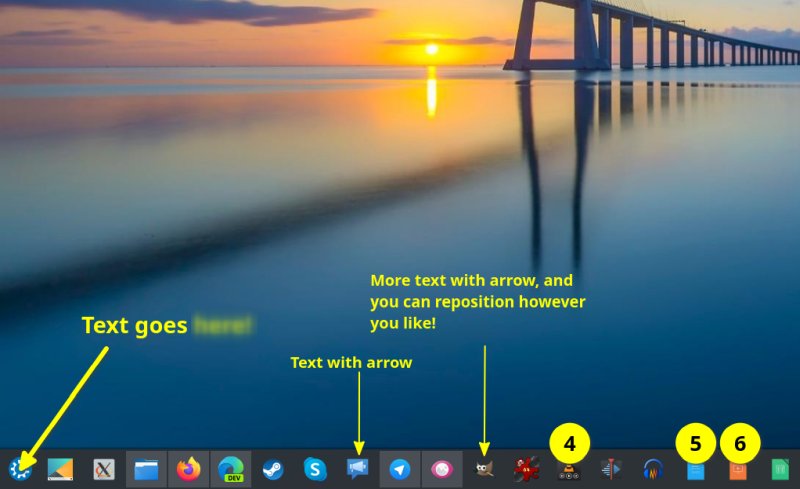
Photo editing comes in many shapes and forms. Shapes and forms, geddit? Now, sometimes, you need a full-blown suite to get things done, and sometimes, you just need a few tiny annotations and markings on an image. Believe or not, doing the latter isn't as trivial as one would expect.
For heavy tasks, one can rely on the likes of GIMP or Krita (if we're talking about freeware), perhaps IrfanView. If you struggle with these, you could load LibreOffice Impress and use text boxes and arrows and shapes to get the desired effect. Dedicated programs intended for lightweight image styling are far and few in between. But I've found a nice little tool, and it's called Ksnip. Follow me.
[...]
I am quite pleased with this almost accidental discovery. KSnip is a solid program, managing to balance simplicity and power quite well. You have lots of options available, without going overboard or making the usage slow and difficult. It makes for an excellent educational tool, allowing you to create visual guides and presentations with ease.
And so, if you need to mark your images with text and some arrows, and perhaps add a small effect here or there, KSnip is the perfect software for the task. You can always do more with the big programs, if you need to, but for ordinary needs and quick editing, it delivers. The usage is intuitive, there were no quirks or bugs, and I was able to make my modifications without having to read hours of tutorials on how to generate a speech balloon or create an arrow. Fast 'n' furious, JPEG style. Mission accomplished.

Also: I Just Threw Away Half Of KDE Panels Code! - Kockatoo Tube
»
-

- Login or register to post comments
 Printer-friendly version
- 2286 reads
 PDF version
More in Tux Machines
- Highlights
- Front Page
- Latest Headlines
- Archive
- Recent comments
- All-Time Popular Stories
- Hot Topics
- New Members
digiKam 7.7.0 is released
After three months of active maintenance and another bug triage, the digiKam team is proud to present version 7.7.0 of its open source digital photo manager. See below the list of most important features coming with this release.
|
Dilution and Misuse of the "Linux" Brand
|
Samsung, Red Hat to Work on Linux Drivers for Future Tech
The metaverse is expected to uproot system design as we know it, and Samsung is one of many hardware vendors re-imagining data center infrastructure in preparation for a parallel 3D world.
Samsung is working on new memory technologies that provide faster bandwidth inside hardware for data to travel between CPUs, storage and other computing resources. The company also announced it was partnering with Red Hat to ensure these technologies have Linux compatibility.
|
today's howtos
|


.svg_.png)

 Content (where original) is available under CC-BY-SA, copyrighted by original author/s.


Recent comments
1 year 11 weeks ago
1 year 11 weeks ago
1 year 11 weeks ago
1 year 11 weeks ago
1 year 11 weeks ago
1 year 11 weeks ago
1 year 11 weeks ago
1 year 11 weeks ago
1 year 11 weeks ago
1 year 11 weeks ago