



F2: Fast And Safe Batch Rename Tool For The Command Line (Cross-Platform)
Submitted by Roy Schestowitz on Thursday 13th of May 2021 09:41:20 PM
Filed under 
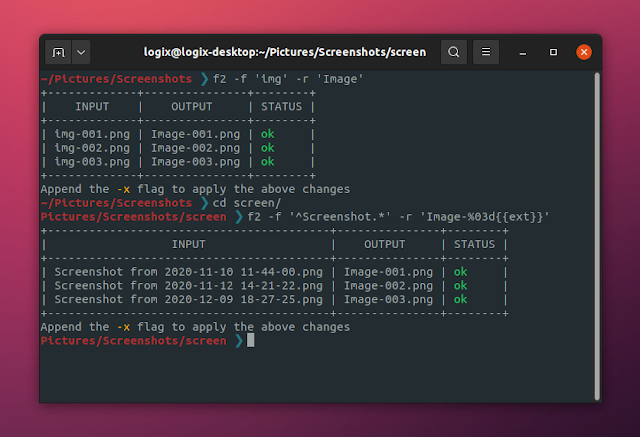
F2 is a command-line file and folder batch renaming tool written in Go. The tool is fast, safe (runs several validations before renaming, and allows undoing the batch rename), and runs on Linux, macOS and Microsoft Windows.
The mass rename command line tool is fairly new, having its first stable release back in February 2021, but it's already quite mature, with features like string replacement, insertion of text as a prefix, suffix or other position in the file name, change the letter case, rename using auto-incremental numbers, and so on. Find and replace using regular expressions is also supported.
The tool can show a preview of the new file and folder names (simply omit the -x command line flag, which is used to apply the changes), and it also supports undoing the last batch renaming operation in case you change your mind and want to revert the changes.
To ensure that the rename operations are safe, F2 also runs several validations before carrying out a rename operation. In case the tool finds conflicts, like the target destination already existing, invalid characters in the target path, an empty filename, etc., it can automatically resolve them using the --fix-conficts / -F flag.

»
-

- Login or register to post comments
 Printer-friendly version
- 2715 reads
 PDF version
More in Tux Machines
- Highlights
- Front Page
- Latest Headlines
- Archive
- Recent comments
- All-Time Popular Stories
- Hot Topics
- New Members
digiKam 7.7.0 is released
After three months of active maintenance and another bug triage, the digiKam team is proud to present version 7.7.0 of its open source digital photo manager. See below the list of most important features coming with this release.
|
Dilution and Misuse of the "Linux" Brand
|
Samsung, Red Hat to Work on Linux Drivers for Future Tech
The metaverse is expected to uproot system design as we know it, and Samsung is one of many hardware vendors re-imagining data center infrastructure in preparation for a parallel 3D world.
Samsung is working on new memory technologies that provide faster bandwidth inside hardware for data to travel between CPUs, storage and other computing resources. The company also announced it was partnering with Red Hat to ensure these technologies have Linux compatibility.
|
today's howtos
|


.svg_.png)

 Content (where original) is available under CC-BY-SA, copyrighted by original author/s.


Recent comments
1 year 11 weeks ago
1 year 11 weeks ago
1 year 11 weeks ago
1 year 11 weeks ago
1 year 11 weeks ago
1 year 11 weeks ago
1 year 11 weeks ago
1 year 11 weeks ago
1 year 11 weeks ago
1 year 11 weeks ago