



Emulate the ZX Spectrum with Raspberry Pi
Submitted by Rianne Schestowitz on Sunday 1st of November 2020 09:53:21 PM
Filed under 

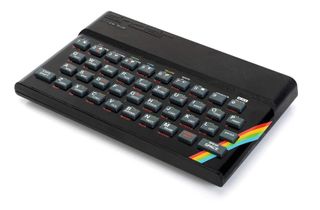
Sir Clive Sinclair, born in 1940 is an entrepreneur and inventor that many will know. You may know him for his quirky Sinclair C5 battery powered “velomobile” which was set to solve commuters problems in 1985. But many will know him for a range of electronic products that bear his name. Sinclair Radionics was formed in 1961 and it created cost effective electronic products such as pocket calculators and portable televisions.
But, in 1980, Sinclair's company released the ZX80 computer for £99.95 and it was marketed as the “first personal computer for under £100”. The ZX80 proved a cost effective means to get your first computer and learn how to code but it did have a few quirks, famously causing the screen to flicker as each key was pressed. The ZX81 released in 1981 and retailing for half the price of the ZX80 addressed this and other issues while providing a solid base for learners eager to code. An agreement with Timex saw the ZX81 hit the US market as the Timex Sinclair 1000, and an unauthorised clone, the TK85 was released in Brazil via Microdigital Eletronica.
The ZX81 was a success and from that initial success more “ZX” machines were released with better graphics, and infamous rubber keys. The first ZX spectrum, released in 1982 introduced the rubber keys and diminutive size of the iconic classic computer. It is here where we start our journey into emulating the ZX Spectrum machines, chiefly the 48K and 128K aka “The Toastrack”. Can emulation give us the same nostalgic glow, can we create BASIC code projects and what is the best way to emulate a ZX Spectrum? Below, we show you two methods: one which turns your Raspberry Pi into a Spectrum and another which gives you a simple emulator that should work in Ubuntu and other flavors of Linux.

Also:
-
Ubuntu 20.10 Brings Full Desktop and Micro Clouds to Raspberry Pi 4
Ubuntu Desktop 20.10 is now fully supported on the Raspberry Pi 4, which can be transformed into a complete Ubuntu workstation, says Ubuntu. Ubuntu 20.10 also introduces Micro Clouds for on-demand compute at the edge.
Ubuntu 20.10 is the first Ubuntu image built as a full desktop image, rather than being a server image like previous releases. According to Tom's Hardware, Ubuntu 20.10 is easy to install and use on the Raspberry Pi and represents a solid foundation for future releases, although it is unlikely it will replace Raspberry Pi OS soon.
-
Raspberry Pi 4 Gets An Impressively Solid Android 11 Port
Raspberry Pi is a great mini-computer that helps you explore computing without spending too much on a machine. With a size as small as a credit card, it offers numerous I/O ports, unlike Appl.. (*cough) $3000 machines that offer only two USB Type-C ports.
Raspberry Pi can run Ubuntu and its own operating system Raspbian, which, as the name suggests, is also based on Debian. But now, thanks to OmniROM, the first Android 11 port for Raspberry Pi 4 has arrived.
»
-

- Login or register to post comments
 Printer-friendly version
- 7072 reads
 PDF version
More in Tux Machines
- Highlights
- Front Page
- Latest Headlines
- Archive
- Recent comments
- All-Time Popular Stories
- Hot Topics
- New Members
digiKam 7.7.0 is released
After three months of active maintenance and another bug triage, the digiKam team is proud to present version 7.7.0 of its open source digital photo manager. See below the list of most important features coming with this release.
|
Dilution and Misuse of the "Linux" Brand
|
Samsung, Red Hat to Work on Linux Drivers for Future Tech
The metaverse is expected to uproot system design as we know it, and Samsung is one of many hardware vendors re-imagining data center infrastructure in preparation for a parallel 3D world.
Samsung is working on new memory technologies that provide faster bandwidth inside hardware for data to travel between CPUs, storage and other computing resources. The company also announced it was partnering with Red Hat to ensure these technologies have Linux compatibility.
|
today's howtos
|


.svg_.png)

 Content (where original) is available under CC-BY-SA, copyrighted by original author/s.


Android 11 on Raspberry Pi
Raspberry Pi Is Ripe And Ready For Android 11 With Fresh OmniROM Release
Android 11 arrives on the Raspberry Pi, thanks to new OmniROM release