Language Selection

English French German Italian Portuguese Spanish

Announcing the Purism Librem Mini

Filed under
Linux

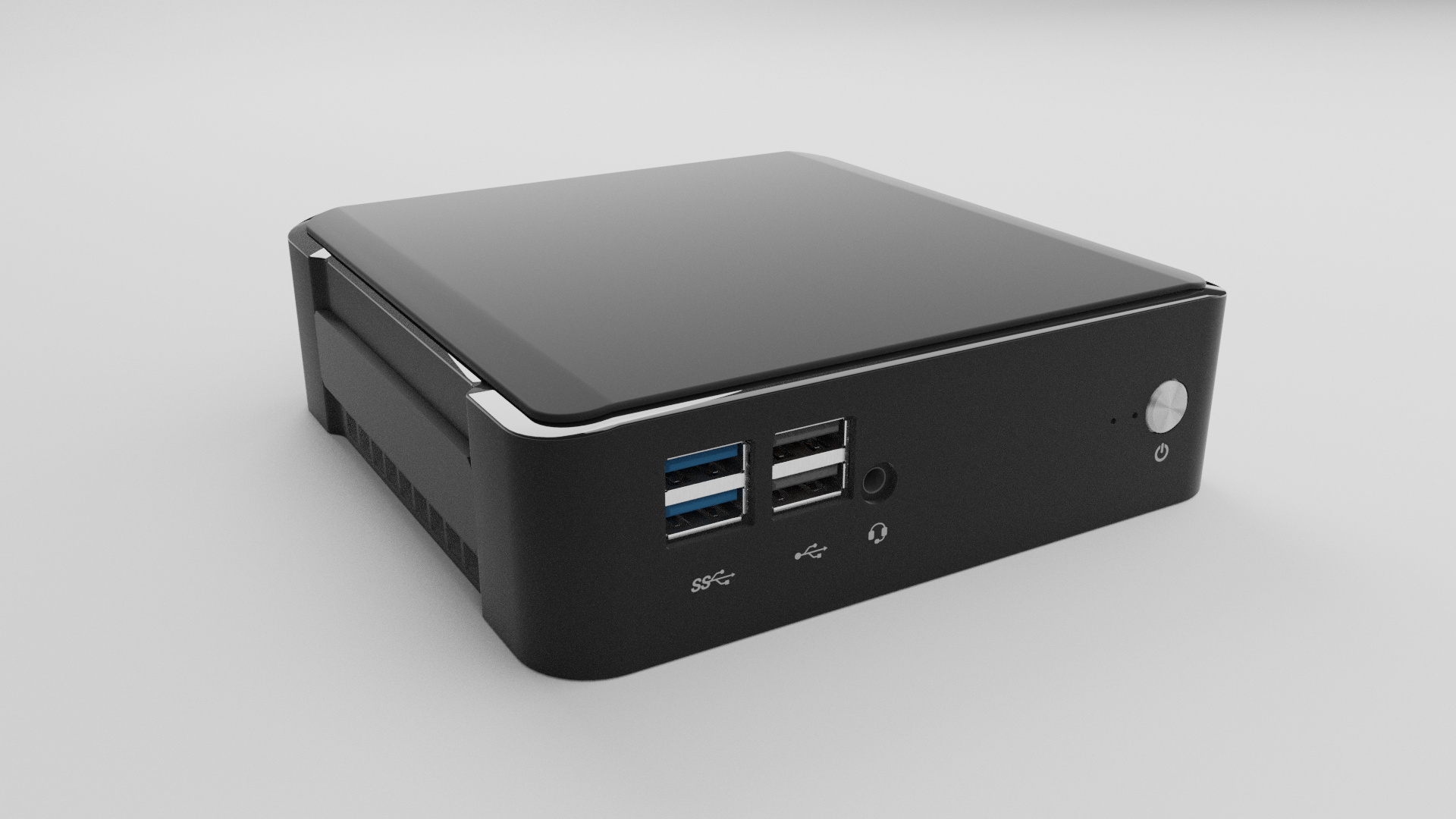
Our small form-factor mini-PC that puts freedom, privacy and security first. We’re really excited about the Librem Mini, it’s a device our community have wanted and we’ve wanted to offer for some time.

The Librem Mini is accessible, small, light and powerful featuring a new 8th gen quad core i7 processor, up to 64 GB of fast DDR4 memory and 4k 60 fps video playback. It’s a desktop for your home or office, a media center for your entertainment, or an expandable home server for your files and applications.

Read more

Purism Librem Mini is a tiny Linux desktop

  • Purism Librem Mini is a tiny Linux desktop

    Desktops have largely fallen out of favor with home consumers, as they instead opt for laptops. Really, it isn't hard to see why this is -- a desktop PC often takes up a lot of room in a home, as it usually requires its own dedicated desk. Not to mention, you then have to add a keyboard, mouse, and monitor. You are then tethered to one place, unable to realistically work outdoors or at a coffee shop.

    And yet, despite all the benefits a notebook has over a desktop, many people -- including yours truly -- prefers them. If you like the idea of a desktop, but prefer one that is very small (and won't take up a lot of space), there are plenty of options such as Intel NUC and Apple Mac mini. Today, we get another diminutive desktop option, but this one is designed for Linux and privacy. Yes, Purism is finally launching a tiny desktop, and it will come pre-installed with the Debian-based PureOS. Called "Librem Mini," the cute bugger has 4 USB-A ports on the front, along with a 3.5mm audio jack, and the power button. On the rear, there are two more USB-A ports, a single USB-C port, Ethernet, HDMI, DisplayPort, and the power port.

Purism Unveils Librem Mini, Its First Linux-Powered Mini PC

  • Purism Unveils Librem Mini, Its First Linux-Powered Mini PC

    Built with the same security and privacy standards Purism is known for, the Librem Mini promises a smaller and versatile alternative to a desktop computer, but you can also use it as a set-top TV box or powerful home server.

    Featuring a beautiful and modern design, the device uses Purism’s PureBoot secured boot process, PureOS Linux-based operating system, Heads secure BIOS replacement, and support for the Librem Key security key to detect, disable and prevent device tampering.

The Purism Librem Mini is a FOSS-Focused Linux PC

  • The Purism Librem Mini is a FOSS-Focused Linux PC

    The Purism Librem Mini is a small form factor PC powered by an 8th Gen Intel Core i7 processor. And, as you’d expect from this company, the uni runs Linux out of the box.

    “Smaller than a Mac Mini, slightly bigger than a Raspberry Pi. More freedom, more privacy, more security,” Purism says of the device.

    The minimal footprint of the fan-cooled Librem Mini should mean it works well as a desktop PC, but also as a media centre and entertainment hub or even a home server.

Purism launches Librem Mini Linux desktop computer for $699

  • Purism launches Librem Mini Linux desktop computer for $699 and up

    Linux laptop maker Purism recently got into the Linux smartphone space with the Librem 5. And now the company is expanding into another market — desktops.

    The Purism Librem Mini is a small form-factor desktop computer that measures about 5″ x 5″ x 1.5″ and which houses an 8th-gen Intel Core i7-8565U Whiskey Lake processor.

    But unlike most mini PCs in this space, the Librem Mini ships with a GNU/Linux distribution and features Purism’s security and privacy features. It’s priced at $699 and up and the Librem Mini is available for pre-order starting today.

  • urism Librem Mini is a Tiny Linux Desktop

    Today, we get another diminutive desktop option, but this one is designed for Linux and privacy.

Purism Mini Linux Mini PC is Powered by an Intel Core i7-8565U

  • Purism Mini Linux Mini PC is Powered by an Intel Core i7-8565U Whiskey Lake Processor

    Purism has been known for its Linux-based secure and privacy-focused laptops for years, and more recently they developed Librem 5 Linux smartphone with the same philosophy in mind.

    But now the company has introduced Purism Mini based on an Intel Core i7 Whiskey Lake processor with up to 64GB DDR4 RAM and running PureOS Linux distribution, and Coreboot based PureBoot bootloader that disables and neutralizes Intel Management Engine (IME).

Purism Librem Mini: A Privacy-First Linux-Based Mini PC

  • Purism Librem Mini: A Privacy-First Linux-Based Mini PC

    Purism flaunts itself as “Social Purpose Company” aiming to do good for society and they have several services and products to offer in this regard.

    While you might be aware of its Librem series of Linux laptops, Librem One (encrypted services), PureOS Linux, and the Librem 5 Linux smartphone. Now, they have come up with a small-factor mini PC targeted at the users who want to take control of their privacy and security.

Forget the Apple Mac Mini, the Purism Librem Mini Linux Mini-PC

  • Forget the Apple Mac Mini, the Purism Librem Mini Linux Mini-PC Is Now Official

    The Librem Mini is first and foremost a device that’s supposed to come with all the benefits of the Librem lineup of computers in a smaller form factor, so it still runs PureOS with Pureboot and Librem Key support.

    It can be used as a stand-alone desktop computers “to protect your family and business,” as the parent company itself says, but it can also play the role of a media center as it offers smooth 4K video at 60 fps. And of course, it can also be a mini server with full disk encryption and tamper detection.

Privacy-focused Linux vendor Purism announces...

  • Privacy-focused Linux vendor Purism announces the stylish Librem Mini

    Purism aren't a company we cover here often, as their devices aren't usually gaming related. However, they did just announce a mini-PC that looks and sounds rather lovely called the Librem Mini.

    Sized at 12.8cm (5.0 inches) x 12.8cm (5.0 inches) x 3.8cm (1.5 inches) they say it's smaller than a Mac Mini and not that much bigger than a Raspberry Pi. Powerful too with an 8th Gen Intel Core i7-8565U processor, up to 64 GB DDR4 RAM, Intel UHD Graphics 620, HDMI 2.0 and DisplayPort 1.2 which will both support 60Hz 4K, Gigabit Ethernet LAN and plenty of ports it's a mighty sounding machine.

Purism Librem Mini is a privacy-focused Linux mini PC

  • Purism Librem Mini is a privacy-focused Linux mini PC

    It seems that we have gotten past the obsession with dongles that gave rise to small HDMI PC sticks. Thanks to the popularity of set-top and smart TV boxes as well as the revival of the Mac Mini, we’re back to being fascinated with small boxes that act as full-blown desktops, sans the discrete graphics card. Comparing Purism’s latest product to the Apple Mac Mini probably isn’t too far-fetched but the Librem Mini does have the advantage not only in power but in the promise of control, security, and privacy.

Everything You Need to Know About the Purism Librem Mini Linux

  • Everything You Need to Know About the Purism Librem Mini Linux PC

    Purism, a company that has already impressed with its Librem lineup of devices, is ready to enter the mini-PC fight with a new device called Librem Mini and supposed to offer all the benefits of its other products but packed in a smaller form factor.

    So today, we’ll be providing you with a closer look at Librem Mini in a way that could help you decide whether it’s worth the money or not.

Purism Librem Mini Linux mini PC launches from $699

  • Purism Librem Mini Linux mini PC launches from $699

    Purism has launched the new Linux mini PC this week with prices starting from $699 for a system equipped with an 8th-gen Intel Core i7-8565U Whiskey Lake processor. Immediate PC measures approximately 5 x 5 x 1.5 inches in size and comes preloaded with a GNU/Linux-based PureOS software, Pureboot bootloader, and support for the company’s Librem Key security key.

    Connectivity on the Linux PC include HDMI 2.0, DisplayPort 1.2, 4 x USB 3.0 Type-A, 2 x USB 2.0 Type-A, 1 x USB 3.1 Type-C, 3.5mm audio combo jack, Gigabit Ethernet and optional wireless module (802.11n + Bluetooth 4.0).

Whiskey Lake mini-PC features privacy-oriented PureOS distro

  • Whiskey Lake mini-PC features privacy-oriented PureOS distro

    Purism’s $599 and up “Librem Mini” mini-PC runs its Linux-based, privacy focused PureOS on an 8th Gen Whiskey Lake CPU with 8GB to 64GB DDR4, a 256GB M.2 SSD, dual 4K displays, and 7x USB ports.

    Purism has launched a self-hosted crowd-funding campaign for a mini-PC that runs its Debian-based privacy and security reinforced PureOS distribution. The 8th Gen Whiskey Lake powered Librem Mini follows other Purism products that run PureOS including its 7th Gen Skylake based Librem 13 and Librem 15 laptops and NXP i.MX8M driven Librem 5 smartphone. Librem also sells its software stack for Android and iOS phones in a Librem One mobile app and subscription service.

Comment viewing options

Select your preferred way to display the comments and click "Save settings" to activate your changes.

More in Tux Machines

digiKam 7.7.0 is released

After three months of active maintenance and another bug triage, the digiKam team is proud to present version 7.7.0 of its open source digital photo manager. See below the list of most important features coming with this release. Read more

Dilution and Misuse of the "Linux" Brand

Samsung, Red Hat to Work on Linux Drivers for Future Tech

The metaverse is expected to uproot system design as we know it, and Samsung is one of many hardware vendors re-imagining data center infrastructure in preparation for a parallel 3D world. Samsung is working on new memory technologies that provide faster bandwidth inside hardware for data to travel between CPUs, storage and other computing resources. The company also announced it was partnering with Red Hat to ensure these technologies have Linux compatibility. Read more

today's howtos

  • How to install go1.19beta on Ubuntu 22.04 – NextGenTips

    In this tutorial, we are going to explore how to install go on Ubuntu 22.04 Golang is an open-source programming language that is easy to learn and use. It is built-in concurrency and has a robust standard library. It is reliable, builds fast, and efficient software that scales fast. Its concurrency mechanisms make it easy to write programs that get the most out of multicore and networked machines, while its novel-type systems enable flexible and modular program constructions. Go compiles quickly to machine code and has the convenience of garbage collection and the power of run-time reflection. In this guide, we are going to learn how to install golang 1.19beta on Ubuntu 22.04. Go 1.19beta1 is not yet released. There is so much work in progress with all the documentation.

  • molecule test: failed to connect to bus in systemd container - openQA bites

    Ansible Molecule is a project to help you test your ansible roles. I’m using molecule for automatically testing the ansible roles of geekoops.

  • How To Install MongoDB on AlmaLinux 9 - idroot

    In this tutorial, we will show you how to install MongoDB on AlmaLinux 9. For those of you who didn’t know, MongoDB is a high-performance, highly scalable document-oriented NoSQL database. Unlike in SQL databases where data is stored in rows and columns inside tables, in MongoDB, data is structured in JSON-like format inside records which are referred to as documents. The open-source attribute of MongoDB as a database software makes it an ideal candidate for almost any database-related project. This article assumes you have at least basic knowledge of Linux, know how to use the shell, and most importantly, you host your site on your own VPS. The installation is quite simple and assumes you are running in the root account, if not you may need to add ‘sudo‘ to the commands to get root privileges. I will show you the step-by-step installation of the MongoDB NoSQL database on AlmaLinux 9. You can follow the same instructions for CentOS and Rocky Linux.

  • An introduction (and how-to) to Plugin Loader for the Steam Deck. - Invidious
  • Self-host a Ghost Blog With Traefik

    Ghost is a very popular open-source content management system. Started as an alternative to WordPress and it went on to become an alternative to Substack by focusing on membership and newsletter. The creators of Ghost offer managed Pro hosting but it may not fit everyone's budget. Alternatively, you can self-host it on your own cloud servers. On Linux handbook, we already have a guide on deploying Ghost with Docker in a reverse proxy setup. Instead of Ngnix reverse proxy, you can also use another software called Traefik with Docker. It is a popular open-source cloud-native application proxy, API Gateway, Edge-router, and more. I use Traefik to secure my websites using an SSL certificate obtained from Let's Encrypt. Once deployed, Traefik can automatically manage your certificates and their renewals. In this tutorial, I'll share the necessary steps for deploying a Ghost blog with Docker and Traefik.