



Using Menus For Command Line Programs and Scripts
Submitted by Roy Schestowitz on Sunday 8th of December 2019 02:41:54 PM
Filed under 
THE holidays are coming (Christmas approaching), so I've taken advantage of some spare time to menu-ise commands that I use frequently. Those commands aren't the mere opening of an application and they often require dealing with input and output (in the command line). So I've created menu.sh and used dialog to craft the following menu, e.g. for operations associated with Techrights. I invoke this menu with the click of one button (of the mouse).
Rianne has a similar menu for commands she often runs (which are long and would otherwise need pasting or typing in length). Her menu looks something like this:
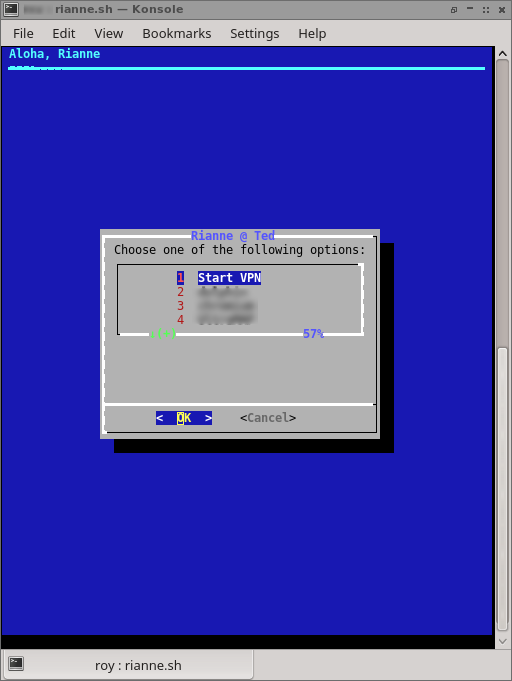
Here's the code (bash file) that renders the menu above (it's really that simple!):
#!/bin/bash

HEIGHT=15
WIDTH=40
CHOICE_HEIGHT=4
BACKTITLE="Aloha, Rianne"
TITLE="Rianne @ Ted"
MENU="Choose one of the following options:"

OPTIONS=(1 "Start VPN"
         2 "REDACTED"
         3 "REDACTED"
	4 "REDACTED"
	5 "REDACTED"
	6 "REDACTED"
	7 "REDACTED"
)

CHOICE=$(dialog --clear \
                --backtitle "$BACKTITLE" \
                --title "$TITLE" \
                --menu "$MENU" \
                $HEIGHT $WIDTH $CHOICE_HEIGHT \
                "${OPTIONS[@]}" \
                2>&1 >/dev/tty)

clear
case $CHOICE in
        1)
            echo "You chose Option 1"
sh ~/vpn.sh ;;

        2)
            echo "You chose Option 2"
REDACTED COMMAND ;;
        3)
            echo "You chose Option 3"
REDACTED COMMAND ;;
        4)
            echo "You chose Option 4"
REDACTED COMMAND ;;
        5)
            echo "You chose Option 5"
REDACTED COMMAND ;;
        6)
            echo "You chose Option 6"
REDACTED COMMAND ;;
        7)
            echo "You chose Option 7"
REDACTED COMMAND ;;

esac
Hopefully this inspires other people out there to do the same. It takes a while to set up, but it's a big time saver over the long run. █
»
-

- Roy Schestowitz's blog
- Login or register to post comments
 Printer-friendly version
- 45363 reads
 PDF version
More in Tux Machines
- Highlights
- Front Page
- Latest Headlines
- Archive
- Recent comments
- All-Time Popular Stories
- Hot Topics
- New Members
digiKam 7.7.0 is released
After three months of active maintenance and another bug triage, the digiKam team is proud to present version 7.7.0 of its open source digital photo manager. See below the list of most important features coming with this release.
|
Dilution and Misuse of the "Linux" Brand
|
Samsung, Red Hat to Work on Linux Drivers for Future Tech
The metaverse is expected to uproot system design as we know it, and Samsung is one of many hardware vendors re-imagining data center infrastructure in preparation for a parallel 3D world.
Samsung is working on new memory technologies that provide faster bandwidth inside hardware for data to travel between CPUs, storage and other computing resources. The company also announced it was partnering with Red Hat to ensure these technologies have Linux compatibility.
|
today's howtos
|


.svg_.png)

 Content (where original) is available under CC-BY-SA, copyrighted by original author/s.


Recent comments
1 year 11 weeks ago
1 year 11 weeks ago
1 year 11 weeks ago
1 year 11 weeks ago
1 year 11 weeks ago
1 year 11 weeks ago
1 year 11 weeks ago
1 year 11 weeks ago
1 year 11 weeks ago
1 year 11 weeks ago