Language Selection

English French German Italian Portuguese Spanish

Pop!_OS 19.04 is here!

Filed under
Ubuntu

It’s spring again! Leaves are budding and updates are blooming for Pop!_OS. Here’s what’s new in Pop!_OS 19.04:

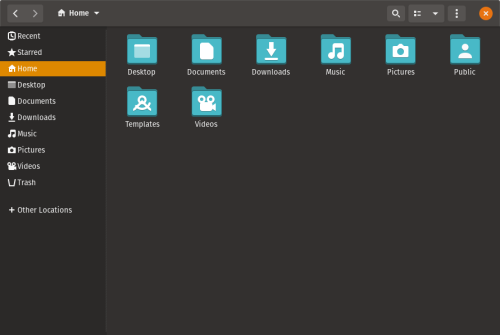
-The Slim Mode option maximizes your screen real estate by reducing the height of the header on application windows
-Dark Mode gives your applications a relaxing ambience for nighttime viewing. Both Dark Mode and Slim Mode can be activated in the Appearance settings menu.

Read more

Also: Pop!_OS 19.04 Run Through

Fixing the icon regression in Pop!_OS 19.04

  • Fixing the icon regression in Pop!_OS 19.04

    After installing Pop!_OS 19.04 yesterday, my desktop experience became an eyesore as the previously consistent icon set was replaced with what I can only describe as icon vomit soup.

Pop!_OS 19.04 Is Here

  • Pop!_OS 19.04 Is Here For An Ubuntu-based Functional Linux Experience

    Just recently, I updated our popular list of the best Linux distros for playing games. While Steam OS topped the list, which shouldn’t surprise anybody, System76’s Pop!_OS ended up in the second position. At first, I was skeptical to put it there, given the existence of dedicated options like Game Drift Linux, Sparky Linux – GameOver Edition, Lakka Linux, etc.

    However, the versatile nature and the ability to get things up and running on Pop!_OS without tons of effort convinced me. Making this already great computing experience even better, System76 has just released Pop!_OS 19.04 with tons of small-big changes sprinkled all across the distro.

System76 Releases Pop!_OS 19.04 for Its Linux PCs

System76 Launch Pop OS 19.04, Based on Ubuntu 19.04

  • System76 Launch Pop OS 19.04, Based on Ubuntu 19.04

    I rarely venture an opinion on my own site, and sometimes when I do, a bunch of you will chime in to tell me I’m wrong. I don’t mind that; it’s a great way to learn.

    But in this instance, for me personally, I don’t see any appreciable value in Pop OS. Certainly nothing that would make me recommend it over regular Ubuntu 19.04 (or over something like Ubuntu MATE 19.04 now that it comes with a glut of GPU niceties onboard).

    Pop OS has a nice enough GTK theme and icon set (as most distributions do) and a couple of interesting desktop tools (like a USB flashing tool).

    But it also comes cosseted in reams cool marketing speak about “creators”, “automation”, “makers” and other fluff.

    Now, maybe if you own one of their rebranded Clevo laptops there’s some substance to the buzzwords. But for, reading it as an outsider, telling me I can use the command line to install Tensorflow is… Like, you know you can do that in Ubuntu, right?!

    Indeed, that’s the rub with most of the features touted on the Pop OS website: they are common to virtually every modern Linux distro out there!

    Don’t get me wrong: highlighting those capabilities is a great bit of marketing. Ubuntu should do it too. But, as a Linux user, I find it a bit “And?”.

    So, erm why not just ship Ubuntu, folks?

Joey Sneddon on Pop OS

  • This Week Twitter Taught Me about Preferences, Pop OS & Raspberry Pi Penguins

    You probably have valid reasons, such as: you’re sane; introverted; privacy conscious; allergic to the toxic cloud of outrage, Trump tweets and automated bot militias that dominates the bite-sized micro-blogging landscape…

    So cue this, a (likely one-shot) series where I share a few of the things I learned through Twitter this week so that you don’t miss out on the banality.

    Is this effort me sloshing a glass half-full of irony in the air, or a shallow attempt at producing some low-effort content? Whichever it is: unroll the embeds, WordPress…

    [...]

    I may personally be somewhat unconvinced by the necessity of System76’s Ubuntu fork — guy doesn’t find use for distro: hardly a shocking option — but a febrile flock of fans over on the bird site flooded my notification stream to try and convince me otherwise anyway.

    A flurry of responses quickly fluff in from fans of both Pop OS and System76 whose feathered had be ruffled.

    [...]

    Don’t forget (as this is an Ubuntu centric site, not a hardware vendor one) I am viewing Pop OS as its own, distinct thing; an Ubuntu competitor, if you will.

    I’m sure Pop OS does run “exceptionally” on the laptops System76 flog — it’d be weird if it didn’t, right? But that’s not what I was commenting on.

    Or to put it another way: I simply don’t get Pop OS.

    And I mean that in the same way that I don’t get Snapchat or country music or crocs, either. They all exist, they are all popular, and folks get a lot of enjoyment from them. But for me it’s a case of blank stares and

Comment viewing options

Select your preferred way to display the comments and click "Save settings" to activate your changes.

More in Tux Machines

digiKam 7.7.0 is released

After three months of active maintenance and another bug triage, the digiKam team is proud to present version 7.7.0 of its open source digital photo manager. See below the list of most important features coming with this release. Read more

Dilution and Misuse of the "Linux" Brand

Samsung, Red Hat to Work on Linux Drivers for Future Tech

The metaverse is expected to uproot system design as we know it, and Samsung is one of many hardware vendors re-imagining data center infrastructure in preparation for a parallel 3D world. Samsung is working on new memory technologies that provide faster bandwidth inside hardware for data to travel between CPUs, storage and other computing resources. The company also announced it was partnering with Red Hat to ensure these technologies have Linux compatibility. Read more

today's howtos

  • How to install go1.19beta on Ubuntu 22.04 – NextGenTips

    In this tutorial, we are going to explore how to install go on Ubuntu 22.04 Golang is an open-source programming language that is easy to learn and use. It is built-in concurrency and has a robust standard library. It is reliable, builds fast, and efficient software that scales fast. Its concurrency mechanisms make it easy to write programs that get the most out of multicore and networked machines, while its novel-type systems enable flexible and modular program constructions. Go compiles quickly to machine code and has the convenience of garbage collection and the power of run-time reflection. In this guide, we are going to learn how to install golang 1.19beta on Ubuntu 22.04. Go 1.19beta1 is not yet released. There is so much work in progress with all the documentation.

  • molecule test: failed to connect to bus in systemd container - openQA bites

    Ansible Molecule is a project to help you test your ansible roles. I’m using molecule for automatically testing the ansible roles of geekoops.

  • How To Install MongoDB on AlmaLinux 9 - idroot

    In this tutorial, we will show you how to install MongoDB on AlmaLinux 9. For those of you who didn’t know, MongoDB is a high-performance, highly scalable document-oriented NoSQL database. Unlike in SQL databases where data is stored in rows and columns inside tables, in MongoDB, data is structured in JSON-like format inside records which are referred to as documents. The open-source attribute of MongoDB as a database software makes it an ideal candidate for almost any database-related project. This article assumes you have at least basic knowledge of Linux, know how to use the shell, and most importantly, you host your site on your own VPS. The installation is quite simple and assumes you are running in the root account, if not you may need to add ‘sudo‘ to the commands to get root privileges. I will show you the step-by-step installation of the MongoDB NoSQL database on AlmaLinux 9. You can follow the same instructions for CentOS and Rocky Linux.

  • An introduction (and how-to) to Plugin Loader for the Steam Deck. - Invidious
  • Self-host a Ghost Blog With Traefik

    Ghost is a very popular open-source content management system. Started as an alternative to WordPress and it went on to become an alternative to Substack by focusing on membership and newsletter. The creators of Ghost offer managed Pro hosting but it may not fit everyone's budget. Alternatively, you can self-host it on your own cloud servers. On Linux handbook, we already have a guide on deploying Ghost with Docker in a reverse proxy setup. Instead of Ngnix reverse proxy, you can also use another software called Traefik with Docker. It is a popular open-source cloud-native application proxy, API Gateway, Edge-router, and more. I use Traefik to secure my websites using an SSL certificate obtained from Let's Encrypt. Once deployed, Traefik can automatically manage your certificates and their renewals. In this tutorial, I'll share the necessary steps for deploying a Ghost blog with Docker and Traefik.