



OpenIndiana 2017.04 Hipster - Temple Gloom
Submitted by Roy Schestowitz on Friday 16th of June 2017 08:14:03 PM
Filed under 
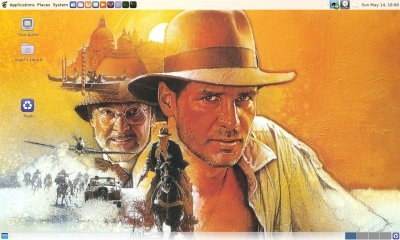
I find the test today somewhat sad. Sure, I did accomplish what I needed, but it gave me no joy, and no hope that this operating system can even even remotely compare against any Linux. Even CentOS is lightyears ahead. In the server environment, it may have its uses, but it completely misses the mark on the desktop.
Package management, applications, it all just feels raw, alien, unfriendly. What do you do if there are problems with drivers, or hardware? Where do you find the latest apps, and this isn't just an act of mercy by a volunteer? What about compatibility on actual hardware. The fact I was not willing to commit my test laptop also tells something.
You can master and tame OpenIndiana, to a level. But it is mostly a futile exercise in obstinacy. All of the stuff we've done above are more or less a given in Linux, and have been so since about 2007. It's like driving an old car and trying to match its abilities to new, modern technology. Unless you're into antiques, it's not really worth it.
The worst part, I guess, isn't the specifics. That can be sorted. It's the absolute lack of progress since 2011, in the desktop space. Underneath it may be wonders, but if you cannot use the system, then it's worthless. Lots of the stuff from the previous version have been removed, made less accessible, but we get nothing new in return. So it is nerdier and harder than before, and that's a grim sign of a future that has no place on the desktop. This seems to be true with other operating systems in this family, too. Just not worth the effort. Stick with Linux. Grade wise, 4/10. We're done.

»
-

- Login or register to post comments
 Printer-friendly version
- 3202 reads
 PDF version
More in Tux Machines
- Highlights
- Front Page
- Latest Headlines
- Archive
- Recent comments
- All-Time Popular Stories
- Hot Topics
- New Members
digiKam 7.7.0 is released
After three months of active maintenance and another bug triage, the digiKam team is proud to present version 7.7.0 of its open source digital photo manager. See below the list of most important features coming with this release.
|
Dilution and Misuse of the "Linux" Brand
|
Samsung, Red Hat to Work on Linux Drivers for Future Tech
The metaverse is expected to uproot system design as we know it, and Samsung is one of many hardware vendors re-imagining data center infrastructure in preparation for a parallel 3D world.
Samsung is working on new memory technologies that provide faster bandwidth inside hardware for data to travel between CPUs, storage and other computing resources. The company also announced it was partnering with Red Hat to ensure these technologies have Linux compatibility.
|
today's howtos
|


.svg_.png)

 Content (where original) is available under CC-BY-SA, copyrighted by original author/s.


Recent comments
1 year 11 weeks ago
1 year 11 weeks ago
1 year 11 weeks ago
1 year 11 weeks ago
1 year 11 weeks ago
1 year 11 weeks ago
1 year 11 weeks ago
1 year 11 weeks ago
1 year 11 weeks ago
1 year 11 weeks ago