



Security Leftovers
Submitted by Roy Schestowitz on Wednesday 10th of August 2022 08:43:16 PM
Filed under

-
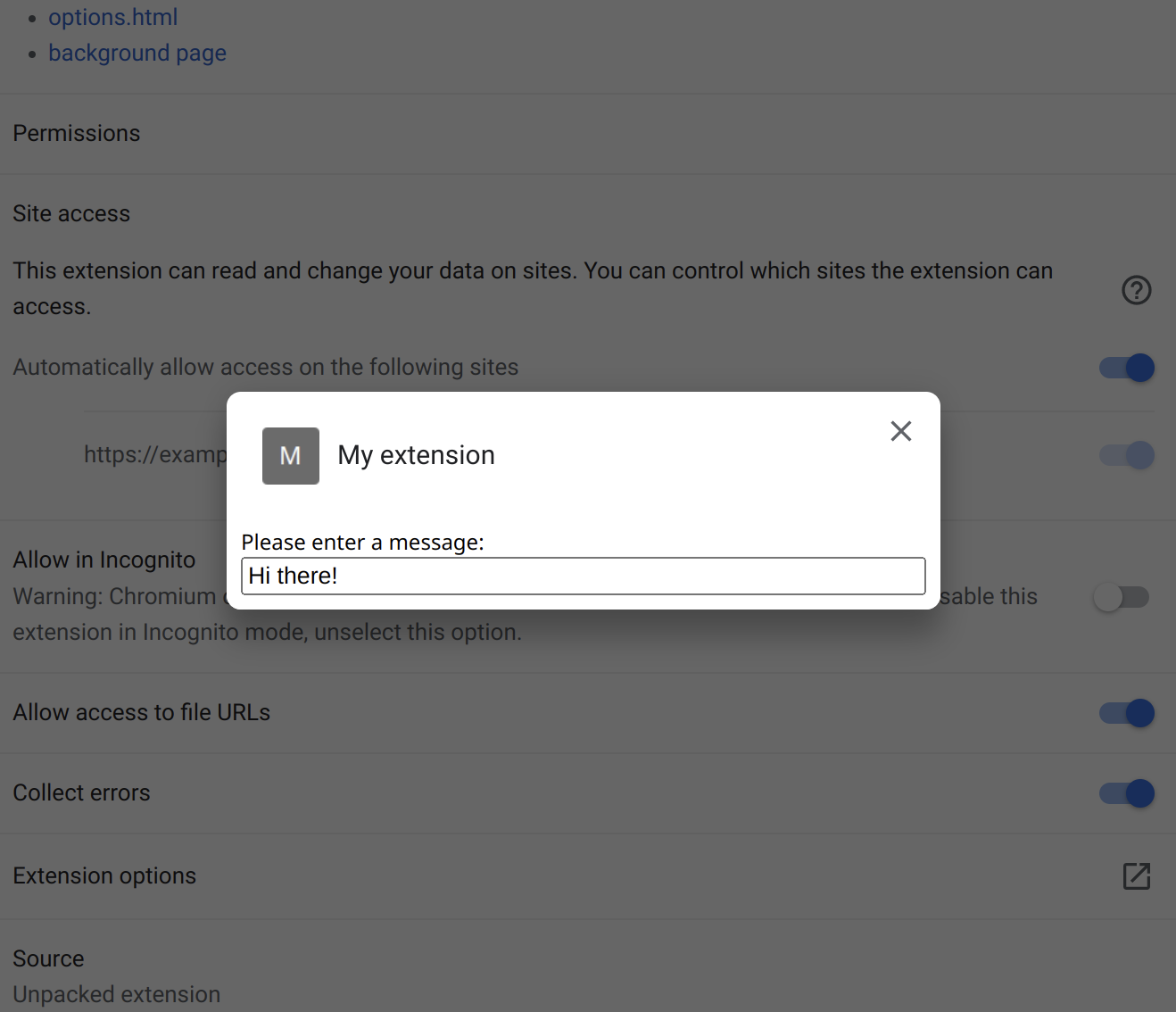
Anatomy of a basic extension | Almost Secure
I am starting an article series explaining the basics of browser extension security. It’s meant to provide you with some understanding of the field and serve as a reference for my more specific articles. You can browse the extension-security-basics category to see other published articles in this series.
Before we go for a deeper dive, let’s get a better understanding of what a browser extension actually is. We’ll take a look at a simple example extension and the different contexts in which its code runs.
[...]
So our example extension is going to be a Chrome-compatible one. I’ll discuss the files one by one but you can download the entire source code to play around with here. Unpack this ZIP file to some directory.
All browsers support trying out extensions by loading them from a directory. In Chromium-based browsers you go to chrome://extensions/, enable developer mode and use “Load unpacked” button. In Firefox you go to about:debugging#/runtime/this-firefox and click “Load Temporary Add-on” button.
This extension uses questionable approaches on purpose. It has several potential security issues, none of these are currently exploitable however. Small changes to the extension functionality will change that however, I’ll introduce these in future articles.
-
CISA warns of UnRAR security flaw affecting Linux systems [Ed: Grotesque bias from Microsoft's propagandist Sofia Wyciślik-Wilson; CISA has in fact just warned about Microsoft Windows, so Sofia tries to write some nonsense about Linux; GNU/Linux barely even use RAR. This is low-graded Microsoft propaganda. Check the banner/feature image saying "Linux" when in fact what CISA announced is actively-exploited holes in Microsoft Windows. RAR is just some ancient proprietary codec/compression algorithm, GNU/Linux users overwhelmingly adopt Gzip.]
The US Cybersecurity and Infrastructure Security Agency has issued a warning about a security issue with the UnRAR tool for Linux-based systems.
The vulnerability is being tracked as CVE-2022-30333, and if successfully exploited, the flaw could allow an attacker to use the process of unpacking an archive to write data to an area of storage.
-
Security updates for Wednesday [LWN.net]
Security updates have been issued by Debian (gst-plugins-good1.0), Fedora (firefox and ghostscript), Gentoo (consul, firefox, libass, libraw, lxml, mdbtools, pam_u2f, spice, and thunderbird), Oracle (kernel, kernel-container, and vim), Red Hat (galera, mariadb, and mysql-selinux, kernel, and kernel-rt), Scientific Linux (kernel), SUSE (bind, java-11-openjdk, kernel, mokutil, ncurses, and u-boot), and Ubuntu (epiphany-browser, libcdio, linux, linux-aws, linux-azure-4.15, linux-dell300x, linux-gcp-4.15, linux-kvm, linux-oracle, linux-raspi2, linux-snapdragon, linux, linux-aws, linux-kvm, linux-lts-xenial, and linux-hwe, linux-aws-hwe, linux-azure, linux-gcp, linux-oracle).
-
Dissecting Google's Titan M chip: Vulnerability research challenges - Help Net Security
The enterprise-grade Titan M security chip was custom built to help protect data. Derived from the same chip Google uses to protect its cloud data centers, it handles processes and information, such as passcode protection, encryption, and secure transactions in apps.
In this Help Net Security video, Damiano Melotti, Security Researcher, Quarkslab, talks about the vulnerability research challenges encountered while exploring Google’s Titan M chip.
-
Palo Alto Networks Releases Security Update for PAN-OS | CISA
Palo Alto Networks has released a security update to address a vulnerability in PAN-OS firewall configurations. A remote attacker could exploit this vulnerability to conduct a reflected denial-of service.
-
CISA Releases Cybersecurity Toolkit to Protect U.S. Elections [Ed: Delete Windows with back doors, for starters...]
CISA—through the Joint Cyber Defense Collaborative (JCDC)—has released a toolkit of free cybersecurity resources for the election community. The toolkit aims to help state and local government officials, election officials, and vendors enhance the cybersecurity and cyber resilience of U.S. election infrastructure. The toolkit resources, which come from CISA, JCDC members, and others across the cybersecurity community, focus on assessing risk and protecting election infrastructure assets commonly targeted by phishing, ransomware, and distributed denial-of-service (DDoS) attacks.
-
Adopting Sigstore Incrementally [Ed: Pentagon-funded companies pushing in the direction of denying you running a program of your choice on your own system]
adopt Sigstore may already sign published artifacts. Signers may have existing procedures to securely store and use signing keys. Sigstore can be used to sign artifacts with existing self-managed, long-lived signing keys. Sigstore provides a simple user experience for signing, verification, and generating structured signature metadata for artifacts and container signatures. Sigstore also offers a community-operated, free-to-use transparency log for auditing signature generation.
Sigstore additionally has the ability to use code signing certificates with short-lived signing keys bound to OpenID Connect identities. This signing approach offers simplicity due to the lack of key management; however, this may be too drastic of a change for enterprises that have existing infrastructure for signing. This blog post outlines strategies to ease adoption of Sigstore while still using existing signing approaches.
-
Sysdig Employs AI to Thwart Container Cryptojacking Attacks [Ed: Calling everything "Hey Hi" (AI) for hype's sake]
At the Black Hat USA 2022 conference, Sysdig today revealed it is adding machine learning algorithms capable of detecting cryptojacking attacks to its cloud service for securing container applications. The algorithms are offered at no additional charge, Sysdig says.
-
Deepfence Expands Scope of Open Source Container Security Platform - Container Journal
Deepfence CEO Sandeep Lahane says as the economy continues to stagnate, the rate at which organizations are embracing open source cybersecurity tools is only going to accelerate.
»
-

- Login or register to post comments
 Printer-friendly version
- 409 reads
 PDF version
More in Tux Machines
- Highlights
- Front Page
- Latest Headlines
- Archive
- Recent comments
- All-Time Popular Stories
- Hot Topics
- New Members
today's howtos
| Open Hardware: XON/XOFF and Raspberry Pi Pico
|
Security Leftovers
| How to Apply Accent Colour in Ubuntu Desktop
A step-by-step tutorial on how to apply accent colour in Ubuntu desktop (GNOME) with tips for Kubuntu and others.
|



 This section of TuxMachines will no longer have new stories in it (with some caveats, including this post). To see the latest stories go to


 Content (where original) is available under CC-BY-SA, copyrighted by original author/s.



Recent comments
2 days 9 hours ago
2 days 13 hours ago
2 days 13 hours ago
3 days 20 hours ago
3 days 21 hours ago
3 days 22 hours ago
3 days 22 hours ago
3 days 23 hours ago
4 days 1 hour ago
4 days 3 hours ago