



CPU-X The Best Linux Alternative Of CPU-Z
Submitted by Roy Schestowitz on Monday 25th of July 2022 11:26:39 AM
Filed under

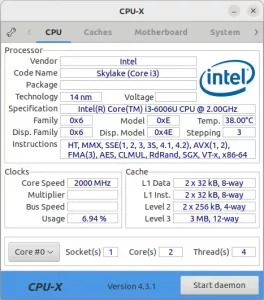
For those want to check PC hardware specs in Linux, CPU-X is a good choice for user switching from Microsoft Windows.
It’s a free open-source system profiling and monitoring application, that looks quite similar to CPU-Z for Windows. With it, you can check your CPU specification, vendor, codename, clocks, and L1/L2/L3 caches.
CPU-Z is a freeware that gathers information on some of the main devices of your system :
Processor name and number, codename, process, package, cache levels.
Mainboard and chipset.
Memory type, size, timings, and module specifications (SPD).
Real time measurement of each core’s internal frequency, memory frequency.

»
-

- Login or register to post comments
 Printer-friendly version
- 1806 reads
 PDF version
More in Tux Machines
- Highlights
- Front Page
- Latest Headlines
- Archive
- Recent comments
- All-Time Popular Stories
- Hot Topics
- New Members
today's howtos
| Open Hardware: XON/XOFF and Raspberry Pi Pico
|
Security Leftovers
| How to Apply Accent Colour in Ubuntu Desktop
A step-by-step tutorial on how to apply accent colour in Ubuntu desktop (GNOME) with tips for Kubuntu and others.
|


 This section of TuxMachines will no longer have new stories in it (with some caveats, including this post). To see the latest stories go to


.svg_.png)

 Content (where original) is available under CC-BY-SA, copyrighted by original author/s.



Recent comments
2 days 5 hours ago
2 days 9 hours ago
2 days 9 hours ago
3 days 16 hours ago
3 days 17 hours ago
3 days 18 hours ago
3 days 18 hours ago
3 days 19 hours ago
3 days 21 hours ago
3 days 23 hours ago