



Devices: Projects in Buzzword ("IoT") and Arduino Space
Submitted by Roy Schestowitz on Thursday 21st of July 2022 08:01:14 PM
-
20 Best Internet of Things Projects (IoT Projects) in 2022
Internet of Things (IoT) is a new predominant technology for this advanced world. This technology can change the lifestyle people lead. The question is, what the Internet of Things is? IoT can be described as a network of physical objects connected through the internet.
Physical objects could be anything that contains embedded electronics, software, sensor, etc., with the internet. Using the IP addresses, those smart objects can exchange data among the network and can make a decision. Research is going on over the IoT trends and projects.
In this article, we will talk about a few IoT project ideas based on standard IoT protocols so that readers get basic knowledge about the Internet of Things. These internet of things examples are keen, useful, and interesting to build.
-
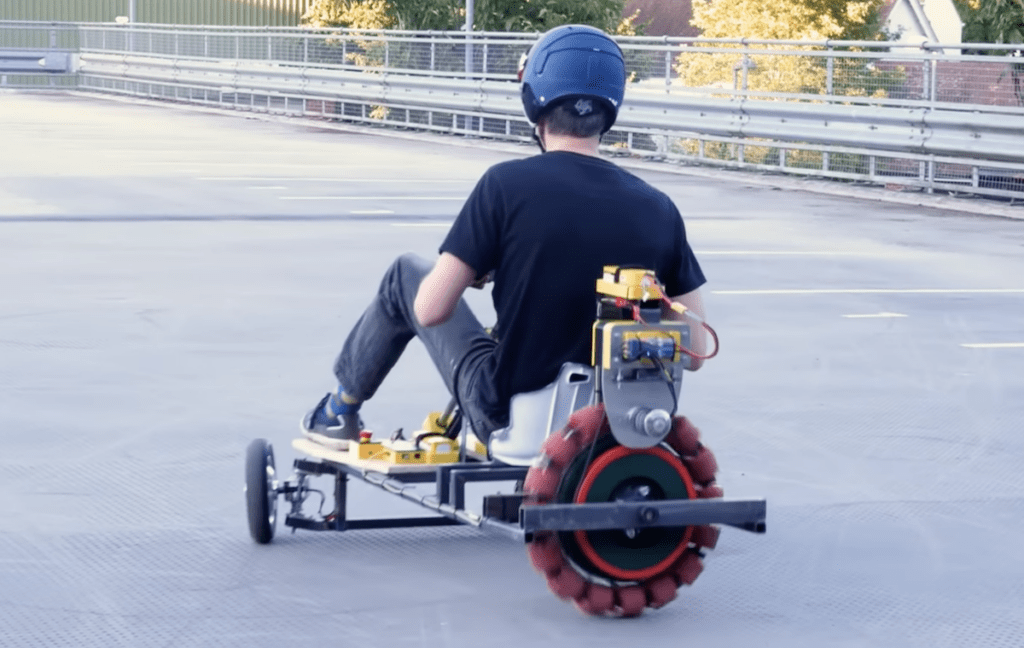
Equipping a go-kart with an omni wheel for endless drifting | Arduino Blog
An omni wheel, sometimes referred to by the more specific trade name “Mecanum” wheel, is a unique type of wheel with “tread” made up of several rollers oriented at an angle relative to the wheel’s spin direction. They allow for forward driving like any other wheel, but also sideways and rotational locomotion depending on the vectoring of all of a vehicle’s wheels working in concert. James Bruton used omni wheels on many of his robots in the past and in his most recent project he equipped a go-kart with an omni wheel for endless drifting.
The go-kart has three drive motors. Two Hoverboard-style hub motor/wheel combos sit at the front of the go-kart on a steering rack. They provide normal front-wheel drive dynamics. But at the back of the go-kart there is a large omni wheel oriented perpendicular to the front wheels (at their neutral position). That means that the omni wheel’s rollers are inline with the vehicle. Those rollers spin freely, so the go-kart drives normally. But when Bruton spins the omni wheel motor, the rear end of the go-kart slides out in a drifting maneuver.
-
This coffee machine lets you know when you've had too much caffeine | Arduino Blog
You’ve probably heard that caffeine is a drug. That is true and it is possible to overdose on caffeine and die. Heathline reports that a lethal dose of caffeine is around 10 grams. But a typical cup of coffee only contains around 100-200 milligrams of caffeine, so you’d have to drink at least 50 cups to reach a lethal amount. However, some coffee, such as from Death Wish Coffee Co, contains much more caffeine and that makes it easier to overdose. With that in mind, Michael Pick used an Arduino to build a custom coffee machine.
According to Pick, Death Wish coffee contains up to 728mg of caffeine per 12oz cup. Theoretically, that makes it possible for a person to drink enough coffee to overdose on caffeine. There aren’t many people out there who drink that much coffee, so this project is entirely tongue-in-cheek. But it is still fun to see an actual progress meter counting up to your death with every cup of joe that you brew. That is exactly what Pick’s coffee machine does. It tracks each cup of coffee brewed and displays the caffeine overdose progress on a small OLED screen attached to the front of the coffee machine.
»
-

- Login or register to post comments
 Printer-friendly version
- 1297 reads
 PDF version
More in Tux Machines
- Highlights
- Front Page
- Latest Headlines
- Archive
- Recent comments
- All-Time Popular Stories
- Hot Topics
- New Members
today's howtos
| Open Hardware: XON/XOFF and Raspberry Pi Pico
|
Security Leftovers
| How to Apply Accent Colour in Ubuntu Desktop
A step-by-step tutorial on how to apply accent colour in Ubuntu desktop (GNOME) with tips for Kubuntu and others.
|



 This section of TuxMachines will no longer have new stories in it (with some caveats, including this post). To see the latest stories go to


 Content (where original) is available under CC-BY-SA, copyrighted by original author/s.



Recent comments
2 days 5 hours ago
2 days 9 hours ago
2 days 9 hours ago
3 days 16 hours ago
3 days 17 hours ago
3 days 18 hours ago
3 days 18 hours ago
3 days 19 hours ago
3 days 21 hours ago
3 days 23 hours ago