



today's programming and hacking leftovers
Submitted by Roy Schestowitz on Wednesday 20th of July 2022 11:43:27 AM
Filed under


-
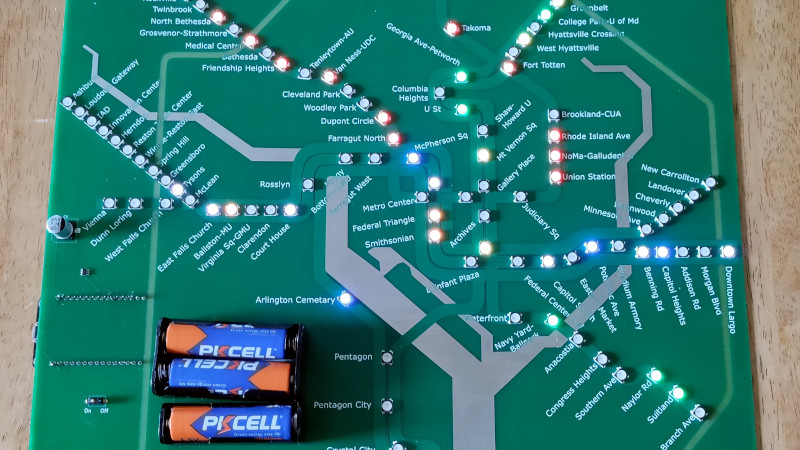
Washington, DC Finally Gets Its Own PCB Metro Map
There was a time, not so long ago, when folks who wanted to make their own custom PCBs would have found themselves in the market for a bucket of acid and a second-hand laser printer. These days, all you have to do is click a few buttons in your EDA program of choice and send the files off for fabrication. It’s easy, cheap, and nobody ends up with chemical burns.
-
Programmable Resistance Box
For prototype electronics projects, most of us have a pile of resistors of various values stored somewhere on our tool bench. There are different methods of organizing them for easy access and identification, but for true efficiency a resistance substitution box can be used on the breadboard to quickly change resistance values at a single point in a circuit. Until now it seemed this would be the pinnacle of quickly selecting differently-sized resistors, but thanks to this programmable resistor bank there’s an even better option available now.
-
Analog Devices presents high-res 3D depth camera
The ADTF3175 is a Time-of-Flight (ToF) optimized for 3D depth sensing and computer vision applications. The device features a 1MP CMOS indirect ToF with a depth range of 0.4 to 4m with ±3mm accuracy. ADI expressed these features can be useful in applications such as industrial robotics, healthcare and augmented reality.
This 3D camera module is based on the ADSD3100 which is a 1MP CMOS ToF-based 3D depth and 2D visual light imager. The ADSD3100 includes an ADC, pixel biasing circuitry and sensor control logic built in the chip to make it cost effective and ease product integration.
-
Put Design Thinking into practice with the Open Practice Library
Design Thinking has been getting a lot of attention over the past few years as a way to enhance your problem solving, ensure learning goals are met, and increase team engagement. As a concept, it's all about problem solving, but it's designed to break down existing approaches and norms. Over the past few decades, teams have developed standardized ways of approaching problems. Agile teams, for example, take retrospectives as a means to both troubleshoot and brainstorm new ways of working. Lean has evolved a set of root cause analysis tooling and techniques to allow for the bottoming out of problems.
A problem solving and brainstorming session needs the freedom to shift perspective away from current thinking. That thinking can be hampered by the familiarity with tooling, the team affinity for certain approaches or tools, the "evangelistic" approach to processes, and the mantra of this is how we have always done it, which is rooted in people's innate resistance to change. Design Thinking is an approach to allow people to see beyond basic human tendencies. It allows people to awaken to alternative approaches that can help uncover unmet and unspoken needs, and to bring new perspectives to the challenges at hand.
-
How much JavaScript do you need to know before learning ReactJS?
React is a UI framework built on top of HTML, CSS, and JavaScript, where JavaScript (JS) is responsible for most of the logic. If you have knowledge of variables, data types, array functions, callbacks, scopes, string methods, loops, and other JS DOM manipulation-related topics, these will tremendously speed up the pace of learning ReactJS.
Your concept of modern JavaScript will dictate the pace of how soon you can get going with ReactJS. You don't need to be a JavaScript expert to start your ReactJS journey, but just as knowledge of ingredients is a must for any chef hoping to master cooking, the same is true for learning ReactJS. It's a modern JavaScript UI library, so you need to know some JavaScript. The question is, how much?
»
-

- Login or register to post comments
 Printer-friendly version
- 1159 reads
 PDF version
More in Tux Machines
- Highlights
- Front Page
- Latest Headlines
- Archive
- Recent comments
- All-Time Popular Stories
- Hot Topics
- New Members
today's howtos
| Open Hardware: XON/XOFF and Raspberry Pi Pico
|
Security Leftovers
| How to Apply Accent Colour in Ubuntu Desktop
A step-by-step tutorial on how to apply accent colour in Ubuntu desktop (GNOME) with tips for Kubuntu and others.
|



 This section of TuxMachines will no longer have new stories in it (with some caveats, including this post). To see the latest stories go to


 Content (where original) is available under CC-BY-SA, copyrighted by original author/s.



Recent comments
2 days 4 hours ago
2 days 8 hours ago
2 days 8 hours ago
3 days 15 hours ago
3 days 16 hours ago
3 days 17 hours ago
3 days 17 hours ago
3 days 17 hours ago
3 days 20 hours ago
3 days 21 hours ago