



today's howtos
Submitted by Roy Schestowitz on Wednesday 20th of July 2022 10:38:12 AM
Filed under

-
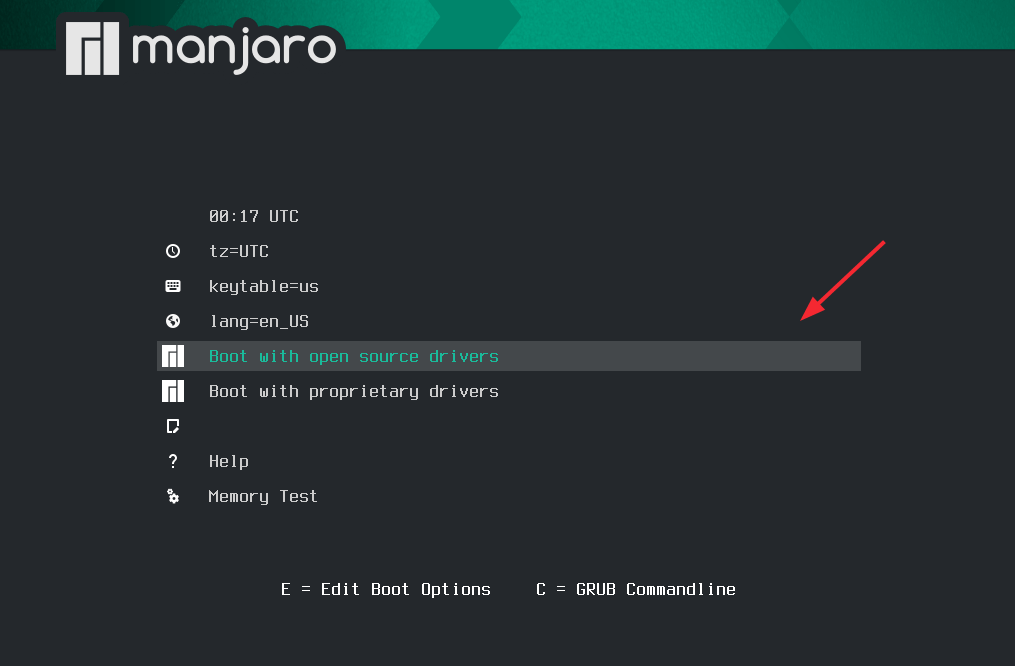
Installation of Manjaro 21 (XFCE Edition) Desktop
Manjaro is a modern and user-friendly Arch-based Linux distribution that comes highly recommended for desktop lovers given its intuitive and elegant UI design.
It is free and open source and comes with three officially supported editions namely Xfce, KDE Plasma, and GNOME. All the editions are fully customizable and you can configure them to suit your own taste. Manjaro is versatile and can be used for home, office, and gaming.
-
How to Install Ansible (Automation Tool) on Fedora 36
In this post, we will cover how to install Ansible on Fedora 36 step by step.
Ansible is a free and open-source agent less automation tool that manages remote Linux machines over ssh protocol. System on which ansible is installed is known as control node and remote machines which are managed by ansible are known managed nodes.
-
How to Install TeamSpeak in Linux
TeamSpeak is a great application that uses VoIP to facilitate audio communication on a chat channel. Besides, it is a free voice conferencing application that supports Linux and other systems. It is an alternative to software like Discord. With TeamSpeak, you can get in touch with people via text and speech, especially for gamers who need to communicate among themselves.
Moreover, TeamSpeak works for meetings, conferences, and online courses. There are different ways to install TeamSpeak on Linux, and we will cover two common methods in this guide.
-
How to Install Wine 7.13 (Development Release) in Linux
Wine, a most popular and powerful open source application for Linux, that used to run Windows-based applications and games on the Linux Platform without any trouble.
WineHQ team recently announced a new development version of Wine 7.13 (release candidate for the upcoming releases). This new development build arrives with a number of new important features and 40+ bug fixes.
The wine team, keep releasing their development builds almost on weekly basis and adding numerous new features and fixes. Each new version brings support for new applications and games, making Wine a most popular and must-have tool for every user, who wants to run Windows-based software on a Linux platform.
-
How To Install OpenCV in Ubuntu
The open-source Computer Vision Library is a popular computer vision library with bindings for different languages, including Java, Python, and C++. Furthermore, it supports other Operating Systems and has multiple applications, such as tracking moving objects, 3D-model extractions, facial recognition, and image analysis.
For developers, OpenCV offers an extensive collection of algorithms, especially for 3D modelling, and things can’t get any better than when using the tool. If you are looking for how to install OpenCV on Ubuntu and spice your support vector projects or enhance algorithms, you are in the right place. This guide covers two easy ways of installing OpenCV.
-
How To Extract Files to a Particular Folder Linux
Compressed files save on bandwidth when sending them to someone. You can compress any files, and there are different tools, such as zip and tar. The compressed files get extracted to the current working directory unless you specify a different one. Besides, the different utilities have various options that you must add to aid in extracting archive files to specific folders.
When using a decompressing tool, there is a way to specify a different directory for the extracted files. This guide will discuss how to create archive files and extract the contents to specific directories using unzip and tar in Linux.
-
Install and Use VLC Media Player in Linux
VLC is free and cross-platform software that supports different multimedia files, including DVDs and CDs. VLC supports various streaming protocols, and it is a great multimedia player to use. VLC is a common tool, especially for Windows users, and if you’ve recently switched to Linux and wondering how to install it on Linux, then you are in the right place.
This guide covers two different ways of installing VLC on Linux, and we will be using Ubuntu for our examples. Nevertheless, the process is simple, and the concept is the same for all Linux systems.
-
How to install Perl on Ubuntu 22.04
Yes, despite having 30 years of service, Perl is still making its mark in backend applications and complex configuration scripts. So don’t be surprised that it’s still so popular.
Perl has been modernized and includes a Python-style package manager called CPAN. It also has a fairly large user community, which means that there is documentation everywhere.
On top of this, it is highly flexible, so you can use it for almost any purpose while being fast and secure.
-
How to Set the Vim Background Colors in Linux
Vim is an exceptional and widely used terminal-based text editor in the Linux community. A growing number of Linux users are slowly embracing the use of vim text editor to meet their file editing objectives.
Not all Linux users are quick to embrace and stick to the default settings and configurations associated with apps like text editors. Some users prefer a colorful approach to the Linux lifestyle.
This article is here to inform us that we can accomplish more than just text editing tasks with Vim. We should be able to set the Vim background colors to our desired preferences while perfecting our text editing skills.
»
-

- Login or register to post comments
 Printer-friendly version
- 1178 reads
 PDF version
More in Tux Machines
- Highlights
- Front Page
- Latest Headlines
- Archive
- Recent comments
- All-Time Popular Stories
- Hot Topics
- New Members
today's howtos
| Open Hardware: XON/XOFF and Raspberry Pi Pico
|
Security Leftovers
| How to Apply Accent Colour in Ubuntu Desktop
A step-by-step tutorial on how to apply accent colour in Ubuntu desktop (GNOME) with tips for Kubuntu and others.
|



 This section of TuxMachines will no longer have new stories in it (with some caveats, including this post). To see the latest stories go to


 Content (where original) is available under CC-BY-SA, copyrighted by original author/s.



Recent comments
2 days 4 hours ago
2 days 8 hours ago
2 days 8 hours ago
3 days 15 hours ago
3 days 16 hours ago
3 days 17 hours ago
3 days 17 hours ago
3 days 17 hours ago
3 days 20 hours ago
3 days 21 hours ago