



Desktop/Laptop/Consoles With GNU/Linux
Submitted by Roy Schestowitz on Sunday 17th of July 2022 05:45:50 PM
Filed under


-
Rubenerd: The reason Linux something something
I wonder what I was thinking? It could have been so profound, life changing, or brilliant. If only I could reach back into my 2019 brain and see exactly what it was I was about discuss. Probably systemd.
-
Chrome OS Flex turns old PCs and Macs into Chromebooks | IT PRO
Chrome OS Flex was announced earlier in the year and offered to selected users via preview access with some 600 bugs resolved during the beta period.
The aim is to make Chrome more widely available to organisations, specifically those that have older hardware. Google has been testing it on a range of Windows-based devices from Acer, Asus, Dell, Lenovo and so on, as well as some MacBooks, including 10-year-old models. More than 400 devices are certified to work with Chrome OS Flex, according to Google and its installation is a simple USB process.
-
Why Google ChromeOS Flex is quickly becoming a big deal
On its blog today, Google shared some updates on ChromeOS Flex. This software can repurpose older PCs and Mac computers to run a base version of ChromeOS that powers Chromebooks. The company says it now certified over 400 compatible devices, up from 100 models in March. Announced in February as early access, this free software is now generally available for anyone to try on certified devices.
-
Anbernic Win600 First Impressions - Xe
When I had SteamOS set up, I did find something that makes the Win600 slightly better than the Steam Deck. When you are adding games to Steam with Emulation Station you need to close the Steam client to edit the leveldb files that Steam uses to track what games you can launch. On the Steam Deck, the Steam client also enables the built-in controllers to act as a keyboard and mouse. This means that you need to poke around and pray with the touchscreen to get EmuDeck games up and running. The mouse/controller switch on the Win600 makes this slightly more convenient because the controllers can always poorly act as a mouse and keyboard.
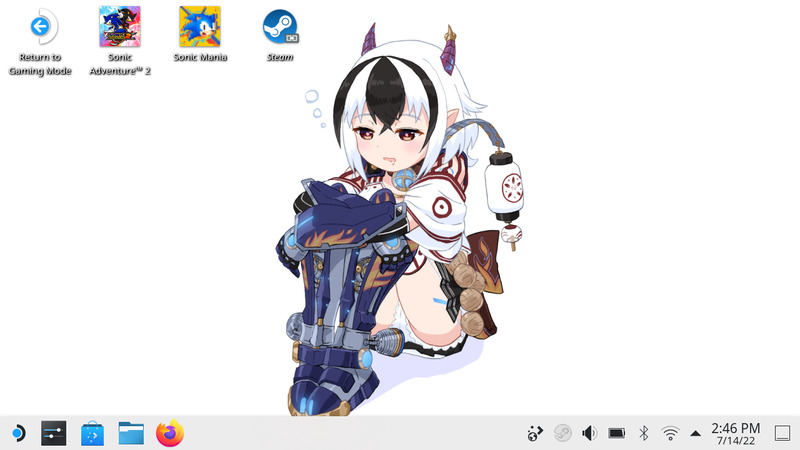
When you are in KDE on the Win600, you don't get a soft keyboard at all. This is mildly inconvenient, but can be fixed with the moonlander yet again. Here's a screenshot of what my KDE desktop on the Win600 looks like...
[...]
Overall, SteamOS is a lot more ergonomic in my opinion and will let you play games to your heart's content.
The D-pad feels really good. I love how it responds. When I did a little bit of Sonic Mania I never felt like I was inaccurate. There were some weird audio hitches on Sonic Mania though where the music would cut out randomly. Not sure what's going on with that. I could play through entire Pokemon games with that D-pad.
»
-

- Login or register to post comments
 Printer-friendly version
- 822 reads
 PDF version
More in Tux Machines
- Highlights
- Front Page
- Latest Headlines
- Archive
- Recent comments
- All-Time Popular Stories
- Hot Topics
- New Members
today's howtos
| Open Hardware: XON/XOFF and Raspberry Pi Pico
|
Security Leftovers
| How to Apply Accent Colour in Ubuntu Desktop
A step-by-step tutorial on how to apply accent colour in Ubuntu desktop (GNOME) with tips for Kubuntu and others.
|



 This section of TuxMachines will no longer have new stories in it (with some caveats, including this post). To see the latest stories go to


 Content (where original) is available under CC-BY-SA, copyrighted by original author/s.



Recent comments
2 days 4 hours ago
2 days 8 hours ago
2 days 8 hours ago
3 days 15 hours ago
3 days 16 hours ago
3 days 17 hours ago
3 days 17 hours ago
3 days 17 hours ago
3 days 20 hours ago
3 days 21 hours ago