



Hardware/Modding: Raspberry Pi CM4 and More
Submitted by Roy Schestowitz on Saturday 16th of July 2022 01:50:27 PM
Filed under

-
I Built a Video Game Console
That's code for "I built a fancy case for my Raspberry Pi (3B+)" if you didn't know.
-
Stratum 1 Grandmaster Time Server On A Budget
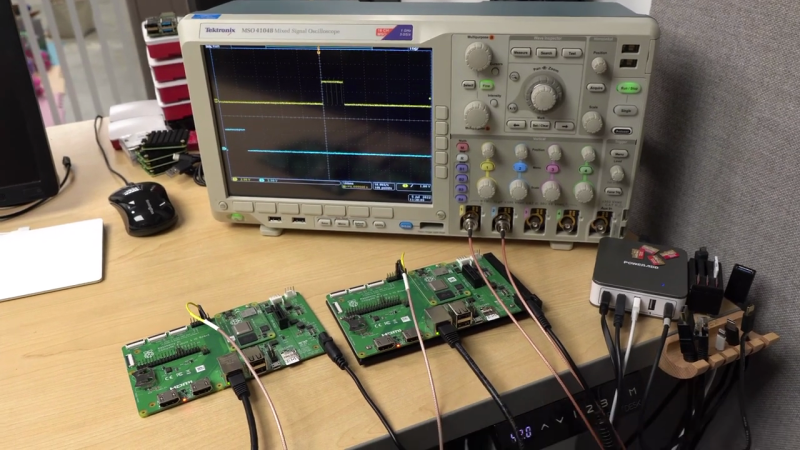
[Jeff Geerling] has been following the various open source time projects for some time now, and is finally able to demonstrate a working and affordable solution for nanoseconds-accurate timekeeping in your local lab. The possibility of a low-cost time server came about with the introduction of the Raspberry Pi CM4 compute module back in Oct 2020, whose Broadcom network chip (BCM54210PE) supports PTP (Precision Time Protocol, IEEE-1588) 1PPS output and hardware-based time stamping. Despite the CM4 data sheet specifying PTP support, it wasn’t available in the kernel. An issue was raised in Feb last year, and Raspberry Pi kernel support was finally released this month.
-
Making Noctua fans work (quietly) with a Supermicro motherboard
Typically one installs whiny siren-like server fans that spin at 5000+ rpm, and don't worry much about noise. But I do.
-
Debix Model A packs i.MX 8M Plus and mirrors RPI form factor
The Debix Model A from Polyhex is a Single Board Computer (SBC) built around the i.MX 8M Plus Quad-core ARM Cortex-A53 CPU industrial-grade processor. This SBC integrates a 2.3 TOPS Neural Processing Unit and expandable storage to target industrial automation, multimedia, and other IoT applications.
The Debix Model A was designed by Polyhex Technology and it’s based on the NXP NPU i.MX 8M Plus industrial processor with maximum frequency of 1.6GHz. By default, this device comes with 2GB of LPDDR4 but can be upgraded to 4GB or 6GB. The default storage interface provides support for an SD Card but can also be customized to provide eMMC support from 8GB up to 128GB.
»
-

- Login or register to post comments
 Printer-friendly version
- 848 reads
 PDF version
More in Tux Machines
- Highlights
- Front Page
- Latest Headlines
- Archive
- Recent comments
- All-Time Popular Stories
- Hot Topics
- New Members
today's howtos
| Open Hardware: XON/XOFF and Raspberry Pi Pico
|
Security Leftovers
| How to Apply Accent Colour in Ubuntu Desktop
A step-by-step tutorial on how to apply accent colour in Ubuntu desktop (GNOME) with tips for Kubuntu and others.
|



 This section of TuxMachines will no longer have new stories in it (with some caveats, including this post). To see the latest stories go to


.svg_.png)

 Content (where original) is available under CC-BY-SA, copyrighted by original author/s.



Recent comments
2 days 3 hours ago
2 days 7 hours ago
2 days 7 hours ago
3 days 14 hours ago
3 days 15 hours ago
3 days 16 hours ago
3 days 16 hours ago
3 days 17 hours ago
3 days 19 hours ago
3 days 21 hours ago