



today's leftovers
Submitted by Roy Schestowitz on Tuesday 12th of July 2022 09:14:19 PM
Filed under

-
9 AMAZING COMMAND LINE TOOLS for Linux - Invidious
-
Can IBM Get Back Into HPC With Power10?
The “Cirrus” Power10 processor from IBM, which we codenamed for Big Blue because it refused to do it publicly and because we understand the value of a synonym here at The Next Platform, shipped last September in the “Denali” Power E1080 big iron NUMA machine. And today, the rest of the Power10-based Power Systems product line is being fleshed out with the launch of entry and midrange machines – many of which are suitable for supporting HPC and AI workloads as well as in-memory databases and other workloads in large enterprises.
-
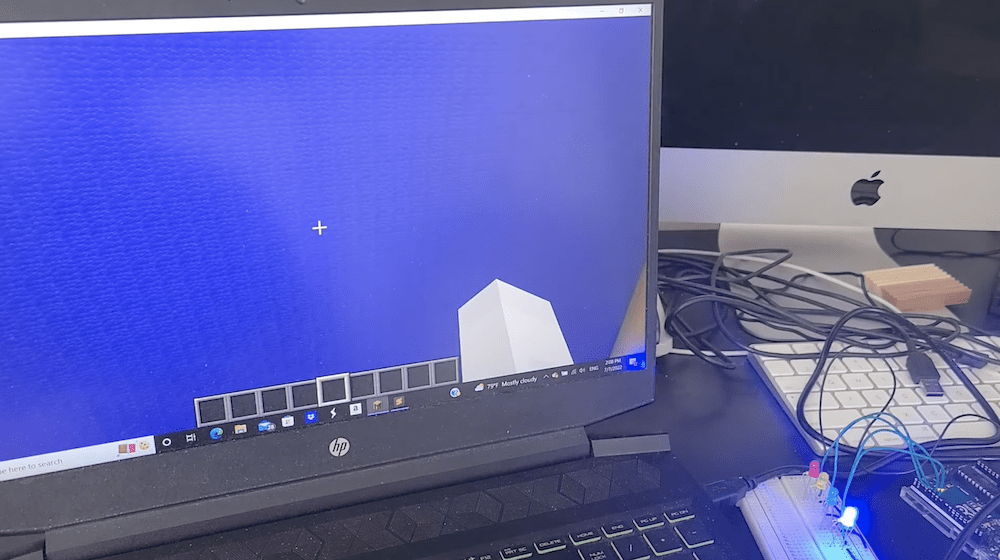
Minecraft controls this LED array [Ed: Microsoft's proprietary junk can only be a liability to Arduino]
A common question asked by new makers is “what is the difference between a microcontroller development board and a single-board computer?” Or, in more common terms, “what is the difference between an Arduino and a Raspberry Pi?” There are many technical differences, but people are really asking about why you would use one over the other. The answer, in most cases, is that you use an Arduino to handle low-level control of sensors, motors, and so on, and you use a Raspberry Pi for computing processor-intensive tasks. If, however, you need both, then MrDemonFrog’s Minecraft-controlled LED array illustrates how to do so.
-
How to install Nitrux 2.2.1 - Invidious
In this video, I am going to show how to install Nitrux 2.2.1
-
How to Install Gradle Build Automation Tool on Rocky Linux 8 - VITUX
Gradle is a build automation tool with a focus on extensibility and performance. It can be used to perform tasks related to software compilation, deployment, testing, static analysis (e.g., linting), and more.
Gradle is very easy to learn if you are new to automated builds or want an alternative solution for any of the above tasks that your current build system does not support well enough or is unable to do at all. Gradle has some advantages over other tools like Ant, Maven, SBT (Scala Build Tool), etc., especially when it comes down to customizability and performance of the generated output during the process of creating a final executable jar for example.
A Gradle plugin is an add-in that extends the Gradle build with some new functionality. Gradle ships with a set of plugins that we can use in our builds right away without any extra configuration. For example, by default, we get tasks for our build and test execution, dependency management, code quality analysis (through the JaCoCo plugin), and so on. We can also add more plugins to enhance our builds further if needed.
-
GNU Linux bash – the ultimate (LTE) modem debugging one-liner – Destination Host Unreachable – solved
»
-

- Login or register to post comments
 Printer-friendly version
- 1030 reads
 PDF version
More in Tux Machines
- Highlights
- Front Page
- Latest Headlines
- Archive
- Recent comments
- All-Time Popular Stories
- Hot Topics
- New Members
today's howtos
| Open Hardware: XON/XOFF and Raspberry Pi Pico
|
Security Leftovers
| How to Apply Accent Colour in Ubuntu Desktop
A step-by-step tutorial on how to apply accent colour in Ubuntu desktop (GNOME) with tips for Kubuntu and others.
|


 This section of TuxMachines will no longer have new stories in it (with some caveats, including this post). To see the latest stories go to


 Content (where original) is available under CC-BY-SA, copyrighted by original author/s.



Recent comments
2 days 2 hours ago
2 days 6 hours ago
2 days 6 hours ago
3 days 13 hours ago
3 days 14 hours ago
3 days 15 hours ago
3 days 15 hours ago
3 days 16 hours ago
3 days 18 hours ago
3 days 20 hours ago