Language Selection

English French German Italian Portuguese Spanish

Programming Leftovers

Filed under
Development

  • So Easy You Could Run It Yourself

    We're not there yet. But it becomes easier every day. Could deploying a frontend framework like Next.js be as simple as a reusable template that deploys the static files to a CDN and the dynamic ones to serverless runtime? Maybe one day.

  • How to Calculate Lag by Group in R?
  • So long, and thanks for all the Gophers!

    Whenever I’d interview candidates for Google, a frequent question was “What’s the best part of working there?”. Invariably, I’d answer with the well-worn (but true!) cliche that it’s the people who work here which make it special – not the free food.

    [...]

    I also got to write and review a small mountain of Go code at the company at which that language was created. This was a fun experience that helped me level-up as a programmer.

    So, why leave? It was much more of a “pull” than a “push”. Things were going well! I enjoyed the work I was doing, my impact was increasing over time, and I was progressively increasing my scope. My team recently shipped something that was a ~year in the making, and the usage metrics were encouraging.

  • How to Use Mutate function in R | R-bloggers

    How to Use Mutate function in R, This article demonstrates how to add additional variables to a data frame using R’s mutate() function.

  • Scalar Context: Lists Versus Arrays | Tom Wyant [blogs.perl.org]

    For a long time after I first encountered Perl, I looked on "list" and "array" as essentially interchangeable concepts. A list was simply the source construct corresponding to an array. This idea is mostly correct. But as they say, the devil is in the details.

    One of the differences is what happens to them in scalar context. An array evaluates to the number of elements it contains.

  • The Rust Programming Language Blog: Changes in the Core Team [Ed: The collapse of Rust is continuing (mass-resignations); a miracle if it lasts 10 years? 5? Rust is based on restrictions of free speech and outsourcing to Microsoft's proprietary prison. I was given warnings from inside Rust 2-4 years ago and immediately changed my assessment of the project. Prior to it I thought it had gathered momentum. Now we see mass resignations and face-saving lies, which those who resign warned would come.]

More in Tux Machines

today's howtos

  • How to Change Comment Color in Vim – Fix Unreadable Blue Color

    Are you annoyed about the comment color in vim? The dark blue color of the comment is often hard to read. In this tutorial, we learn how to change the comment color in Vim. There are few methods we can use to look vim comment very readable.

  • How to Add Repository to Debian

    APT checks the health of all the packages, and dependencies of the package before installing it. APT fetches packages from one or more repositories. A repository (package source) is basically a network server. The term "package" refers to an individual file with a .deb extension that contains either all or part of an application. The normal installation comes with default repositories configured, but these contain only a few packages out of an ocean of free software available. In this tutorial, we learn how to add the package repository to Debian.

  • Making a Video of a Single Window

    I recently wanted to send someone a video of a program doing some interesting things in a single X11 window. Recording the whole desktop is easy (some readers may remember my post on Aeschylus which does just that) but it will include irrelevant (and possibly unwanted) parts of the screen, leading to unnecessarily large files. I couldn't immediately find a tool which did what I wanted on OpenBSD [1] but through a combination of xwininfo, FFmpeg, and hk I was able to put together exactly what I needed in short order. Even better, I was able to easily post-process the video to shrink its file size, speed it up, and contort it to the dimension requirements of various platforms. Here's a video straight out of the little script I put together: [...]

  • Things You Can And Can’t Do

    And it got me thinking about what you can and can’t do — what you do and don’t have control over.

  • allow-new-zones in BIND 9.16 on CentOS 8 Stream under SELinux

    We run these training systems with SELinux enabled (I wouldn’t, but my colleague likes it :-), and that’s the reason I aborted the lab: I couldn’t tell students how to solve the cause other than by disabling SELinux entirely, but there wasn’t enough time for that.

  • Will the IndieWeb Ever Become Mainstream?

    This is an interesting question, thanks for asking it, Jeremy. I do have some history with the IndieWeb, and some opinions, so let’s dive in.

    The short answer to the question is a resounding no, and it all boils down to the fact that the IndieWeb is really complicated to implement, so it will only ever appeal to developers.

  • How to Install CUPS Print Server on Ubuntu 22.04

    If your business has multiple personal computers in the network which need to print, then we need a device called a print server. Print server act intermediate between PC and printers which accept print jobs from PC and send them to respective printers. CUPS is the primary mechanism in the Unix-like operating system for printing and print services. It can allow a computer to act as a Print server. In this tutorial, we learn how to set up CUPS print server on Ubuntu 22.04.

Open Hardware: XON/XOFF and Raspberry Pi Pico

  • From XON/XOFF to Forward Incremental Search

    In the olden days of computing, software flow control with control codes XON and XOFF was a necessary feature that dumb terminals needed to support. When a terminal received more data than it could display, there needed to be a way for the terminal to tell the remote host to pause sending more data. The control code 19 was chosen for this. The control code 17 was chosen to tell the remote host to resume transmission of data.

  • Raspberry Pi Pico Used in Plug and Play System Monitor | Tom's Hardware

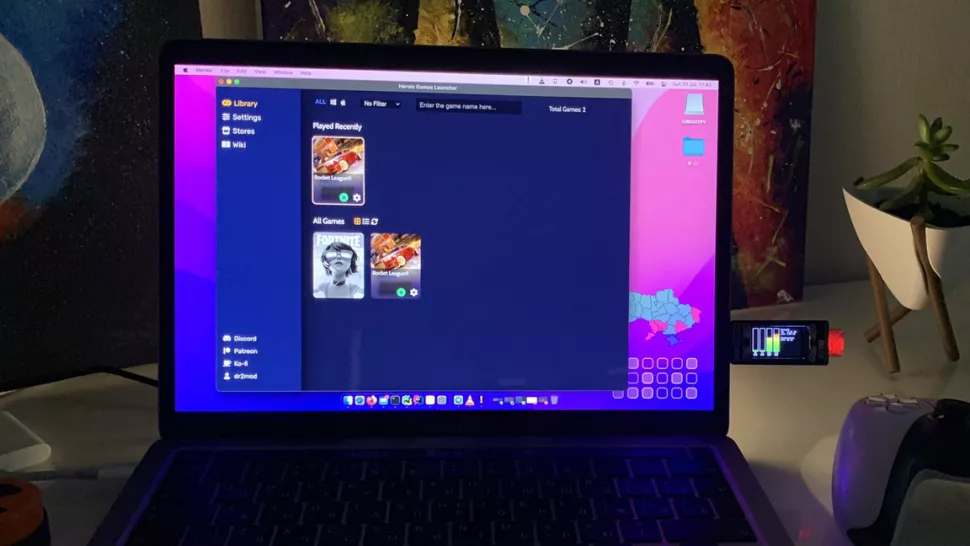
    Dmytro Panin is at it again, creating a teeny system monitor for his MacBook from scratch with help from our favorite microcontroller, the Raspberry Pi Pico. This plug-and-play system monitor (opens in new tab) lets him keep a close eye on resource usage without having to close any windows or launch any third-party programs. The device is Pico-powered and plugs right into the MacBook to function. It has a display screen that showcases a custom GUI featuring four bar graphs that update in real-time to show the performance of different components, including the CPU, GPU, memory, and SSD usage. It makes it possible to see how hard your PC is running at a glance.

Security Leftovers

How to Apply Accent Colour in Ubuntu Desktop

A step-by-step tutorial on how to apply accent colour in Ubuntu desktop (GNOME) with tips for Kubuntu and others. Read more