



Joplin, Clash, and More
Submitted by Roy Schestowitz on Saturday 9th of July 2022 09:56:40 PM
Filed under

-
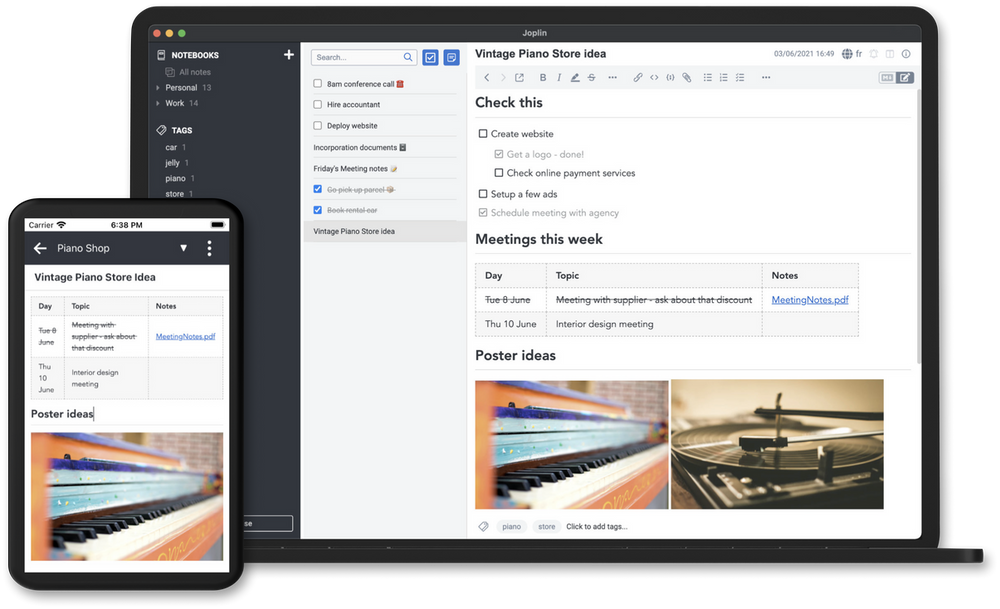
Joplin is An Amazing Open-source Note-Taking app and Evernote Alternative
All code in this repository is licensed under the MIT License unless a
directory contains a LICENSE or LICENSE.md file, in which case that file
applies to the code in that sub-directory. -
Clash is an Open-source Server Tunnel
Clash is a free open-source terminal-based Tunnel system that supports HTTP, HTTPS, and SOCKS servers, written in the Go programming language.
[...]
Clash is released under the GPL-3.0 License
-
Databricks hoists mainsail on flagship open source projects
Data and AI company Databricks has announced several contributions to popular data and AI open source projects including Delta Lake, MLflow and Apache Spark.
-
How to reset Gnome in Linux such as Ubuntu 22.04 Jammy - Linux Shout
Learn the command to reset the changes made to GNOME Desktop on Linux systems such as Ubuntu 22.04 Jammy JellyFish.
Linux comes with extreme possibilities to customize the Desktop GUI interface such as Gnome. However, if you are a beginner and made some changes that don’t offer the desired effect and have unpleasant residuals then there is a way to reset it. A command to get back the default settings of Gnome UI or factory settings
-
How To Install Nmap on Fedora 36 - idroot
In this tutorial, we will show you how to install Nmap on Fedora 36. For those of you who didn’t know, Nmap a.k.a Network Mapper is a command-line network scanning utility for Linux and other operating systems. It is also used for network inventory services, managing service upgrades, and monitoring hosts’ downtime. While Nmap is a potent tool, it is essential to note that it can be misused. In the hands of a skilled attacker, Nmap can be used to launch attacks against systems or to gather sensitive information about a network.
This article assumes you have at least basic knowledge of Linux, know how to use the shell, and most importantly, you host your site on your own VPS. The installation is quite simple and assumes you are running in the root account, if not you may need to add ‘sudo‘ to the commands to get root privileges. I will show you the step-by-step installation of the Nmap network scanning tool on a Fedora 36.
-
ATX board supports 4K-quad displays, four RJ45 ports and expandable storage
The ADS630 is part of DFI’s new ADS series of embedded solutions built around the 12th Gen Intel Core SoC processors. This board comes in an ATX form factor supporting up to 128GB UDIMM RAM, four SATA 3.0 devices and runs on Win10 and Linux.
The ADS630 is enabled to accommodate the R680E or the Q670E chipsets from Intel. The ADS630 supports several 12Gen Intel processors which are shown in the image below for reference.
»
-

- Login or register to post comments
 Printer-friendly version
- 935 reads
 PDF version
More in Tux Machines
- Highlights
- Front Page
- Latest Headlines
- Archive
- Recent comments
- All-Time Popular Stories
- Hot Topics
- New Members
today's howtos
| Open Hardware: XON/XOFF and Raspberry Pi Pico
|
Security Leftovers
| How to Apply Accent Colour in Ubuntu Desktop
A step-by-step tutorial on how to apply accent colour in Ubuntu desktop (GNOME) with tips for Kubuntu and others.
|



 This section of TuxMachines will no longer have new stories in it (with some caveats, including this post). To see the latest stories go to


 Content (where original) is available under CC-BY-SA, copyrighted by original author/s.



Recent comments
2 days 2 hours ago
2 days 6 hours ago
2 days 6 hours ago
3 days 13 hours ago
3 days 14 hours ago
3 days 15 hours ago
3 days 15 hours ago
3 days 16 hours ago
3 days 18 hours ago
3 days 20 hours ago