



Plans for GNOME 43 and Beyond
Submitted by Roy Schestowitz on Sunday 3rd of April 2022 07:51:16 PM
Filed under 
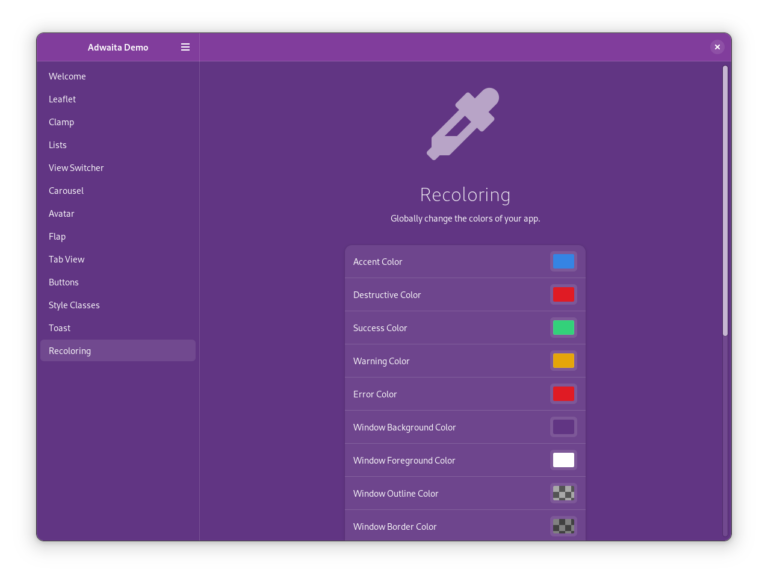
The arrival of libadwaita allows us to do a few new things with the GNOME platform, since we have a platform library to help developers implement new platform features and implement them properly. For example, libadwaita gave us the opportunity to implement a global dark style preference with machinery that allows developers to choose whether they support it and easily adjust their app’s styling when it’s enabled. Alexander Mikhaylenko spent a long time reworking Adwaita so that it works with recoloring, and I want to take full advantage of that with the next two features: global accent colors and a recoloring API.
Libadwaita makes it simple to implement a much-wanted personalization feature: customizable accent colors. Global accent colors will be opt-in for app developers. For the backend I want accent colors to be desktop- and platform-agnostic like the new dark style preference. I plan to submit a proposal for this to xdg-desktop-portal in the near future. In GNOME it’d probably be best to show only a few QA-tested accents in the UI, but libadwaita would support arbitrary colors so that apps from KDE, GNOME, elementary OS, and more all use the same colors if they support the preference.
Developers using the recoloring API will be able to programmatically change colors in their apps and have dependent colors update automatically. They’ll be able to easily create presets which can be used, for example, to recolor the window based on a text view’s color scheme. Technically this is already possible with CSS in libadwaita 1.0, but the API will make it simpler. Instead of having to consider every single color, they’ll only need to set a few and libadwaita will handle the rest properly. The heuristics used here will also be used to ensure that accent colors have proper contrast against an app’s background.

»
-

- Login or register to post comments
 Printer-friendly version
- 1789 reads
 PDF version
More in Tux Machines
- Highlights
- Front Page
- Latest Headlines
- Archive
- Recent comments
- All-Time Popular Stories
- Hot Topics
- New Members
digiKam 7.7.0 is released
After three months of active maintenance and another bug triage, the digiKam team is proud to present version 7.7.0 of its open source digital photo manager. See below the list of most important features coming with this release.
|
Dilution and Misuse of the "Linux" Brand
|
Samsung, Red Hat to Work on Linux Drivers for Future Tech
The metaverse is expected to uproot system design as we know it, and Samsung is one of many hardware vendors re-imagining data center infrastructure in preparation for a parallel 3D world.
Samsung is working on new memory technologies that provide faster bandwidth inside hardware for data to travel between CPUs, storage and other computing resources. The company also announced it was partnering with Red Hat to ensure these technologies have Linux compatibility.
|
today's howtos
|


 Content (where original) is available under CC-BY-SA, copyrighted by original author/s.



Recent comments
1 year 11 weeks ago
1 year 11 weeks ago
1 year 11 weeks ago
1 year 11 weeks ago
1 year 11 weeks ago
1 year 11 weeks ago
1 year 11 weeks ago
1 year 11 weeks ago
1 year 11 weeks ago
1 year 11 weeks ago