



Software: Hugginn, Firefox, Cryptomator, and Calories
Submitted by Roy Schestowitz on Saturday 2nd of April 2022 05:39:15 PM
Filed under 
-
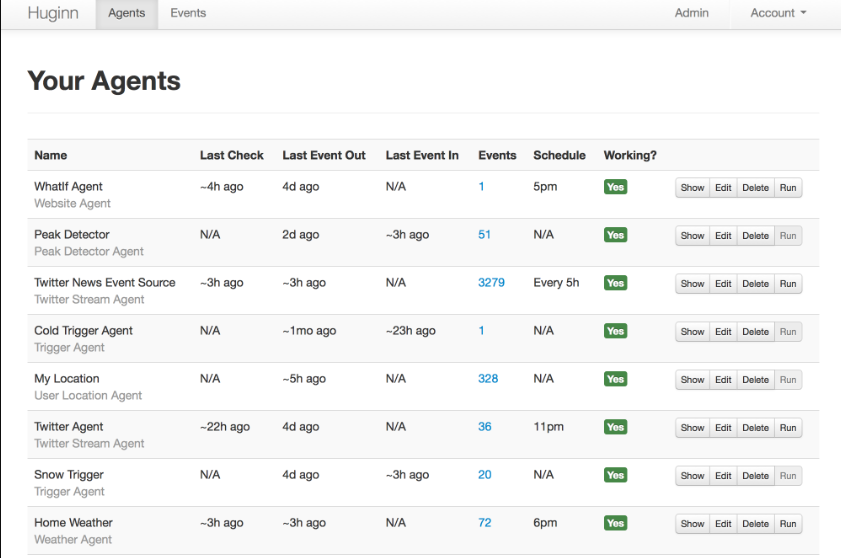
Hugginn is an open-source Zaphir and IFTTT alternative
Huginn is a free, open-source self-hosted task and service automation manager alternative to popular services as Zapier and IFTTT.
You can install Huginn at your server, create, and manage automation agents with less effort with a straightforward admin.
-
Firefox Tried To Simplify The Download Workflow. Here's How To Change It Back.
I hate it when developers try to make things "simpler," especially when something has been one way for a very, very long, LONG time. That's the case with the most recent Firefox 98.0.1. Developers, in their misdirected zeal to "simplify" the download workflow, managed to ROYALLY screw it up. Hey, I've been using it ONE WAY for so many years, and now the download workflow isn't doing what I expect or what I've become accustomed to. I literally have adapted Firefox's time-honored "download workflow" to the way I work, and the new way is a HUGE disruption to the way I work.
-
Repo Review: Cryptomator
Cryptomator is a useful tool for easily encrypting any data that you may wish to store online. It allows you to create a securely encrypted folder, or vault, containing your files, that you can then upload to any online cloud hosting service. Cryptomator uses AES 256 bit encryption to ensure that your data is always kept safe and secure while stored in a vault.
Cryptomator has a sleek, modern user interface that's very easy to use. To the left side of the window is a panel from which you can select a vault from the list. Clicking on Add Vault brings up a small window giving you the option to create a new vault, or import an already created one into Cryptomator. To import a vault created with Cryptomator, you simply have to navigate to the directory where the vault is stored, and load in the masterkey.cryptomator file.
-
Calories is a free open-source CLI calories and weight tracker
Calories is a command-line tool for tracking calories and weight using the Harris Benedict formula for calculating your BMR (Basal Metabolic Rate).The program is written by Mario, a software Developer originally from Graz, but living in Vienna, Austria.
Calories app is written in the Go programming language, and it is available for Windows, Linux and macOS in 32- and 64-bit.
»
-

- Login or register to post comments
 Printer-friendly version
- 1364 reads
 PDF version
More in Tux Machines
- Highlights
- Front Page
- Latest Headlines
- Archive
- Recent comments
- All-Time Popular Stories
- Hot Topics
- New Members
digiKam 7.7.0 is released
After three months of active maintenance and another bug triage, the digiKam team is proud to present version 7.7.0 of its open source digital photo manager. See below the list of most important features coming with this release.
|
Dilution and Misuse of the "Linux" Brand
|
Samsung, Red Hat to Work on Linux Drivers for Future Tech
The metaverse is expected to uproot system design as we know it, and Samsung is one of many hardware vendors re-imagining data center infrastructure in preparation for a parallel 3D world.
Samsung is working on new memory technologies that provide faster bandwidth inside hardware for data to travel between CPUs, storage and other computing resources. The company also announced it was partnering with Red Hat to ensure these technologies have Linux compatibility.
|
today's howtos
|


.svg_.png)

 Content (where original) is available under CC-BY-SA, copyrighted by original author/s.


Recent comments
1 year 11 weeks ago
1 year 11 weeks ago
1 year 11 weeks ago
1 year 11 weeks ago
1 year 11 weeks ago
1 year 11 weeks ago
1 year 11 weeks ago
1 year 11 weeks ago
1 year 11 weeks ago
1 year 11 weeks ago