



Hardware/Devices: Pine64, Librem, RISC-V
Submitted by Roy Schestowitz on Saturday 19th of March 2022 11:24:26 AM
Filed under 
-
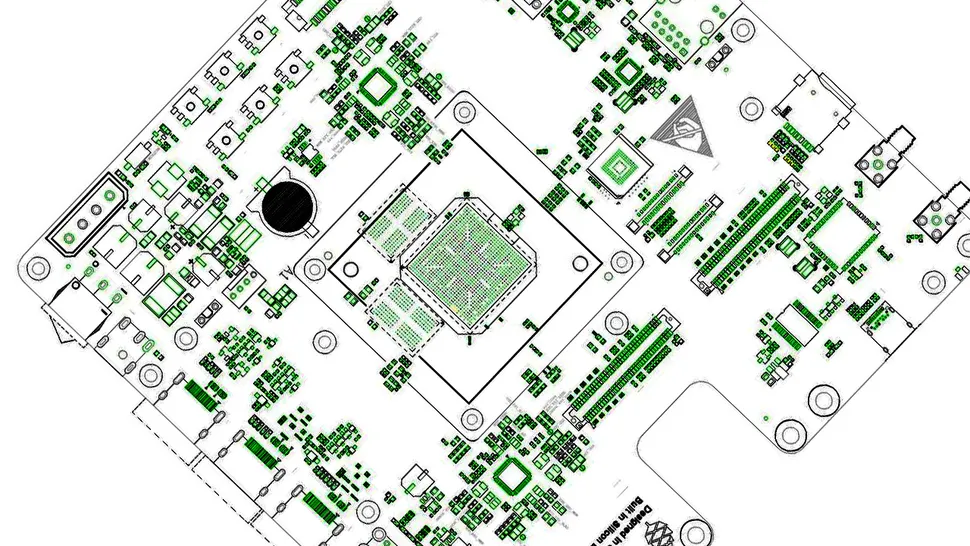
Pine64 Announce Rockchip RK3588 Powered QuartzPro64 Development Board | Tom's Hardware
Pine64’s announcement also delved into the vexed issue of pricing, with the board likely to retail “north of $300”, putting it out of Raspberry Pi competitor territory. The manufacturer hasn’t yet settled on a price-point, but it is likely to be sold at cost or even subsidized. “Here’s the take-away,” the announcement concludes. “This is an amazing platform, but it will take time for it to mature.”
-
Russell Coker: More About the Librem 5
I concluded my previous post about the Purism Librem 5 [1] with the phone working as a Debian/GNOME system with SSH access over the LAN. Before I published that post I managed to render it unbootable, making a new computer unbootable on the first day of owning it isn’t uncommon for me. In this case I tried to get SE Linux running on it and changing the kernel commandline parameter “security=apparmor” to “security=selinux” caused it to fail the checksum on kernel parameters and halt the boot. That seems to require a fresh install, it seems possible that I could setup my Librem5 to boot a recovery image from a SD card in such situations but that doesn’t seem to be well documented and I didn’t have any important data to lose. If I do figure out how to recover data by booting from a micro SD card I’ll document it.
Here’s the documentation for reflashing the phone [2], you have to use the “--variant luks” option for the flashing tool to have an encrypted root filesystem (should default to on to match the default shipping configuration). There is an option --skip-cleanup to allow you to use the same image multiple times, but that probably isn’t useful. The image that is available for download today has the latest kernel update that I installed yesterday so it seems that they quickly update the image which makes it convenient to get the latest (dpkg is slow on low power ARM systems). Overall the flash tool is nicely written, does the download and install and instructs you how to get the phone in flashing mode. It is a minor annoyance that the battery has to be removed as part of the flashing process, I will probably end up flashing my phone more often than I want to take the back off the case. A mitigating factor is that the back is well designed and doesn’t appear prone to having it’s plastic tabs breaking off when removed (as has happened to several other phones I’ve owned).
-
Java News Roundup: JDK 19 and Jakarta EE 10 Updates, Ansynch and Buffered Logging by Amazon Corretto
JEP 422, Linux/RISC-V Port, has been promoted from Candidate to Proposed to Target for JDK 19. This JEP proposes to port the JDK to Linux/RISC-V, a free and open-source RISC instruction set architecture. The template interpreter, C1 and C2 JIT compilers, and all current mainline GCs, including ZGC and Shenandoah, will be supported. The main focus of this JEP is to integrate the port into the JDK main-line repository. The review is scheduled to conclude on March 17, 2022.
»
-

- Login or register to post comments
 Printer-friendly version
- 1449 reads
 PDF version
More in Tux Machines
- Highlights
- Front Page
- Latest Headlines
- Archive
- Recent comments
- All-Time Popular Stories
- Hot Topics
- New Members
digiKam 7.7.0 is released
After three months of active maintenance and another bug triage, the digiKam team is proud to present version 7.7.0 of its open source digital photo manager. See below the list of most important features coming with this release.
|
Dilution and Misuse of the "Linux" Brand
|
Samsung, Red Hat to Work on Linux Drivers for Future Tech
The metaverse is expected to uproot system design as we know it, and Samsung is one of many hardware vendors re-imagining data center infrastructure in preparation for a parallel 3D world.
Samsung is working on new memory technologies that provide faster bandwidth inside hardware for data to travel between CPUs, storage and other computing resources. The company also announced it was partnering with Red Hat to ensure these technologies have Linux compatibility.
|
today's howtos
|


.svg_.png)

 Content (where original) is available under CC-BY-SA, copyrighted by original author/s.


Recent comments
1 year 11 weeks ago
1 year 11 weeks ago
1 year 11 weeks ago
1 year 11 weeks ago
1 year 11 weeks ago
1 year 11 weeks ago
1 year 11 weeks ago
1 year 11 weeks ago
1 year 11 weeks ago
1 year 11 weeks ago