



What’s Old Is News Again
Submitted by Roy Schestowitz on Tuesday 8th of March 2022 11:54:36 PM
Filed under 

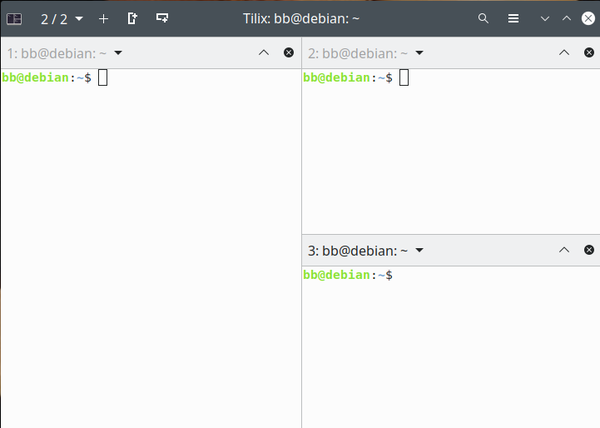
Tiling desktops are graphical environments in which windows open in a grid. They appeared early in Linux’s history and have always had a few followers, especially among developers. However, for the last two decades, tiling desktops were often ignored in the efforts to mimic Windows and macOS and to improve usability. However, in the last few years, tiling desktops have become more popular, most likely because modern computing power means that more users are working with more windows open. Today, users can choose from a variety of tiling desktops: Some have been around for years, and others are more recent.
The idea behind tiling desktops is to reduce clutter on the desktop and make windows easier to find. By contrast, the standard or stacking desktop becomes less orderly with each open window. Most stacking desktops open windows in the upper left corner or some other default location. As users search through windows, the unwanted ones tend to be dragged aside, destroying what little order existed. In fact, the clutter is so great that many stacking desktops have a Show Desktop icon or widget. Others, like Ubuntu’s discarded Unity desktop, encourage users to open only one window at a time. Tiling desktops, on the other hand, arrange windows in a grid, making them easy to find. Should the windows become too numerous and too small for comfortable browsing, users can use virtual workspaces to add another grid. You can remove windows from the grid to increase their size and temporarily stack them on top of the grid. Another advantage of tiling desktops is that they can be easily navigated from the keyboard, although many also support a mouse.

»
-

- Login or register to post comments
 Printer-friendly version
- 1447 reads
 PDF version
More in Tux Machines
- Highlights
- Front Page
- Latest Headlines
- Archive
- Recent comments
- All-Time Popular Stories
- Hot Topics
- New Members
digiKam 7.7.0 is released
After three months of active maintenance and another bug triage, the digiKam team is proud to present version 7.7.0 of its open source digital photo manager. See below the list of most important features coming with this release.
|
Dilution and Misuse of the "Linux" Brand
|
Samsung, Red Hat to Work on Linux Drivers for Future Tech
The metaverse is expected to uproot system design as we know it, and Samsung is one of many hardware vendors re-imagining data center infrastructure in preparation for a parallel 3D world.
Samsung is working on new memory technologies that provide faster bandwidth inside hardware for data to travel between CPUs, storage and other computing resources. The company also announced it was partnering with Red Hat to ensure these technologies have Linux compatibility.
|
today's howtos
|


 Content (where original) is available under CC-BY-SA, copyrighted by original author/s.



Recent comments
1 year 11 weeks ago
1 year 11 weeks ago
1 year 11 weeks ago
1 year 11 weeks ago
1 year 11 weeks ago
1 year 11 weeks ago
1 year 11 weeks ago
1 year 11 weeks ago
1 year 11 weeks ago
1 year 11 weeks ago