



today's howtos
Submitted by Roy Schestowitz on Tuesday 8th of March 2022 12:27:19 AM
Filed under 
-
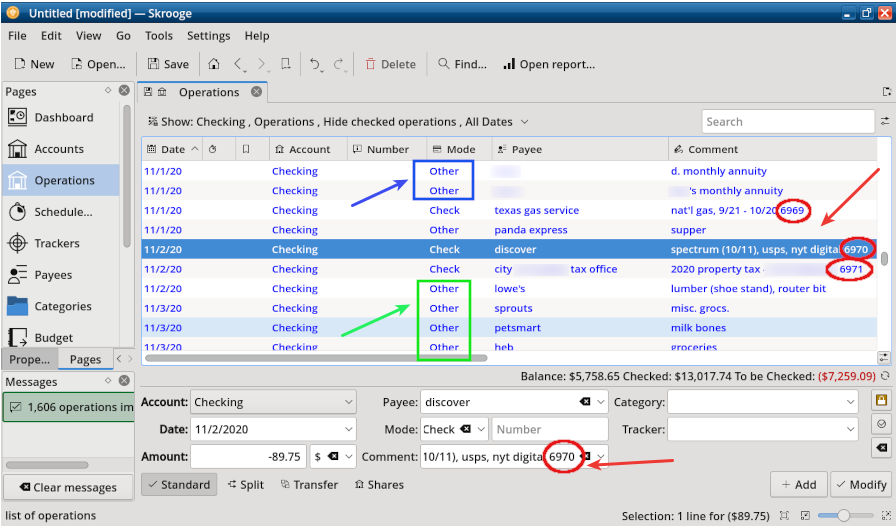
Skrooge, Revisited, Part 2: Importing Other File Formats
In my previous article, I offered some tips for using Skrooge more efficiently. After getting started with the program by manually entering two months' worth of my most recent transactions, I became more adventurous and tried importing all of my checkbook data -- from June 2019 to the present -- into Skrooge. (I do my bookkeeping redundantly with GnuCash, HomeBank as well as a LibreOffice Calc checkbook template).
One of Skrooge's strengths is its impressive import / export capabilities. A list of supported file formats is available at https://skrooge.org/imports.
Since both .xhb and .gnc (.gnucash) formats are supported, I imported my HomeBank and GnuCash data files -- approximately 1600 transactions. As another part of the evaluation, I imported two small test files created with Grisbi (.gsb) and Money Manager EX (.mmb). Each of those files contains approximately 75 transactions.
-
Czech translation of LibreOffice Base Guide 6.4
-
Cloudflare Tunnel Tutorial - Expose Web Services to the Internet
Imagine working on a web service on your local computer, and you want somebody outside your network to access it on their PC. You have several options you can use to achieve that.
You could decide to purchase a hosting service, such as a server and configure all DNS settings to make the service available on the public internet.
If you decide to use containerization like Docker, Kubernetes, etc., you will need to set up even more configurations. That includes configuring ACLs, GRE tunnels, and rotating IP addresses.
But why all that hustle when you can easily expose your locally hosted web service using Cloudflare Tunnel?
Cloudflare Tunnel provides you with a secure way to connect your resources to Cloudflare without a publicly routable IP address. With Tunnel, you do not send traffic to an external IP — instead, a lightweight daemon in your infrastructure (cloudflared) creates outbound-only connections to Cloudflare’s edge.
This tutorial will cover how to use Cloudflare Tunnel to create and manage tunnels to expose web services from a computer to the internet.
-
GIMP Tutorial: A Simple Floating Logo
I saw a tutorial about a "floating" logo in GIMP.org/tutorials and thought I'd share it.
-
How to install and configure docker In OpenSUSE Leap 15
Docker is an open source containerization platform. It enables developers to package applications into containers—standardized executable components combining application source code with the operating system (OS) libraries and dependencies required to run that code in any environment.
Docker is a set of platform as a service products that use OS-level virtualization to deliver software in packages called containers. Containers are isolated from one another and bundle their own software, libraries and configuration files; they can communicate with each other through well-defined channels.
In this guide we are going to explore various options to install docker in OpenSUSE Leap 15.
-
How to install Adobe Flash Player on a Chromebook - Updated Tutorial
Today we are looking at how to install Adobe Flash Player on a Chromebook. Please follow the video/audio guide as a tutorial where we explain the process step by step and use the commands below.
-
How to install Kdenlive on Zorin OS 16 - Invidious
-
How To Install WonderCMS on Ubuntu 20.04 LTS - idroot
In this tutorial, we will show you how to install WonderCMS on Ubuntu 20.04 LTS. For those of you who didn’t know, WonderCMS is a free, open-source, and flat-file content management system written in PHP and jQuery. WonderCMS also doesn’t require a traditional/relational database like MariaDB. The flat file technology enables WonderCMS to save all data to a text file (flat file) called database.js which is structured in JSON format. It also offers a rich set of features including, custom login URL, SEO friendly, WYSIWYG, flexible CSS framework, native markdown, and more.
This article assumes you have at least basic knowledge of Linux, know how to use the shell, and most importantly, you host your site on your own VPS. The installation is quite simple and assumes you are running in the root account, if not you may need to add ‘sudo‘ to the commands to get root privileges. I will show you through the step-by-step installation of WonderCMS on an Ubuntu 20.04 Focal Fossa server. You can follow the same instructions for Ubuntu 18.04, 16.04, and any other Debian-based distribution like Linux Mint.
»
-

- Login or register to post comments
 Printer-friendly version
- 1609 reads
 PDF version
More in Tux Machines
- Highlights
- Front Page
- Latest Headlines
- Archive
- Recent comments
- All-Time Popular Stories
- Hot Topics
- New Members
digiKam 7.7.0 is released
After three months of active maintenance and another bug triage, the digiKam team is proud to present version 7.7.0 of its open source digital photo manager. See below the list of most important features coming with this release.
|
Dilution and Misuse of the "Linux" Brand
|
Samsung, Red Hat to Work on Linux Drivers for Future Tech
The metaverse is expected to uproot system design as we know it, and Samsung is one of many hardware vendors re-imagining data center infrastructure in preparation for a parallel 3D world.
Samsung is working on new memory technologies that provide faster bandwidth inside hardware for data to travel between CPUs, storage and other computing resources. The company also announced it was partnering with Red Hat to ensure these technologies have Linux compatibility.
|
today's howtos
|


 Content (where original) is available under CC-BY-SA, copyrighted by original author/s.



Recent comments
1 year 11 weeks ago
1 year 11 weeks ago
1 year 11 weeks ago
1 year 11 weeks ago
1 year 11 weeks ago
1 year 11 weeks ago
1 year 11 weeks ago
1 year 11 weeks ago
1 year 11 weeks ago
1 year 11 weeks ago