



Raw photo development with darktable
Submitted by Roy Schestowitz on Thursday 3rd of February 2022 03:14:58 AM
Filed under 

Digital cameras normally produce their photographs in a convenient and compressed image format, most often JPEG. But, just as our brains perform a great deal of invisible processing to make our eyes work as well as they do, digital cameras do a lot of work between the sensor and the storage device. The data recorded by the sensor does not make for a particularly satisfying image until it has been through exposure compensation, white-balance adjustment, noise removal, sharpness adjustment, and even, with some devices, advanced manipulation like high-dynamic-range processing. The results from today's cameras can be amazingly good, but they invariably encapsulate a set of processing decisions and loses information from the original image.
Professional photographers — and hobbyists with an inflated sense of the quality of their snapshots — often choose to do that post-processing themselves. For such people, cameras can be convinced to write the raw data from the sensor (or something close to it) directly to a file in a format that is [Flatirons] normally referred to as "raw" (or "RAW" even though it is not an acronym). Photographers can work with raw files to take full advantage of all of the data collected by the sensor and apply their own preferences — if they can get at that data. Naturally, every camera produces raw data in its own special, proprietary format. Fortunately, the free-software community has proved skilled at understanding these formats and writing decoders for them, so there is support for raw images from most available cameras.
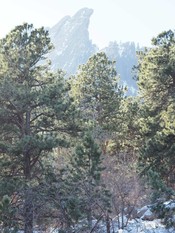
Taking photographs in raw format implies a commitment to put some time into "developing" them into a more useful form; that is what a raw image editor is for. There are several of these editors available, including darktable, which is where your editor chose to start. In the name of "research", an afternoon was taken off work to wander in the local parks in search of a suitable raw image to process with darktable; the result is shown on the right. This image is a JPEG thumbnail created by the camera and stored with the raw image, extracted with dcraw. It is not a great work of art by any means, but it is useful to experiment with: there is a lot of contrast, and the rock formation (known as the "Second Flatiron") is somewhat lost in the haze that was present that day. This picture might just benefit from the sort of manipulation a raw editor can perform.

»
-

- Login or register to post comments
 Printer-friendly version
- 2120 reads
 PDF version
More in Tux Machines
- Highlights
- Front Page
- Latest Headlines
- Archive
- Recent comments
- All-Time Popular Stories
- Hot Topics
- New Members
digiKam 7.7.0 is released
After three months of active maintenance and another bug triage, the digiKam team is proud to present version 7.7.0 of its open source digital photo manager. See below the list of most important features coming with this release.
|
Dilution and Misuse of the "Linux" Brand
|
Samsung, Red Hat to Work on Linux Drivers for Future Tech
The metaverse is expected to uproot system design as we know it, and Samsung is one of many hardware vendors re-imagining data center infrastructure in preparation for a parallel 3D world.
Samsung is working on new memory technologies that provide faster bandwidth inside hardware for data to travel between CPUs, storage and other computing resources. The company also announced it was partnering with Red Hat to ensure these technologies have Linux compatibility.
|
today's howtos
|


 Content (where original) is available under CC-BY-SA, copyrighted by original author/s.



Recent comments
1 year 11 weeks ago
1 year 11 weeks ago
1 year 11 weeks ago
1 year 11 weeks ago
1 year 11 weeks ago
1 year 11 weeks ago
1 year 11 weeks ago
1 year 11 weeks ago
1 year 11 weeks ago
1 year 11 weeks ago