



Moodle LMS review
Submitted by Roy Schestowitz on Saturday 2nd of October 2021 02:54:45 PM
Filed under 
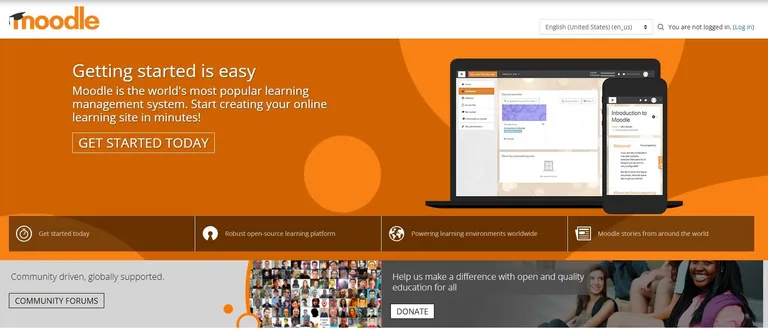
Despite the open source origin, Moodle still has plenty of features. A notable one is the modern interface, that is designed to be used via a web browser on a desktop or laptop, or on mobile platforms with available iOS and Android apps (see below). This interface includes a personalized dashboard that can display a list of courses, including the current ones, along with past courses, and future ones as well. Also displayed are the pending tasks.
There are plenty of advanced features as well that go beyond the basics. A good example is the text editor. This easy to use text editor is designed to work from within the web interface, and facilitates both formatting text, and also adding in images and other content. There is also file management, and allows users to drag and drop files from popular online cloud storage providers, such as DropBox and Google Drive. There is also an all-in-one calendar to track everything from group meetings and personal events.
Moodle also encourages collaboration among educators and among learners. To this end, there is support for a variety of activities, such as chat, wikis, forums, database activities and glossaries. Teachers can also encourage interaction, by including full quizzes, or even a single multiple choice question that is called ‘Choice.’
Teachers not only can grade an assignment online, but also can provide comments to guide the student’s learning. Surveys can also be created for learners to provide feedback and to guide lessons. Workshops can also be created to get a peer assessment.

»
-

- Login or register to post comments
 Printer-friendly version
- 2867 reads
 PDF version
More in Tux Machines
- Highlights
- Front Page
- Latest Headlines
- Archive
- Recent comments
- All-Time Popular Stories
- Hot Topics
- New Members
digiKam 7.7.0 is released
After three months of active maintenance and another bug triage, the digiKam team is proud to present version 7.7.0 of its open source digital photo manager. See below the list of most important features coming with this release.
|
Dilution and Misuse of the "Linux" Brand
|
Samsung, Red Hat to Work on Linux Drivers for Future Tech
The metaverse is expected to uproot system design as we know it, and Samsung is one of many hardware vendors re-imagining data center infrastructure in preparation for a parallel 3D world.
Samsung is working on new memory technologies that provide faster bandwidth inside hardware for data to travel between CPUs, storage and other computing resources. The company also announced it was partnering with Red Hat to ensure these technologies have Linux compatibility.
|
today's howtos
|


 Content (where original) is available under CC-BY-SA, copyrighted by original author/s.



Recent comments
1 year 11 weeks ago
1 year 11 weeks ago
1 year 11 weeks ago
1 year 11 weeks ago
1 year 11 weeks ago
1 year 11 weeks ago
1 year 11 weeks ago
1 year 11 weeks ago
1 year 11 weeks ago
1 year 11 weeks ago