



Arduino and Hardware for (Mostly) GNU/Linux
Submitted by Roy Schestowitz on Wednesday 26th of May 2021 12:49:56 AM
Filed under 
-
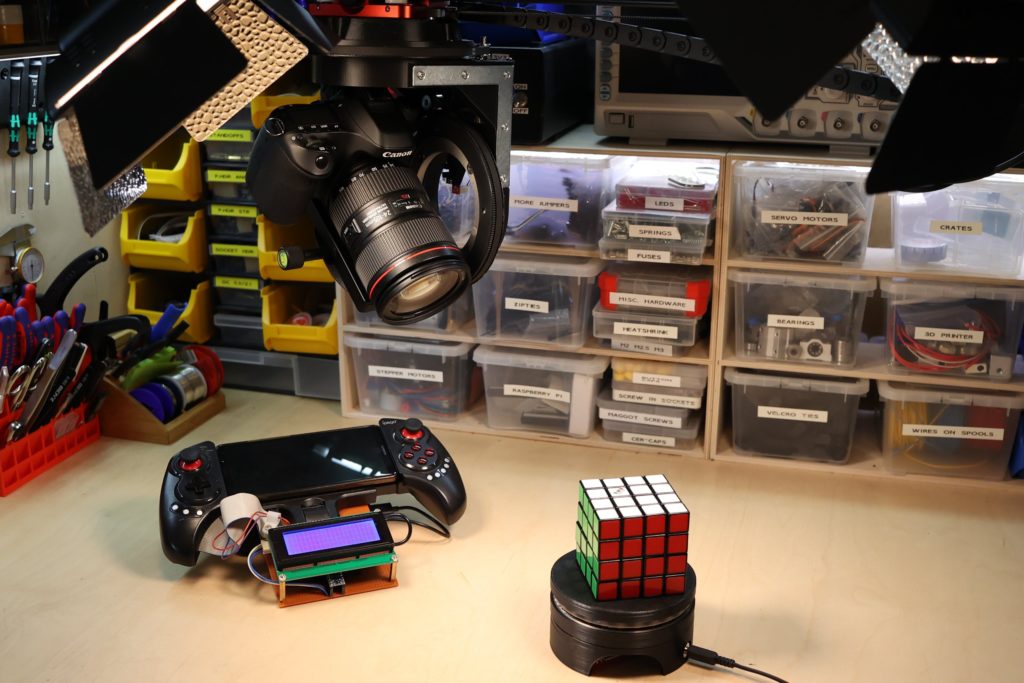
This low-cost motion control rig helps capture high-quality shots | Arduino Blog
Being a camera operator is tough. Having to move the camera and maintain a smooth motion can be tricky, and the speed at which it’s done is never consistent. That’s what prompted Andy to create his own motorized robotic camera rig that can move in up to four different axes simultaneously. The camera gets attached to a standard mounting plate and then placed into the gimbal. The gimbal is able to both pitch the camera up (rotate around the X axis) and rotate it side to side (called ‘yaw’ or Z-axis rotation). In order to prevent a bunch of wires from tangling around each other while spinning, each rotational axis uses a slipring to transfer electrical power and signals continuously.
-
Arm announces first Armv9 cores, including powerhouse Cortex-X2
Arm unveiled its first Armv9 cores: Cortex-X2 (16% faster than -X1), Cortex-A710 (10% faster than -A78), and Cortex-A510 (35% faster than -A55), all with at least twice the AI power of their predecessors.
After announcing the Armv9 architecture in March, Arm has quickly followed up with the first three core IP designs based on it: the flagship, customizable Cortex-X2, as well as the “Big” Cortex-A710 and “Little” Cortex-A510. Arm skipped over the Cortex-A79 and -A56-59 naming schemes, perhaps to emphasize the fresh start with Armv9. Arm also announced a DSU-110 L3 bus follow-on to DynamIQ, which enables 8MB L3 on the Armv9 designs, as well as a high-end Mali-G710 GPU (see farther below).
-
Arm Announces The Cortex-X2 Armv9 Flagship CPU, Cortex-A710, Cortex-A510
Arm today announced the Cortex-X2 as their new flagship Armv9 processor design.
The Cortex-X2 was announced by Arm this morning along with the Cortex-A510 as a new Armv9 "little" core design and the Cortex-A710 was also announced as the Cortex-A78 successor.
-
PC/104 boards keep the legacy alive with Quadro P1000 and Intel Braswell
Adlink announced the “CM5-P1000,” the first PC/104 board equipped with Nvidia’s Quadro P1000 graphics. Meanwhile, ICOP has introduced a PC/104 form-factor “IBW-6954” SBC with an Intel Braswell CPU.
Adlink and ICOP have each announced products that support the legacy PC/104 embedded board form factor and run Linux and Windows 10. Adlink’s CM5-P1000 is billed as the world’s first PC/104 board featuring Nvidia’s Quadro P1000, bringing advanced graphics and AI capabilities to legacy customers. ICOP’s IBW-6954 brings its customers somewhat up to date with an Intel Atom processor from the 6-year-old Braswell generation. ICOP chose Braswell because it is the last Intel platform that can support both UEFI and Legacy BIOS.
»
-

- Login or register to post comments
 Printer-friendly version
- 2140 reads
 PDF version
More in Tux Machines
- Highlights
- Front Page
- Latest Headlines
- Archive
- Recent comments
- All-Time Popular Stories
- Hot Topics
- New Members
digiKam 7.7.0 is released
After three months of active maintenance and another bug triage, the digiKam team is proud to present version 7.7.0 of its open source digital photo manager. See below the list of most important features coming with this release.
|
Dilution and Misuse of the "Linux" Brand
|
Samsung, Red Hat to Work on Linux Drivers for Future Tech
The metaverse is expected to uproot system design as we know it, and Samsung is one of many hardware vendors re-imagining data center infrastructure in preparation for a parallel 3D world.
Samsung is working on new memory technologies that provide faster bandwidth inside hardware for data to travel between CPUs, storage and other computing resources. The company also announced it was partnering with Red Hat to ensure these technologies have Linux compatibility.
|
today's howtos
|


.svg_.png)

 Content (where original) is available under CC-BY-SA, copyrighted by original author/s.


Recent comments
1 year 11 weeks ago
1 year 11 weeks ago
1 year 11 weeks ago
1 year 11 weeks ago
1 year 11 weeks ago
1 year 11 weeks ago
1 year 11 weeks ago
1 year 11 weeks ago
1 year 11 weeks ago
1 year 11 weeks ago