



Lagrange v1.3.2 Is Released
Submitted by Roy Schestowitz on Monday 12th of April 2021 09:31:27 AM
Filed under 
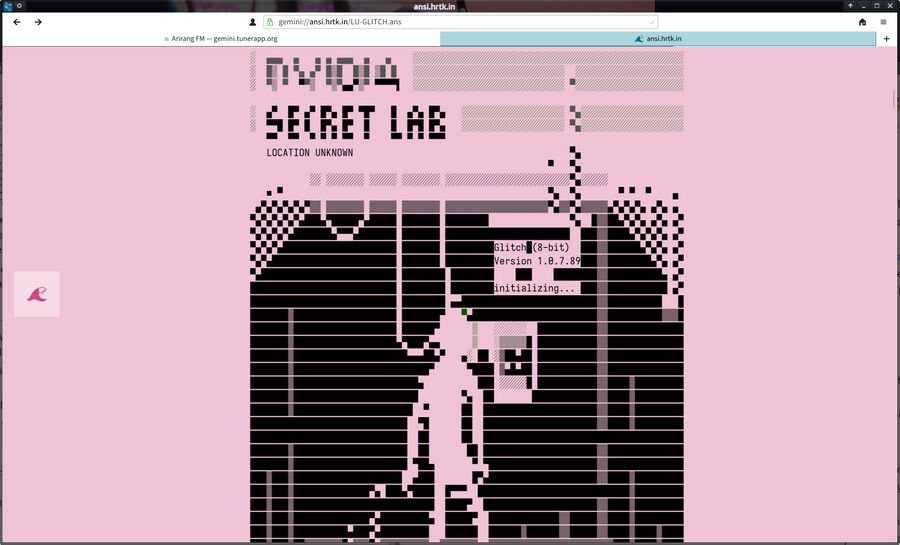
Lagrange is the by far best graphical web browser for the Gemini "space" (A purely text-based web equivalent for hackers). The latest release is mostly a bug-fix for the big 1.3.0 release on March 31st. It fixes a crash for those upgrading from v1.2 caused by older now invalid CA configuration, pixel ratio detection has been improved and there's a handful of other fixes relating to the sidebar, bookmarks, the Gopher URL support and keybindings.
[...]
Lagrange is a special-purpose browser for the "Gemini Space". It has no idea what to do if you enter a regular web https:// URL in the address bar so it will simply refer that to the systems regular web browser. It does the same with regular web links on Gemini sites.
Lagrange 1.3.0, released on March 31st, was a major new release with some big improvements in a number of areas. It added the option to have pre-formatted collapse on page loads, it started showing alternative text when hovering over pre-formatted text blocks and it got code to correctly handle unknown URL schemes. Page rendering was also improved with better color themes, it got better spacing for bullets and lists, it got lager content buffers for smoother browsing on larger Gemini pages and it got smarter word wrapping. The already great graphical user-interface got the ability to apply user interface scaling immediately upon closing the Preferences (prior versions had to be restarted to make scaling settings take effect), git got soft shadows for pop-up menus, highlighted domain names in URL fields, and a few other small improvements.

»
-

- Login or register to post comments
 Printer-friendly version
- 1483 reads
 PDF version
More in Tux Machines
- Highlights
- Front Page
- Latest Headlines
- Archive
- Recent comments
- All-Time Popular Stories
- Hot Topics
- New Members
digiKam 7.7.0 is released
After three months of active maintenance and another bug triage, the digiKam team is proud to present version 7.7.0 of its open source digital photo manager. See below the list of most important features coming with this release.
|
Dilution and Misuse of the "Linux" Brand
|
Samsung, Red Hat to Work on Linux Drivers for Future Tech
The metaverse is expected to uproot system design as we know it, and Samsung is one of many hardware vendors re-imagining data center infrastructure in preparation for a parallel 3D world.
Samsung is working on new memory technologies that provide faster bandwidth inside hardware for data to travel between CPUs, storage and other computing resources. The company also announced it was partnering with Red Hat to ensure these technologies have Linux compatibility.
|
today's howtos
|


 Content (where original) is available under CC-BY-SA, copyrighted by original author/s.



Recent comments
1 year 11 weeks ago
1 year 11 weeks ago
1 year 11 weeks ago
1 year 11 weeks ago
1 year 11 weeks ago
1 year 11 weeks ago
1 year 11 weeks ago
1 year 11 weeks ago
1 year 11 weeks ago
1 year 11 weeks ago