



OpenSUSE: YaST Development Sprint and Digest of YaST Development Sprint
Submitted by Roy Schestowitz on Tuesday 26th of January 2021 04:48:17 AM
Filed under 
-
Digest of YaST Development Sprint 116
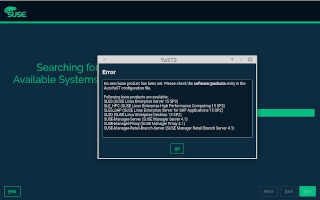
Let’s start with an installer improvement quite some people was waiting for. Both openSUSE and SUSE Linux Enterprise can use either wicked or NetworkManager to handle the system’s network configuration. Only the former can be fully configured with YaST (which is generally not a problem because there are plenty of tools to configure NetworkManager). Moreover, during the standard installation process, wicked is always used to setup the network of the installer itself. If the user decides to rely on wicked also in the final system, then the configuration of the installer is carried over to it. But, so far, if the user opted to use NetworkManager then the installer configuration was lost and the network of the final system had to be be configured again using NetworkManager this time. Not anymore!
That’s not the only installer behavior we have refined based on feedback from our users. In some scenarios, the logic used to decide whether an existing EFI System Partition (ESP) could be reused was getting in the way of those aiming for a fine-grained control of their partitions. That should now be fixed by the changes described in this pull request, that have been already submitted to Tumbleweed and will be part of the upcoming releases (15.3) of both openSUSE Leap and SLE.
-
Session One Meetup Generates Enhancements, Actions
The first session of the openSUSE Project’s meetup regarding the End of the Year Survey Results on Jan. 23 is already starting produce some actionable items from contributors.
The session on openSUSE’s Jitsi instance had engagement from about 20 people from around the globe.
Topics discussed in the two-hour session focused on addressing pain points, transferring knowledge and promoting openSUSE projects.
Members of the “let’s improve the openSUSE learning experience” shared statics and analysis from the survey and attendees engaged in generating ideas and actions to enhance and improve the above mentioned items.
»
-

- Login or register to post comments
 Printer-friendly version
- 2551 reads
 PDF version
More in Tux Machines
- Highlights
- Front Page
- Latest Headlines
- Archive
- Recent comments
- All-Time Popular Stories
- Hot Topics
- New Members
digiKam 7.7.0 is released
After three months of active maintenance and another bug triage, the digiKam team is proud to present version 7.7.0 of its open source digital photo manager. See below the list of most important features coming with this release.
|
Dilution and Misuse of the "Linux" Brand
|
Samsung, Red Hat to Work on Linux Drivers for Future Tech
The metaverse is expected to uproot system design as we know it, and Samsung is one of many hardware vendors re-imagining data center infrastructure in preparation for a parallel 3D world.
Samsung is working on new memory technologies that provide faster bandwidth inside hardware for data to travel between CPUs, storage and other computing resources. The company also announced it was partnering with Red Hat to ensure these technologies have Linux compatibility.
|
today's howtos
|


 Content (where original) is available under CC-BY-SA, copyrighted by original author/s.



Recent comments
1 year 11 weeks ago
1 year 11 weeks ago
1 year 11 weeks ago
1 year 11 weeks ago
1 year 11 weeks ago
1 year 11 weeks ago
1 year 11 weeks ago
1 year 11 weeks ago
1 year 11 weeks ago
1 year 11 weeks ago