



Resource management in KDE
Submitted by Roy Schestowitz on Friday 30th of October 2020 09:38:29 PM
Filed under 
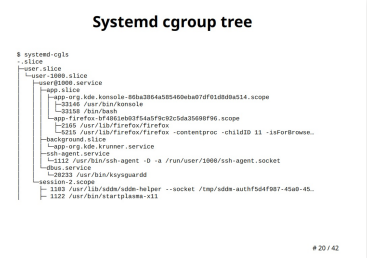
Edmundson started by explaining that the job of a desktop environment is deliver applications to the user. Users "need to be in control", he said. That role has become more complicated in recent years. Some time ago, when a user was running a web browser like Firefox or a chat application like Kopete, the management of running processes was easy. The user could run a ps command and would see just one line of output for each of those applications. This was easy to understand and self-explanatory.
Now, the situation is "very different". When a user opens a Firefox instance they can get a dozen processes; Discord in a Flatpak ("because it is cool now") launches 13 processes. The ps output is unreadable; it consists of "random names doing random things". Just understanding that output is difficult; aggregating the results to get an idea of how much CPU time or power the application is using has become even more challenging. There is thus a need to track processes properly in desktop environments, since the available data no longer means anything. We "need some metadata", Edmundson concluded.
Fairness is also an increasingly important issue. Edmundson gave an example of Krita, an advanced graphics application. It performs some heavy processing, all contained within a single process. On the other hand, Discord has those 13 processes, many of which will be making heavy use of the CPU "because it is written in Electron". The system's CPU scheduler will see those two applications as 14 opaque processes, not knowing what they correspond to. This means that Krita could get only 1/14 of the available CPU time, even though it represents half of the applications running. Metadata about running applications needs to propagate through the whole software stack to be available to the scheduler, he said.
One of Plasma's tasks is mapping windows to applications. More precisely, it tries to map windows to their associated desktop files — the configuration files containing metadata that are used, for example, to create menu entries. Applications open windows and "we hope we can match it all up". The Plasma developers use a lot of hacks and heuristics to perform this matching, but "we do not like guessing", he said. He made an example of a Firefox window being used to watch an Akademy talk like his. There is an audio icon inside that window, but this icon is not managed by the same process as the one controlling the outer window, he explained. Plasma needs to find the link between them, and "it is an arbitrary guessing game".

»
-

- Login or register to post comments
 Printer-friendly version
- 5789 reads
 PDF version
More in Tux Machines
- Highlights
- Front Page
- Latest Headlines
- Archive
- Recent comments
- All-Time Popular Stories
- Hot Topics
- New Members
digiKam 7.7.0 is released
After three months of active maintenance and another bug triage, the digiKam team is proud to present version 7.7.0 of its open source digital photo manager. See below the list of most important features coming with this release.
|
Dilution and Misuse of the "Linux" Brand
|
Samsung, Red Hat to Work on Linux Drivers for Future Tech
The metaverse is expected to uproot system design as we know it, and Samsung is one of many hardware vendors re-imagining data center infrastructure in preparation for a parallel 3D world.
Samsung is working on new memory technologies that provide faster bandwidth inside hardware for data to travel between CPUs, storage and other computing resources. The company also announced it was partnering with Red Hat to ensure these technologies have Linux compatibility.
|
today's howtos
|


 Content (where original) is available under CC-BY-SA, copyrighted by original author/s.



Recent comments
1 year 11 weeks ago
1 year 11 weeks ago
1 year 11 weeks ago
1 year 11 weeks ago
1 year 11 weeks ago
1 year 11 weeks ago
1 year 11 weeks ago
1 year 11 weeks ago
1 year 11 weeks ago
1 year 11 weeks ago