



today's howtos
Submitted by Roy Schestowitz on Saturday 24th of October 2020 07:07:26 PM
Filed under 
-
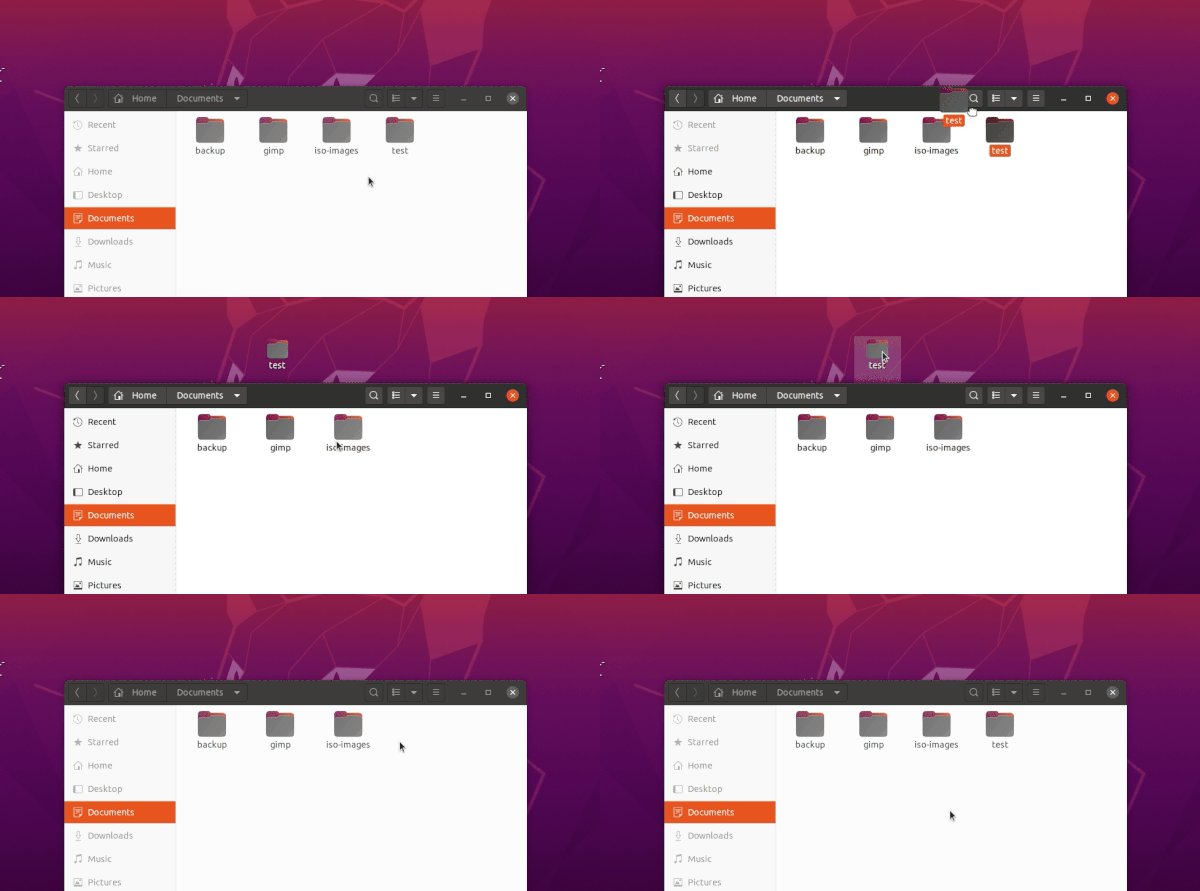
Enable ‘Drag & Drop’ Between Desktop and File Browser in Ubuntu 20.04 | UbuntuHandbook
Since the desktop icons are handled by an extension instead of Nautilus file browser, drag’n’drop action between desktop and file browser does no longer work.
Fortunately, a fork of the original Desktop Icons extension now is available with several enhancements, including Drag’n’Drop.
-
How to install (and uninstall) XFCE on Ubuntu | FOSS Linux
Are you wondering about trying the XFCE desktop on a Ubuntu PC? Here's a tutorial on how to install XFCE on Ubuntu. You will get multiple options at the login.
-
How To Install InfluxDB on Ubuntu 20.04 LTS - idroot
In this tutorial we will show you how to install InfluxDB on Ubuntu 20.04 LTS, as well as some extra required package by InfluxDB
-
How To Install Squid Proxy on Ubuntu 20.04 LTS - idroot
In this tutorial we will show you how to install Squid Proxy on Ubuntu 20.04 LTS, as well as some extra required package by Squid
-
Openstack RDO && KVM Hypervisor: Setting up KVM Hypervisor on Ubuntu Groovy Gorilla (20.10)
Due to version LIBVIRT&&QEMU you are forced to deploy Ubuntu 20.10 on Btrfs file system . In particular case, Virtual Environment is a fair enough . See also Install KVM&Libvirt on SparkyLinux2020.08
-
AppImage vs Snaps vs Flatpak: What Should I Use? - YouTube
AppImages, Snaps and Flatpaks are the 3 biggest universal package management systems available on Linux and whilst sharing some similarities they all have very noticiable and very important differences that you should take into consideration before deciding which one you want to use.
-
Use Tilt Ball Switch with Raspberry PI and Python - peppe8o
Tilt sensor are small and cheap electronic able to detect inclination. While being not as accurate like accelerometers, they are small, inexpensive and easy to use. For this reason tilt ball switches are popular for toys and gadgets.
Tilt ball switch are usually made of an internal cavity with a free conductive mass inside. When this switch is in vertical position, conductive mass goes down and connects terminals. When it is in horizontal position, conductive mass moves from terminals, so resulting in current not passing:
In this tutorial I’ll show you how to use a simple Tilt Ball Switch with your Raspberry PI with a LED detecting sensor position. I’ll use a Raspberry PI Zero W, but this guide applies also to newer Raspberry PI boards. Small resistors (330 Ohm) will be also used to protect from power outage that can damage your Raspberry PI board.
-
How to Download a File From a Server to Your Desktop Using SSH - RoseHosting
Easily download files from your server to your desktop computer using SSH by following this easy guide. We'll show you how, step-by-step.
-
Slack installation on CentOS 8.0
Slack is a collaborative software that is used for the communication between various team members of a company. It has various workspaces where the teams are connected and can take decisions in a common shared environment. It allows users to organize conversations by using various channels. A channel is used for group discussions, and team members can share files, images, and videos. In slack, teammates can also communicate through video and audio calls to each other. If the user wants to join a community or team, then using a specific team workspace, users can request to join a team.
This article is about the installation of slack, this guide will provide the step by step installation of slack on your CentOS 8.0.
Please note: The commands in this tutorial get updated for newer Slack versions, this means that the commands might show a newer software version number than the screenshots. Just execute the commands as shown in the guide to install Slack.
»
-

- Login or register to post comments
 Printer-friendly version
- 2088 reads
 PDF version
More in Tux Machines
- Highlights
- Front Page
- Latest Headlines
- Archive
- Recent comments
- All-Time Popular Stories
- Hot Topics
- New Members
digiKam 7.7.0 is released
After three months of active maintenance and another bug triage, the digiKam team is proud to present version 7.7.0 of its open source digital photo manager. See below the list of most important features coming with this release.
|
Dilution and Misuse of the "Linux" Brand
|
Samsung, Red Hat to Work on Linux Drivers for Future Tech
The metaverse is expected to uproot system design as we know it, and Samsung is one of many hardware vendors re-imagining data center infrastructure in preparation for a parallel 3D world.
Samsung is working on new memory technologies that provide faster bandwidth inside hardware for data to travel between CPUs, storage and other computing resources. The company also announced it was partnering with Red Hat to ensure these technologies have Linux compatibility.
|
today's howtos
|


 Content (where original) is available under CC-BY-SA, copyrighted by original author/s.



Recent comments
1 year 11 weeks ago
1 year 11 weeks ago
1 year 11 weeks ago
1 year 11 weeks ago
1 year 11 weeks ago
1 year 11 weeks ago
1 year 11 weeks ago
1 year 11 weeks ago
1 year 11 weeks ago
1 year 11 weeks ago