



Software: Creative Writing, Universal USB Installer, MellowPlayer and Command-Line Tools
Submitted by Roy Schestowitz on Monday 12th of October 2020 10:17:01 PM
Filed under 
-
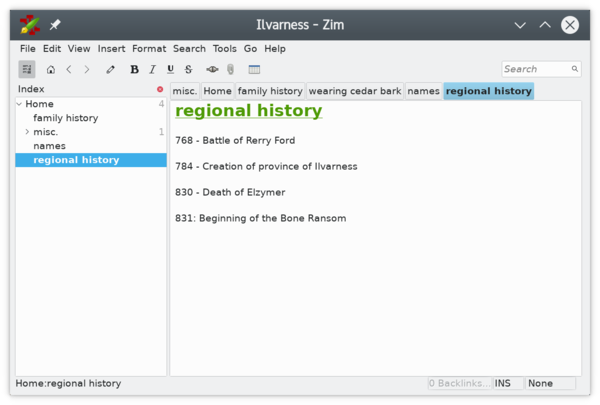
Hacking Free Software for Creative Writing
Some tools designed for programming can also be very helpful for writing fiction. A few to look at include personal wikis, random word generators, and version control tools.
One of the most important lessons I have learned from using free software is the ability to improvise. Although I am not a developer, I long ago learned to hunt for useful scripts and adapt them for my own purposes. However, it is only recently that I realized that, with a little improvisation, tools designed for programming can be made useful for writing fiction.
Some free software, of course, is already designed for use by writers. Although a sadly high number of users have yet to learn that The PC is Not A Typewriter, as Robin Williams said in the title of her book, LibreOffice is designed for writers of long documents. Similarly, Calc, like any spreadsheet, is ideal for outlining scenes and for keeping track of more abstract elements of storytelling, such as the phases of the moon or the course of a character’s illness. However, the repositories of free software also contain some less obvious tools that are useful for writers, including those detailed below.
-
Universal USB Installer 1.9.9.4 - Neowin
Universal USB Installer is a Live Linux USB Creator that allows you to choose from a selection of Linux Distributions to put on your USB Flash Drive. The Universal USB Installer is easy to use. Simply choose a Live Linux Distribution, the ISO file, your Flash Drive and, Click Install. Upon completion, you should have a ready to run bootable USB Flash Drive with your select operating system installed. Other features include; Persistence (if available) – note that casper persistence will only work with fat16 or fat32 formatted drives.
-
MellowPlayer is a Desktop App for Various Streaming Music Services - It's FOSS
Undoubtedly, a lot of users prefer tuning in to streaming services to listen to their favorite music instead of purchasing individual music from stores or downloading them for a collection.
Of course, streaming services let you explore new music and help artists reach out to a wider audience easily. But, with so much music streaming services available (Soundcloud, Spotify, YouTube Music, Amazon Music, etc) it often becomes annoying to utilize them effectively while using your computer.
You may install Spotify on Linux but there is no desktop app for Amazon Music. So, potentially you cannot manage the streaming service from a single portal.
-
7 Essential CLI Tools You Should Know in a GUI-Based World | IT Pro
»
-

- Login or register to post comments
 Printer-friendly version
- 2300 reads
 PDF version
More in Tux Machines
- Highlights
- Front Page
- Latest Headlines
- Archive
- Recent comments
- All-Time Popular Stories
- Hot Topics
- New Members
digiKam 7.7.0 is released
After three months of active maintenance and another bug triage, the digiKam team is proud to present version 7.7.0 of its open source digital photo manager. See below the list of most important features coming with this release.
|
Dilution and Misuse of the "Linux" Brand
|
Samsung, Red Hat to Work on Linux Drivers for Future Tech
The metaverse is expected to uproot system design as we know it, and Samsung is one of many hardware vendors re-imagining data center infrastructure in preparation for a parallel 3D world.
Samsung is working on new memory technologies that provide faster bandwidth inside hardware for data to travel between CPUs, storage and other computing resources. The company also announced it was partnering with Red Hat to ensure these technologies have Linux compatibility.
|
today's howtos
|


 Content (where original) is available under CC-BY-SA, copyrighted by original author/s.



Recent comments
1 year 11 weeks ago
1 year 11 weeks ago
1 year 11 weeks ago
1 year 11 weeks ago
1 year 11 weeks ago
1 year 11 weeks ago
1 year 11 weeks ago
1 year 11 weeks ago
1 year 11 weeks ago
1 year 11 weeks ago