



Tiny Rock Pi S and Raspberry Pi
Submitted by Roy Schestowitz on Monday 28th of September 2020 04:10:48 AM
Filed under 


-
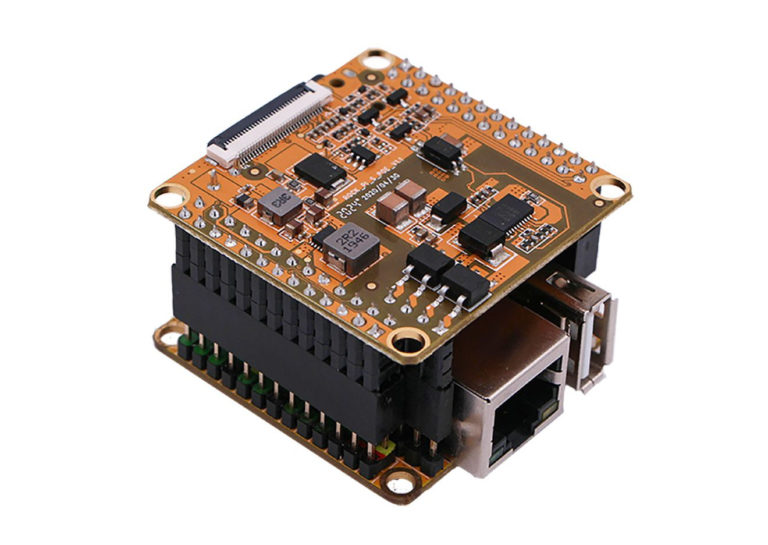
Tiny Rock Pi S SBC gets 802.3af PoE & audio HAT add-on board
Powered by a Rockchip RK3308 quad-core Cortex-A35 processor, Radxa Rock Pi S single board computer was launched with specifications listing PoE support via an add-on board. Just one little problem though: it was not available for sale.
The good news is that Radxa has now launched a PoE HAT for the Linux SBC adding support for 802.3af PoE up to 10W input, making it one of the smallest single board computers with PoE support in the world, and adding audio features with a 3.5mm audio jack, and an FPC connector for a microphone array. It can be purchased on Seeed Studio for $13.00.
-
Raspberry Pi: Five handy home office projects to try
Initially designed as a low-cost computing board for teaching kids to code, the Raspberry Pi has since evolved into a fully fledged PC comfortably capable of replacing your desktop setup. At the same time, the board's legions of dedicated fans have ensured a steady stream of ingenious open-source projects: media center, weather station, virtual assistant, Lego-powered book scanner – if you can imagine it, the chances are it's been done.
[...]
Cybersecurity has become a major concern for companies while their employees are working from home, who now have far less visibility on the devices being used to access corporate data. While a Raspberry Pi won't provide the solution for IT admins, it can be modified into a handy network-monitoring tool that will allow you to keep an eye on devices and data connecting to your home network.
-
Iain R. Learmonth: Multicast IPTV
For almost a decade, I’ve been very slowly making progress on a multicast IPTV system. Recently I’ve made a significant leap forward in this project, and I wanted to write a little on the topic so I’ll have something to look at when I pick this up next. I was aspiring to have a useable system by the end of today, but for a couple of reasons, it wasn’t possible.
[...]
The Raspberry Pi devices will run DVBlast, an open-source DVB demultiplexer and streaming server. Each of the tuners will be tuned to a different transponder giving me the ability to stream any combination of available channels simultaneously. This is everything that would be needed to watch TV on PCs on the home network with VLC.
I’ve not yet worked out if Kodi will accept multicast streams as a TV source, but I do know that Tvheadend will. Tvheadend can also act as a PVR to record programmes for later playback so is useful even if the multicast streams can be viewed directly.
So how far did I get? I have built two Raspberry Pis in cases with the DVB-T hats on. They need to sit in the lounge as that’s where the antenna comes down from the roof. There’s no wired network connection in the lounge. I planned to use an OpenBSD box as a gateway, bridging the wireless network to a wired network.
»
-

- Login or register to post comments
 Printer-friendly version
- 3508 reads
 PDF version
More in Tux Machines
- Highlights
- Front Page
- Latest Headlines
- Archive
- Recent comments
- All-Time Popular Stories
- Hot Topics
- New Members
digiKam 7.7.0 is released
After three months of active maintenance and another bug triage, the digiKam team is proud to present version 7.7.0 of its open source digital photo manager. See below the list of most important features coming with this release.
|
Dilution and Misuse of the "Linux" Brand
|
Samsung, Red Hat to Work on Linux Drivers for Future Tech
The metaverse is expected to uproot system design as we know it, and Samsung is one of many hardware vendors re-imagining data center infrastructure in preparation for a parallel 3D world.
Samsung is working on new memory technologies that provide faster bandwidth inside hardware for data to travel between CPUs, storage and other computing resources. The company also announced it was partnering with Red Hat to ensure these technologies have Linux compatibility.
|
today's howtos
|


 Content (where original) is available under CC-BY-SA, copyrighted by original author/s.



Recent comments
1 year 11 weeks ago
1 year 11 weeks ago
1 year 11 weeks ago
1 year 11 weeks ago
1 year 11 weeks ago
1 year 11 weeks ago
1 year 11 weeks ago
1 year 11 weeks ago
1 year 11 weeks ago
1 year 11 weeks ago