



Adventures of porting postmarketOS to the Librem 5
Submitted by Roy Schestowitz on Saturday 19th of September 2020 01:32:09 AM
Filed under 



I’ve been longing to drop the shackles of Android ever since I made the decision to stop using my Nokia N900. Nokia had given up on Linux phones, and it was clear that there would be no further security patches for my favorite smartphone of all time. Shaking Google out of Android had been my mission for years, and I had resorted to running my own builds of “de-Googled” LineageOS. I was longing for something better. I was out of the country when I first read about postmarketOS (“pmOS”) in May 2017. postmarketOS is a Linux distribution based on Alpine Linux, that strives to provide a Linux distribution running the mainline Linux kernel, as a means to revive old smartphones long forgotten by their manufacturers. My beloved N900 was one device with (rough) support! I quickly jumped on eBay to order a second N900 to meet me at home when I arrived back, because obviously two are needed. Obviously… Thus began my relationship with postmarketOS, one that continues to this day.
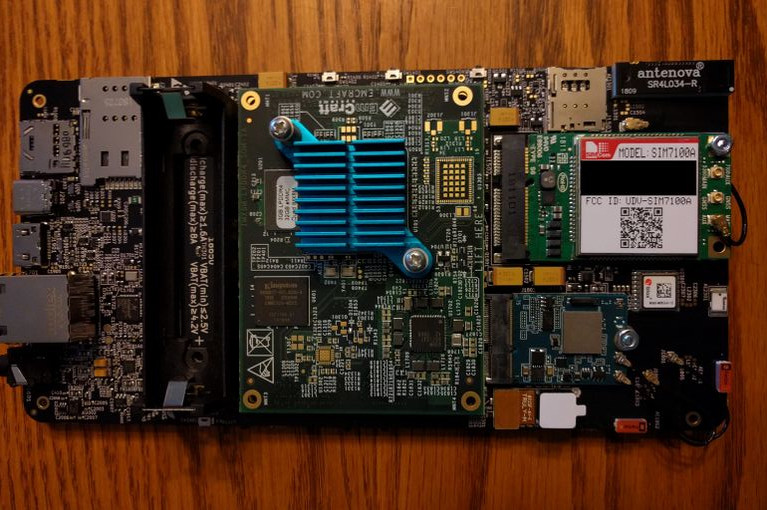
Things were not all rosy though… After some time it became clear that the older N900 CPU wasn’t going to get any faster for running “modern” applications and that there would never be a free userspace graphics driver for its GPU, so I was quite excited when I first learned about the Librem 5. Sure, it didn’t have a physical slide-out keyboard, but the promise of a device from a company that would treat Linux support as a first-class citizen was too good to pass up. I promptly pre-ordered a developer kit (“devkit”) and phone, with the full intention of porting postmarketOS to the device and eventually using it full time to replace the heaping pile of Android in my pocket.

»
-

- Login or register to post comments
 Printer-friendly version
- 2878 reads
 PDF version
More in Tux Machines
- Highlights
- Front Page
- Latest Headlines
- Archive
- Recent comments
- All-Time Popular Stories
- Hot Topics
- New Members
digiKam 7.7.0 is released
After three months of active maintenance and another bug triage, the digiKam team is proud to present version 7.7.0 of its open source digital photo manager. See below the list of most important features coming with this release.
|
Dilution and Misuse of the "Linux" Brand
|
Samsung, Red Hat to Work on Linux Drivers for Future Tech
The metaverse is expected to uproot system design as we know it, and Samsung is one of many hardware vendors re-imagining data center infrastructure in preparation for a parallel 3D world.
Samsung is working on new memory technologies that provide faster bandwidth inside hardware for data to travel between CPUs, storage and other computing resources. The company also announced it was partnering with Red Hat to ensure these technologies have Linux compatibility.
|
today's howtos
|


 Content (where original) is available under CC-BY-SA, copyrighted by original author/s.



Recent comments
1 year 11 weeks ago
1 year 11 weeks ago
1 year 11 weeks ago
1 year 11 weeks ago
1 year 11 weeks ago
1 year 11 weeks ago
1 year 11 weeks ago
1 year 11 weeks ago
1 year 11 weeks ago
1 year 11 weeks ago