



Software: Clipboard Managers, Gscan2pdf and Ventoy
Submitted by Roy Schestowitz on Friday 7th of August 2020 08:50:47 AM
Filed under 
-
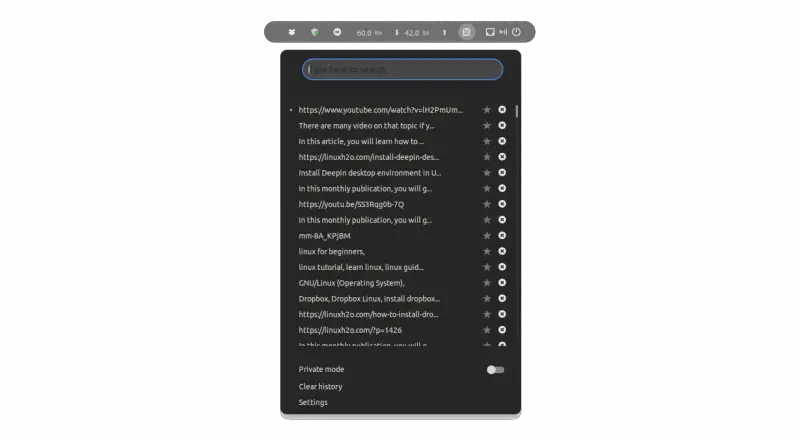
Different clipboard managers for Linux | 2020
In this article, you will learn about clipboard managers and what are the different clipboard managers available for Linux.
A clipboard manager keeps track of the things that you have copied in your system. It keeps the history of it just like the history command that has all the commands list that you have executed in the shell so far.
-
Repo Review: Gscan2pdf
Gscan2pdf is a document scanning tool that allows you to easily post-process and create PDF or DjVu documents from your scanned pages. It has support for Optical Character Recognition (OCR), and also has a number of different image enhancing filters.
Gscan2pdf is pretty straightforward to use. Just hit the little scanner button in the toolbar to open up the Scan Document window. From here, you can select your scanner from the dropdown menu (Scanning in Gscan2pdf is handled via the SANE library). There are some options available for changing the color mode, page size and rotation, double or single sided page mode, number of pages to be scanned, hue, brightness, white level, and numerous other settings.
-
Ventoy: The Ultimate USB Loader
USB flash drives on Linux have always been problematic. Aside from the nostalgic unetbootin, the bootable USB solutions on Linux are always lame. Either you don't have all the features of the Windows programs, or it's complicated and laborious to make it work.
Just for comparison, Windows has Wubi, Rufus, Yumi, Universal USB Installer, LiLi USB Creator, and the list goes on and on.
On Linux, we had Unetbootin, which was a very good tool, but which did not continue development in the jump from 32 to 64 bits. Really, it did not improve as it should, lagging behind other solutions. So, we who use Linux have been orphaned of some solution that was practical, easy and that effectively worked.
»
-

- Login or register to post comments
 Printer-friendly version
- 2206 reads
 PDF version
More in Tux Machines
- Highlights
- Front Page
- Latest Headlines
- Archive
- Recent comments
- All-Time Popular Stories
- Hot Topics
- New Members
digiKam 7.7.0 is released
After three months of active maintenance and another bug triage, the digiKam team is proud to present version 7.7.0 of its open source digital photo manager. See below the list of most important features coming with this release.
|
Dilution and Misuse of the "Linux" Brand
|
Samsung, Red Hat to Work on Linux Drivers for Future Tech
The metaverse is expected to uproot system design as we know it, and Samsung is one of many hardware vendors re-imagining data center infrastructure in preparation for a parallel 3D world.
Samsung is working on new memory technologies that provide faster bandwidth inside hardware for data to travel between CPUs, storage and other computing resources. The company also announced it was partnering with Red Hat to ensure these technologies have Linux compatibility.
|
today's howtos
|


 Content (where original) is available under CC-BY-SA, copyrighted by original author/s.



Recent comments
1 year 11 weeks ago
1 year 11 weeks ago
1 year 11 weeks ago
1 year 11 weeks ago
1 year 11 weeks ago
1 year 11 weeks ago
1 year 11 weeks ago
1 year 11 weeks ago
1 year 11 weeks ago
1 year 11 weeks ago