



Debian-based Grml 2020.06 Released and NsCDE in Debian-based Sparky
Submitted by Roy Schestowitz on Friday 3rd of July 2020 09:39:12 PM
Filed under 
-
Grml 2020.06 – Codename Ausgehfuahangl
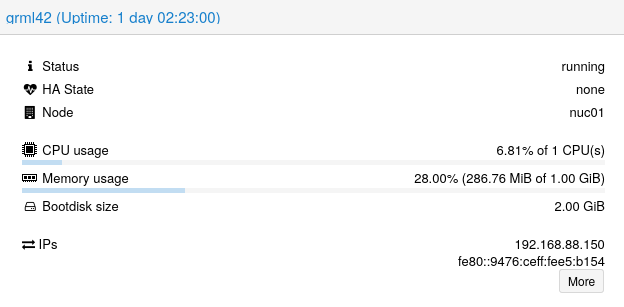
We did it again™, at the end of June we released Grml 2020.06, codename Ausgehfuahangl. This Grml release (a Linux live system for system administrators) is based on Debian/testing (AKA bullseye) and provides current software packages as of June, incorporates up to date hardware support and fixes known issues from previous Grml releases.
I am especially fond of our cloud-init and qemu-guest-agent integration, which makes usage and automation in virtual environments like Proxmox VE much more comfortable.
-
NsCDE
There is a new desktop available for Sparkers: NsCDE
What is NsCDE?
Not so Common Desktop Environment (NsCDE) is a retro but powerful (kind of) UNIX desktop environment which resembles CDE look (and partially feel) but with a more powerful and flexible framework beneath-the-surface, more suited for 21st century unix-like and Linux systems and user requirements than original CDE.
NsCDE can be considered as a heavyweight FVWM theme on steroids, but combined with a couple other free software components and custom FVWM applications and a lot of configuration, NsCDE can be considered a lightweight hybrid desktop environment.
»
-

- Login or register to post comments
 Printer-friendly version
- 3456 reads
 PDF version
More in Tux Machines
- Highlights
- Front Page
- Latest Headlines
- Archive
- Recent comments
- All-Time Popular Stories
- Hot Topics
- New Members
digiKam 7.7.0 is released
After three months of active maintenance and another bug triage, the digiKam team is proud to present version 7.7.0 of its open source digital photo manager. See below the list of most important features coming with this release.
|
Dilution and Misuse of the "Linux" Brand
|
Samsung, Red Hat to Work on Linux Drivers for Future Tech
The metaverse is expected to uproot system design as we know it, and Samsung is one of many hardware vendors re-imagining data center infrastructure in preparation for a parallel 3D world.
Samsung is working on new memory technologies that provide faster bandwidth inside hardware for data to travel between CPUs, storage and other computing resources. The company also announced it was partnering with Red Hat to ensure these technologies have Linux compatibility.
|
today's howtos
|


 Content (where original) is available under CC-BY-SA, copyrighted by original author/s.



Recent comments
1 year 11 weeks ago
1 year 11 weeks ago
1 year 11 weeks ago
1 year 11 weeks ago
1 year 11 weeks ago
1 year 11 weeks ago
1 year 11 weeks ago
1 year 11 weeks ago
1 year 11 weeks ago
1 year 11 weeks ago