



Introducing Jcat
Submitted by Roy Schestowitz on Saturday 29th of February 2020 04:34:56 AM
Filed under 
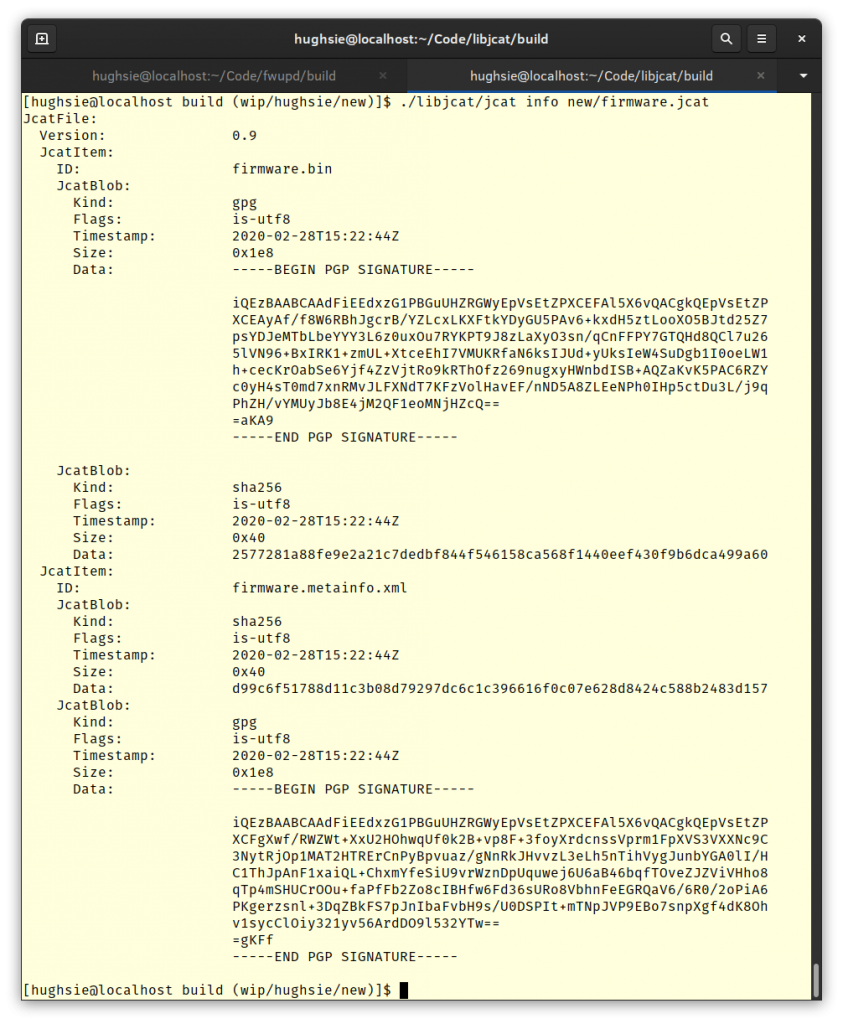
Jcat is a gzipped JSON file of detached signatures. Because it’s gzipped it’s easy to compress and decompress in basically any language, and because it’s JSON it’s dead simple to parse and generate in any framework. There is a little overhead of some metadata (e.g. signing ID, creation time, etc) and but it’s all the kind of thing you can just edit in vim if you needed to. There’s also support for storing binary stuff like DER certificates (base64 to the rescue…), but if possible I’d like it to be all readable in a text editor. The jcat command line tool can import existing detached signatures into the Jcat file, and can also verify the existing .jcat file against all the files in a directory or archive. You can include multiple signatures for the same file (using the AppStream ID as the key) and of course sign multiple files using all the cryptographic engines you need. There’s also rudimentary support for actually creating signatures in the jcat command line client too, although it’s WIP for the GNUTLS engine and completely missing for GPGME at the moment.
This new thing also lets us fix another glaring issue in fwupd. Some companies can’t use PKCS-7, and some can’t use GPG for equally bad and nonsensical reasons – at the moment you need to specify the remote keyring when enabling a remote as we need to know if we need to download the metadata.xml.gz.asc or the .p7b version. Using a .jcat file allows to to not care, and just download one detached thing that can be used no matter how you’ve compiled your system. By adding SHA-256 as an additional not-to-be-used-for-trust engine, Jcat also lets you verify the download of your metadata and cabinet files even when you don’t have GPG or PKCS-7 available, which I know at least one company does on an IOT project. Jcat allows us to move the scary cryptographic verification code out of fwupd and makes the update-your-firmware codebase easier to maintain without worrying about potential landmines.

»
-

- Login or register to post comments
 Printer-friendly version
- 2464 reads
 PDF version
More in Tux Machines
- Highlights
- Front Page
- Latest Headlines
- Archive
- Recent comments
- All-Time Popular Stories
- Hot Topics
- New Members
digiKam 7.7.0 is released
After three months of active maintenance and another bug triage, the digiKam team is proud to present version 7.7.0 of its open source digital photo manager. See below the list of most important features coming with this release.
|
Dilution and Misuse of the "Linux" Brand
|
Samsung, Red Hat to Work on Linux Drivers for Future Tech
The metaverse is expected to uproot system design as we know it, and Samsung is one of many hardware vendors re-imagining data center infrastructure in preparation for a parallel 3D world.
Samsung is working on new memory technologies that provide faster bandwidth inside hardware for data to travel between CPUs, storage and other computing resources. The company also announced it was partnering with Red Hat to ensure these technologies have Linux compatibility.
|
today's howtos
|


 Content (where original) is available under CC-BY-SA, copyrighted by original author/s.



Recent comments
1 year 11 weeks ago
1 year 11 weeks ago
1 year 11 weeks ago
1 year 11 weeks ago
1 year 11 weeks ago
1 year 11 weeks ago
1 year 11 weeks ago
1 year 11 weeks ago
1 year 11 weeks ago
1 year 11 weeks ago