



How SUSE builds its Enterprise Linux distribution – PART 1
Submitted by Roy Schestowitz on Monday 27th of January 2020 06:14:28 PM
Filed under 
In 2020, one might think that Operating Systems in general are not interesting any more, possibly because some have an interest on shifting the attention to an “upper layer”, like Cloud or Containers. But even if the OS lost it’s former attraction, somehow you (or someone else) still needs a software system that manages computer hardware, software resources and provides services to applications and users. Obviously an OS is essential but it needs everything around it to serve an higher purpose than just a basic interface between human and hardware.
As of now with the increased pace of new technologies and changes to the “upper layer”, a modern Operating System needs to adapt, support new hardware, new software, and needs. But also be stable, resilient and secure to properly host the “upper layer”.
But before we discuss modern days, let’s have a look back in the past.
[...]
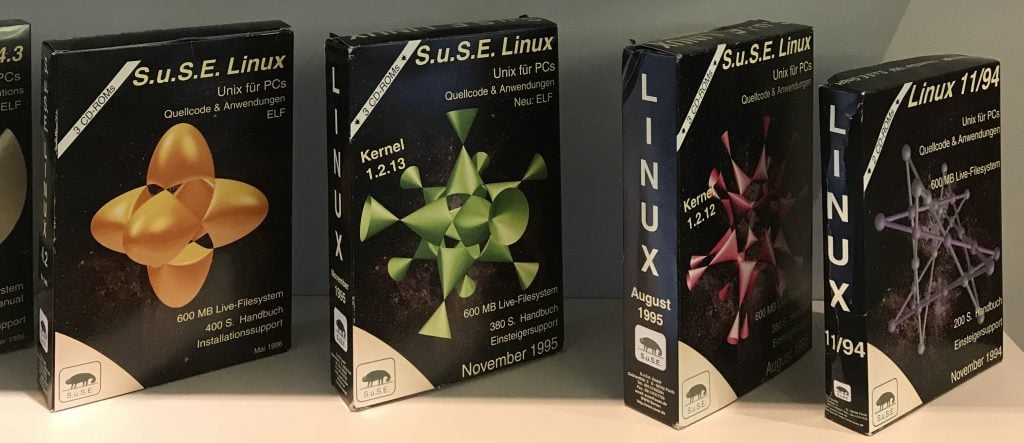
SUSE is a long lasting player in the GNU/Linux Operating Systems, as you might know SUSE once stood for Software-und System-Entwicklung (Software and Systems Development), and was created in 1992 doing a lot of translation, documentation and hacking (on technologies but not subverting computer security). The same year we were distributing the first comprehensive Linux Distribution (more than just Linux Kernel and GNU tools), called Softlanding Linux System (SLS), one of the earliest Linux Distributions at large.
Soon we switched our focus from SLS to Slackware (initially based on SLS), by translating in German and supporting this new Linux Distribution. And thanks to this effort and experience, we were able to release S.u.S.E Linux 1.0 based on Slackware in 1994.
This were really an exciting time for the Linux community, it was basically the beginning and everything rapidly changed or grew, new projects arise, new people started to contribute, in short a lot of things were in flux. Just two years after S.u.S.E Linux 1.0, in 1996, we have released SUSE Linux 4.2 our very first true SUSE distribution! which was not based on Slackware but on Jurix.
Yet another big milestone was achieved in 2000, when we brought the first Enterprise Linux Distribution ever, with SUSE Linux Enterprise Server (for IBM S/390)!

»
-

- Login or register to post comments
 Printer-friendly version
- 2171 reads
 PDF version
More in Tux Machines
- Highlights
- Front Page
- Latest Headlines
- Archive
- Recent comments
- All-Time Popular Stories
- Hot Topics
- New Members
digiKam 7.7.0 is released
After three months of active maintenance and another bug triage, the digiKam team is proud to present version 7.7.0 of its open source digital photo manager. See below the list of most important features coming with this release.
|
Dilution and Misuse of the "Linux" Brand
|
Samsung, Red Hat to Work on Linux Drivers for Future Tech
The metaverse is expected to uproot system design as we know it, and Samsung is one of many hardware vendors re-imagining data center infrastructure in preparation for a parallel 3D world.
Samsung is working on new memory technologies that provide faster bandwidth inside hardware for data to travel between CPUs, storage and other computing resources. The company also announced it was partnering with Red Hat to ensure these technologies have Linux compatibility.
|
today's howtos
|


 Content (where original) is available under CC-BY-SA, copyrighted by original author/s.



Recent comments
1 year 11 weeks ago
1 year 11 weeks ago
1 year 11 weeks ago
1 year 11 weeks ago
1 year 11 weeks ago
1 year 11 weeks ago
1 year 11 weeks ago
1 year 11 weeks ago
1 year 11 weeks ago
1 year 11 weeks ago