



Linux Without systemd: Why You Should Use Devuan, the Debian Fork
Submitted by Roy Schestowitz on Friday 27th of July 2018 09:20:24 AM
Filed under 
Debian 8 was the first version to adopt systemd. The Devuan project began at that time, but the first stable release didn’t land until 2017, alongside the release of Debian 9.
Devuan uses the same APT package manager as Debian, but it maintains its own package repositories. Those are the servers that store the software you download using APT.
Devuan’s repositories contain the same software as Debian, only with patches that enable programs to run without systemd. This mainly refers to backend components such as policykit, which manages which users can access or modify certain parts of your PC.
What Is It Like to Use Devuan?
Just like with Debian, there are multiple ways to install Devuan. The “minimal” download provides you with the essential tools you need to get Devuan up and running on your machine. The “live” download provides you with a working desktop that you can test out before installing Devuan onto your computer.
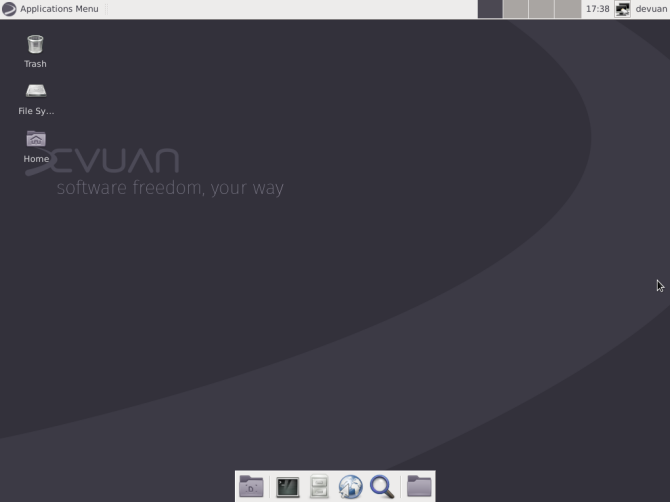
Devuan uses the Xfce desktop environment by default. This is a traditional computing environment akin to how PC interfaces looked several decades ago. Functionally, Xfce is still able to handle most tasks people have come to expect from computers today.
The live version of Devuan comes with plenty of software to cover general expectations. Mozilla Firefox is available for browsing the web. LibreOffice is there for opening and editing documents. GIMP can alter photos and other images. These apps all function as you would expect, with no concern for which init system you’re running.

»
-

- Login or register to post comments
 Printer-friendly version
- 3239 reads
 PDF version
More in Tux Machines
- Highlights
- Front Page
- Latest Headlines
- Archive
- Recent comments
- All-Time Popular Stories
- Hot Topics
- New Members
digiKam 7.7.0 is released
After three months of active maintenance and another bug triage, the digiKam team is proud to present version 7.7.0 of its open source digital photo manager. See below the list of most important features coming with this release.
|
Dilution and Misuse of the "Linux" Brand
|
Samsung, Red Hat to Work on Linux Drivers for Future Tech
The metaverse is expected to uproot system design as we know it, and Samsung is one of many hardware vendors re-imagining data center infrastructure in preparation for a parallel 3D world.
Samsung is working on new memory technologies that provide faster bandwidth inside hardware for data to travel between CPUs, storage and other computing resources. The company also announced it was partnering with Red Hat to ensure these technologies have Linux compatibility.
|
today's howtos
|


 Content (where original) is available under CC-BY-SA, copyrighted by original author/s.



Recent comments
1 year 11 weeks ago
1 year 11 weeks ago
1 year 11 weeks ago
1 year 11 weeks ago
1 year 11 weeks ago
1 year 11 weeks ago
1 year 11 weeks ago
1 year 11 weeks ago
1 year 11 weeks ago
1 year 11 weeks ago