



today's leftovers
Submitted by Roy Schestowitz on Sunday 10th of July 2022 07:55:01 PM
Filed under

-
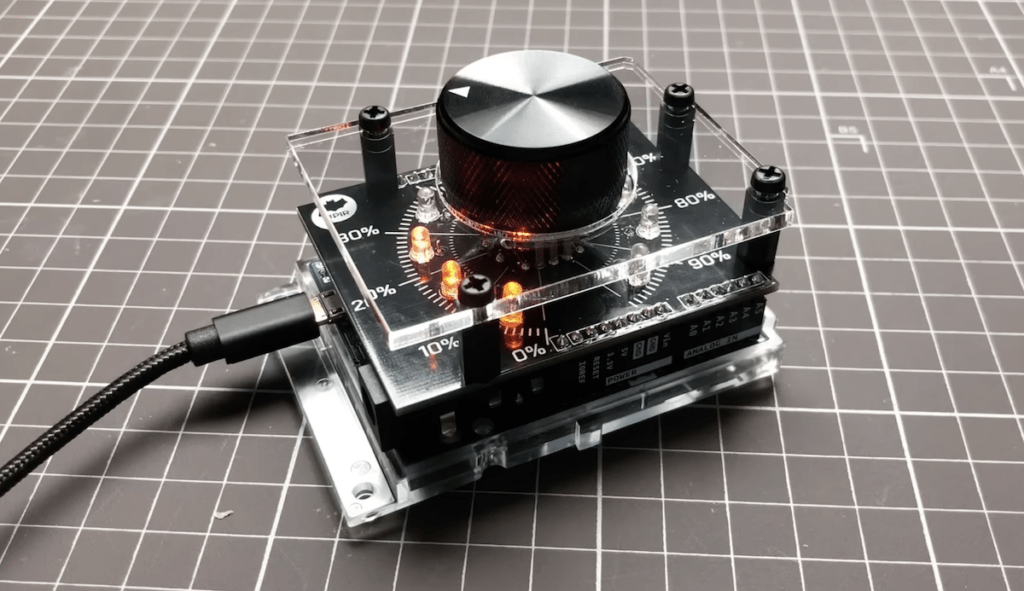
Dial up your PCB design skills with an LED volume control shield | Arduino Blog
The beauty of Arduino development boards is that they let you jump right into prototyping. Just connect the sensors, buttons, LEDs, or whatever other hardware you require to the Arduino’s I/O pins, code and flash a sketch, and you’re in business. But you might come to a stage where you want something more polished than a breadboard or perfboard. When you reach that stage, you can follow along with YouTuber Upir’s LED volume knob project to learn how to design your first PCB.
Upir chose to use an Arduino Leonardo board for this project because its ATmega32U4 microcontroller’s built-in USB HID functionality. That means that it can be configured to show up as a USB mouse or keyboard when plugged into any computer, regardless of the operating system or software that computer runs. In this case, that makes it easy to send keyboard shortcuts that adjust the computer’s volume.
-
'Significant Improvements' Made to Ubuntu Firefox Snap - OMG! Ubuntu!
Canonical has, over the years, often talked about how it has improved the startup time of Snap apps yet, for many of us, those improvements have been …theoretical at best.
But in its latest ‘update’ on efforts being made to improve Firefox Snap performance the company may, at last, deliver a real-world speed boost to back those claims up.
Startup time of the Firefox Snap is up to 50% faster on fresh installs than before.
The first key improvement is courtesy of Mozilla developers who have tweaked the browser’s behaviour to only load one locale (aka language pack) on first start, based on system settings, rather than loading in all languages available.
-
IBM acquires Databand to bolster its data observability stack
IBM today announced that it acquired Databand, a startup developing an observability platform for data and machine learning pipelines. Details of the deal weren’t disclosed, but Tel Aviv-based Databand had raised $14.5 million prior to the acquisition.
-
My current mixed views on the Linux kernel netconsole
The Linux kernel's netconsole allows you to "log kernel printk messages over UDP" to a remote system; this makes it another form of kernel (message) console, alongside the video console and serial console. I've looked into netconsole periodically and played with it a bit, and the whole experience has left me with decidedly mixed feelings and very little desire to actually use it in our environment.
The first problem with netconsole in practice is that the story on the receiving side is what you could politely call lacking. The usual advice is to send netconsole messages to either a listening syslogd or to some manual command. No one seems to have built a usable, ready to go 'netconsole server' that would reliably capture netconsole messages, put them in per-host files or the like, and so on (Facebook's netconsd could be extended into this but it doesn't ship with a file logger).
The second problem is that on the sending side, the usage case for netconsole is limited in our environment. If you want to capture normal kernel messages off the machine in normal circumstances, a remote syslog server generally works just as well. If you want to capture kernel messages in crazy situations, you're almost certainly better off with a serial console, including "serial over IPMI", because there are a lot fewer moving parts in the kernel for sending output over a serial link than there are for sending even relatively hard-coded UDP messages.
-
Brunch With Brent: Tim Canham | Jupiter Extras 87
We explore topics including the hardware and software powering NASA’s Ingenuity Mars Helicopter; JPL's switch from Solaris to Linux; the open source projects, tools, and philosophy at JPL, ...and more.
»
-

- Login or register to post comments
 Printer-friendly version
- 926 reads
 PDF version
More in Tux Machines
- Highlights
- Front Page
- Latest Headlines
- Archive
- Recent comments
- All-Time Popular Stories
- Hot Topics
- New Members
today's howtos
| Open Hardware: XON/XOFF and Raspberry Pi Pico
|
Security Leftovers
| How to Apply Accent Colour in Ubuntu Desktop
A step-by-step tutorial on how to apply accent colour in Ubuntu desktop (GNOME) with tips for Kubuntu and others.
|



 This section of TuxMachines will no longer have new stories in it (with some caveats, including this post). To see the latest stories go to


.svg_.png)

 Content (where original) is available under CC-BY-SA, copyrighted by original author/s.



Recent comments
2 days 2 hours ago
2 days 6 hours ago
2 days 6 hours ago
3 days 13 hours ago
3 days 14 hours ago
3 days 15 hours ago
3 days 15 hours ago
3 days 16 hours ago
3 days 18 hours ago
3 days 20 hours ago