
news
Linux Mint Devs Change the Way Linux Kernels Are Tracked
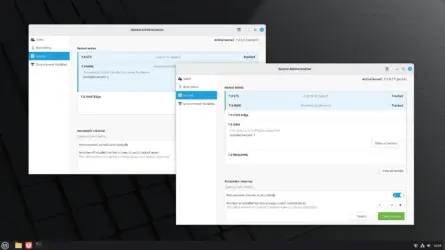
In the upcoming Linux Mint 23 release, due out later this year, kernel management was re-implemented within the System Administration tool and supports both Linux Mint and LMDE (Linux Mint Debian Edition) distributions. Best of all, it now tracks kernel series rather than individual kernels.
With the new kernel management implementation, you have more control over the kernels that are installed on your Linux Mint system. For example, you can manually trigger a cleanup if you need to free up space immediately, or you can choose to protect a kernel so that it cannot be deleted during kernel cleanups.
OMG Ubuntu:
-
Linux Mint will delete your old kernel versions automatically - OMG! Ubuntu
Kernel management is moving out of Update Manager and into the System Administration tool on both standard and LMDE versions and it now track kernels by series rather than individual versions.
You’ll get to choose which kernel series are tracked and how many older kernels within each series the system should keep (in addition to the one you’re booted on; it doesn’t yank out the rug under its own feet).
Updates for tracked series kernels will appear in Update Manager as before, but in a marked change, your older, unused kernel versions will be removed automatically, once a week.
A manual ‘Clean up’ button will also let you ‘free up space immediately’, according to Mint project leader Clement Lefebvre. A History button will enable you to easily see a list of which kernels were removed and when.